
Upload image from clipboard or URL
Upload images & files directly from a URL or the clipboard (ctrl+v), without needing to have them on your computer!
As of May 2026, Upload image from clipboard or URL has 5,000 users and a 5.00/5 rating from 11 reviews in the Workflow & Planning category.
Usersup 150.0 percent+150.0%
5.0K
5,000
Ratingno change0%
5.00
11 reviews
Reviewsno change0%
11
Version
1.4.1
Manifest V3
90-day change · In the last 90 days this extension gained 3.0K users.
History
2 snapshotsTracking since Apr 26, 2026.
View as table
| Date | Users | Rating | Reviews | Version |
|---|---|---|---|---|
| Apr 26, 2026 | 2.0K | 5.00 | 11 | 1.4.1 |
| May 24, 2026 | 3.0K | 5.00 | 11 | 1.4.1 |
| Now | 5.0K | 5.00 | 11 | 1.4.1 |
Permissions & access
- Permissions
- scripting
- Host access
- <all_urls>
Screenshots

About
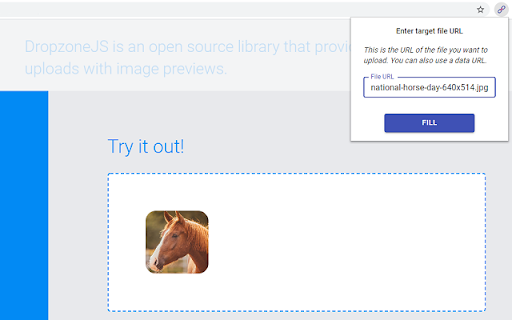
This extension will let you "fill" a file input directly from a remote URL. Normally, if you want to upload an image (or other file) from a URL, you first have to download it to your computer, then upload it, and then delete it from your computer.
With this extension, all you have to do is enter the URL of the file, and the extension will automatically upload it into the page for you.

The extension can now also upload an image directly from your clipboard. Just paste the image in the extension's popup using ctrl+v, and the image will be loaded into the page.

You can use this extension to post an image on Facebook or Twitter, upload files to your Cloud storage or anywhere else you upload files.

This is not a good tool for uploading large files. It first reads the entire file into your computer's RAM, and then uploads it into the page. Especially video files will just be too large for it to handle. This is meant more so for images and small files.

Chrome hides extensions by default after you install them. If the extension icon "disappeared", go to extensions menu by clicking on the puzzle icon in your extensions toolbar, and then pin this extension to the toolbar. You can also use this extension with the Ctrl + Shift + U key combination, even when it's not in the 'pinned' state.

Credits
Icons sourced from www.flaticon.com
Technical
- Version
- 1.4.1
- Manifest
- V3
- Size
- 159KiB
- Min Chrome
- 88
- Languages
- 1
- Featured
- Yes
Metadata
- ID
- eiglgndkjiabiepkliiemoabepkkhacb
- Developer ID
- uafe171d0286f567ff69de7a03fd0273c
- Developer Email
- [email protected]
- Created
- May 10, 2020
- Last Updated (Store)
- Mar 12, 2025
- Last Scraped
- May 24, 2026
- Website
- —
- Support URL
- —
- Privacy Policy
- —
Similar extensions
Alternatives to Upload image from clipboard or URL, ranked by description similarity.

ChatGPT File Uploader
This extension allows you to upload files to a webpage.
596
★ 5.0

ShareMe for PC Windows - 100% Free Download-latest version
ShareMe For PC: Share files Smoothly on PC, Windows, and Mac with Share it - Lightning-fast, secure and free
1.0K
★ 5.0

Upload Better
Upload your clipboard, recent downloads, or a pinned file to any file input, anywhere.
209
★ 5.0
Upload file for ChatGPT
Unlock superpower for ChatGPT without ChatGPT Plus
3.0K
★ 3.1

Fast Fill - Fill the form only with one click
Fill the forms with one click
570
★ 1.0

Velvet Drop
Elegant, sexy drag and drop zone for your file inputs.
—

File Upload Blocker
This extension will block file uploading.
2.0K
★ 1.0

Web Guide
Prefill common form fields with data you've entered elsewhere and save time online.
3
Data sourced from the Chrome Web Store · last verified May 24, 2026.