Tab Porter - Export & Restore Chrome Windows
Export all the Chrome tabs into an HTML file. Reopen all the tabs into Chrome Window at any time or any system.
As of June 2026, Tab Porter - Export & Restore Chrome Windows has 4,000 users and a 4.48/5 rating from 27 reviews in the Functionality & UI category.
Usersup 33.3 percent+33.3%
4.0K
4,000
Ratingno change0%
4.48
27 reviews
Reviewsno change0%
27
Version
1.0.0.1
Manifest V3
90-day change · In the last 90 days this extension gained 1.0K users.
History
1 snapshotsTracking since May 3, 2026.
View as table
| Date | Users | Rating | Reviews | Version |
|---|---|---|---|---|
| May 3, 2026 | 3.0K | 4.48 | 27 | 1.0.0.1 |
| Now | 4.0K | 4.48 | 27 | 1.0.0.1 |
Permissions & access
- Permissions
- tabstabGroups
- Host access
- None declared
Screenshots

About
Feature :
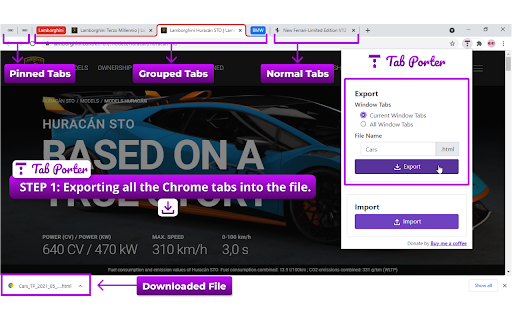
       -  Export/Reopen also work for Current Chrome Window or All Chrome Window.
       -  Automatically all tabs are reopened in Chrome Window using the extension.
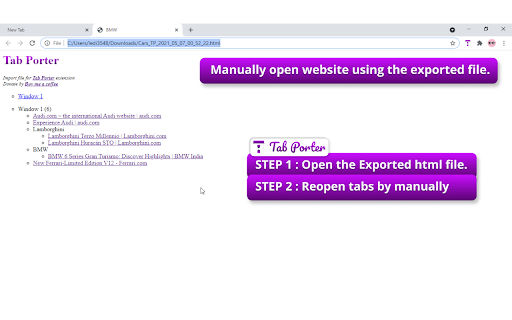
       -  Manually open website using the exported HTML file. The file having all website links is present according to Windows and Tabs order.
       -  Normal Tabs, Pinned Tabs, and Grouped Tabs properties also will be restored.
       -  Reopen will support collapsed/expand for grouped tabs on the Chrome Window.

You are researching something called research1. In-between of research1 you need to move to other research. At this point, you can export research1 by using the TabPorter. After completing the other research you can resume research1 by importing the file.

Or you can send the exported file to a friend or colleague. He can resume the resarch1.

Export Step:
      1. Select the TabPorter.
      2. Select the options Window Tabs - Current/All Window Tabs
      3. Enter the File name prefix.
      4. Click the Export button.

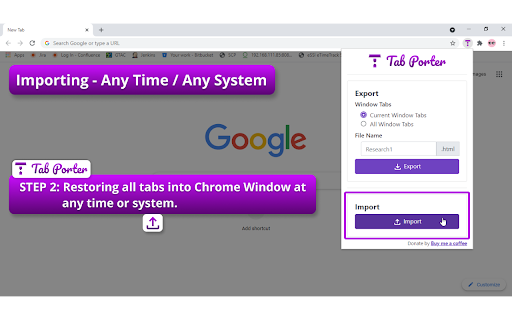
Import Step:
      1. Select the TabPorter.
      2. Click the Import button.
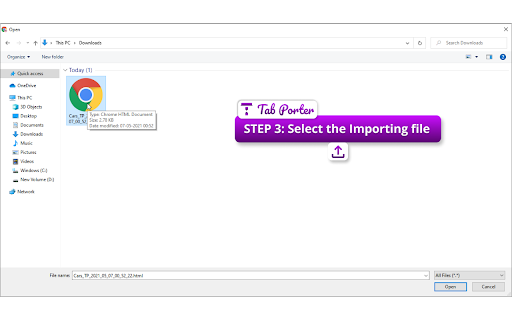
      3. Select the importing research file.
      4. Automatically all tabs are reopened in Chrome Window.

Html Step:
     1. Open the Research HTML file.
     2. Website link will under the Window(Single/Multiple Window) or Groups.
     3. You can manually reopen the website.


Export or backup all the Google Chrome tabs into an HTML file. Reopen all tabs into Google Chrome Window at any time or any system.
Technical
- Version
- 1.0.0.1
- Manifest
- V3
- Size
- 804KiB
- Min Chrome
- 88
- Languages
- 1
- Featured
- Yes
Metadata
- ID
- hjbdgionekajacbeocbgopledpkegkmo
- Developer ID
- u471738b866c22300c7d17645298cd4d1
- Developer Email
- [email protected]
- Created
- May 6, 2021
- Last Updated (Store)
- May 10, 2021
- Last Scraped
- Jun 2, 2026
- Website
- —
- Support URL
- —
- Privacy Policy
- —
Similar extensions
Alternatives to Tab Porter - Export & Restore Chrome Windows, ranked by description similarity.

Tab Exporter pro
Export and import Chrome tabs across windows
39
★ 5.0

Save Tabs
Export and Import Tabs.
500
★ 5.0

Save Tabs Chrome
Organize browser with Save Tabs chrome extension. Restore chrome session in one click. Save tab groups, manage and export tabs
584
★ 4.9

Chrome Tabs Saver
A Chrome extension that saves open tabs so you don't lose them.
10

Smart Sessions - Tab Manager
Save & restore your browser sessions. Auto saving, multiple sessions and more.
6.0K
★ 4.1

Tab Manager for Chrome™
Quick access to all opened tabs. Manage browser tabs to easily navigate and switch between them.
10.0K
★ 4.2

Collapse
End the day with one window
3

Tab Teleporter
Instantly transfer and open all synced tabs from your Chrome devices at once.
11
Data sourced from the Chrome Web Store · last verified Jun 2, 2026.