
Scroll Preview
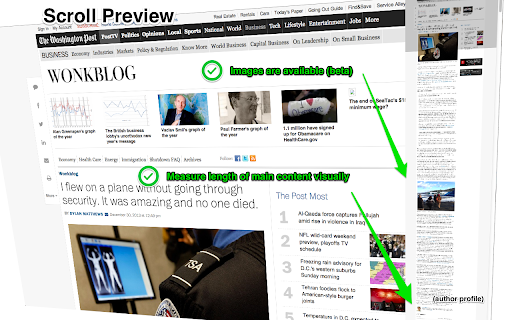
Scroll Preview integrates a whole-page preview with scrollbar that inspired by Sublime Text's mini map.
As of June 2026, Scroll Preview has 609 users and a 3.88/5 rating from 26 reviews in the Workflow & Planning category.
Usersup 0.5 percent+0.5%
609
609
Ratingno change0%
3.88
26 reviews
Reviewsno change0%
26
Version
6.2
Manifest V3
History
3 snapshotsTracking since Apr 1, 2026.
View as table
| Date | Users | Rating | Reviews | Version |
|---|---|---|---|---|
| Apr 1, 2026 | 606 | 3.88 | 26 | 6.2 |
| May 3, 2026 | 593 | 3.88 | 26 | 6.2 |
| Jun 1, 2026 | 597 | 3.88 | 26 | 6.2 |
| Now | 609 | 3.88 | 26 | 6.2 |
Permissions & access
- Permissions
- activeTabstorage
- Host access
- None declared
Screenshots


About
HOW IT WORKS
   •   Alt + A — get a new scrollbar with rough preview
   •   drag/click the scrollbar — just like how you used to
   •   Alt + Shift + A — get a refined preview (please wait patiently)
   •   tired of key pressing? — turn on Automatic or Conditional mode in option page

FAQ
   •   https://github.com/chintown/monocle/wiki

UPDATES
   •   Floating handle
   •   Conditional mode for articles
   •   Setting synchronization

FEATURES
   •   Captures whole-page snapshot (Alt+A)
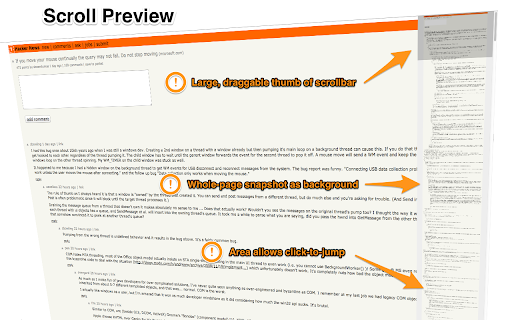
   •   Adds an additional easy-to-drag scrollbar which works nicely with the native one
   •   Integrates snapshot with scrollbar for better previewing
   •   Refreshes snapshot while window is resized
   •   Allows hide/show toggling (Alt+A again)
   •   If you found blank areas shown in snapshot, let the browser re-scan the page to refine it. (Shift+Alt+A)
   •   Applies anti-aliasing on snapshot.
   •   Jumps to where you click on the snapshot.
   •   Magnifier on snapshot (works great with click-to-jump).
   •   Always-on mode (Options > Basics > Automatically)
   •   Option page (chrome://extensions/ > Scroll Preview > Options)
   •   Auto-hide
   •   Blacklist / Whitelist


ISSUES
   •   https://github.com/chintown/monocle/issues

CONTRIBUTORS
   •   Mike Chen

ACKNOWLEDGEMENTS
   •   "html2canvas" by Niklas von Hertzen
Technical
- Version
- 6.2
- Manifest
- V3
- Size
- 68.71KiB
- Min Chrome
- 88
- Languages
- 1
- Featured
- Yes
Metadata
- ID
- hhpfdnhklmhheldplcmfhfdooeekgpmm
- Developer ID
- u419364ce4a4c8fcac6fba9a30b6bf92a
- Developer Email
- [email protected]
- Created
- Jan 30, 2014
- Last Updated (Store)
- Nov 12, 2024
- Last Scraped
- Jun 1, 2026
- Website
- —
- Support URL
- https://github.com/chintown/monocle/wiki
- Privacy Policy
- —
Similar extensions
Alternatives to Scroll Preview, ranked by description similarity.

Page Go-Quick page flipping tool
Long webpage tool, bottom right quick flip, return top, jump bottom, page up/down, added mid-page button.
848
★ 5.0

The Weaver
Captures a scrolling screenshot of the entire active webpage.
1

Screenshot Collab
Take unlimited screenshots of any webpage. Annotate, edit, and save screenshots locally, or upload and share them via Google Drive.
167
★ 5.0

Hover PDF Reader
Enhanced PDF reader for immersive academic reading experience
126
★ 5.0

Scrroll In
An extension to save scroll position of a webpage
3.0K
★ 4.1

SnapBox
Bulk link opener for power users. Right-click drag to open multiple links, shift-click for batch checkboxes.
26

Mousepad for lazy scrollers
Scroll extension for lazy scrollers. 📖🖱️⬆️⬇️
12
★ 5.0
Splash
Organize and preview your websites
106
Data sourced from the Chrome Web Store · last verified Jun 1, 2026.