
Bookmark Search
Search for bookmarks from the omnibox.
As of June 2026, Bookmark Search has 10,000 users and a 4.36/5 rating from 207 reviews in the Workflow & Planning category.
Usersdown 50.0 percent−50.0%
10.0K
10,000
Ratingno change0%
4.36
207 reviews
Reviewsdown 0.5 percent−0.5%
207
Version
2.0.0
Manifest V3
90-day change · In the last 90 days this extension lost 10.0K users.
History
2 snapshotsTracking since May 3, 2026.
View as table
| Date | Users | Rating | Reviews | Version |
|---|---|---|---|---|
| May 3, 2026 | 20.0K | 4.36 | 208 | 2.0.0 |
| Jun 1, 2026 | 20.0K | 4.36 | 207 | 2.0.0 |
| Now | 10.0K | 4.36 | 207 | 2.0.0 |
Permissions & access
- Permissions
- bookmarksnotificationsstorage
- Host access
- None declared
Screenshots
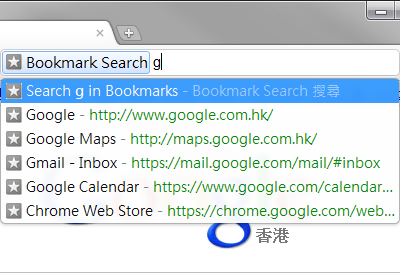


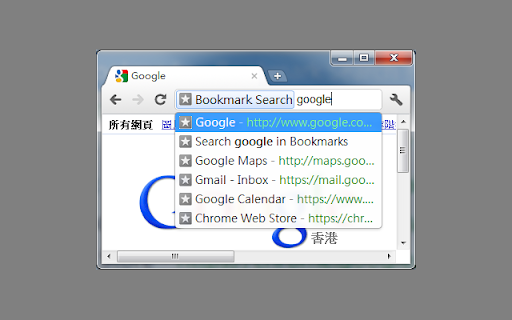
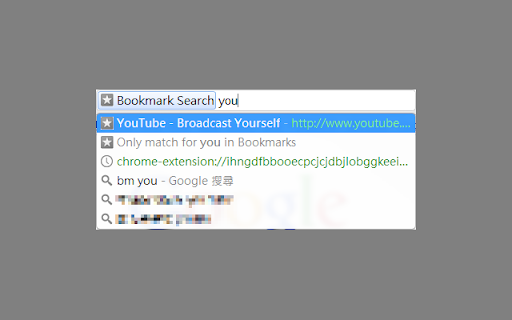
About
Search for bookmarks and quickly navigate to them using the omnibox (the address bar) easily!

Type the keyword "bm", which is shortened from the word "bookmark", tab/space and start typing!

It can support JavaScript bookmarklets by enabling the corresponding option in the options page.

This extension is open-sourced, available at GitHub: https://github.com/alvinhochun/chrome-bookmark-search

Changelog
========
== 2.0.0 (2025-03-03) ==
- Migrate to Manifest V3, since Manifest V2 is being obsoleted. Otherwise, the Chrome Web Store would have disabled and removed this extension. (Thanks sfllaw for the patch.)
- Remove support for JavaScript bookmarklets, because Chrome and other browsers enforce Content Security Policy on bookmarklets. (Thanks sfllaw for the patch.)
- Fix the built-in search so it doesn't break on bookmark folders. (Thanks sfllaw for the patch.)
- Modify small icon to make it look better in dark mode.

== 1.4.3 (2018-08-19) ==
- Fix the bookmark page search link on more recent Chrome versions. (Thanks nbegley for the patch.)
- Fix a typo. (Thanks nbegley for the patch.)

== 1.4.2.1 (2013-08-09) ==
- Pressing arrow keys or switching windows could cause automatic matches (first match item) to be forgotten. Some code has been modified to prevent this from happening. (Thanks northtea for pointing it out)

== 1.4.2 (2013-07-11) ==
- JavaScript bookmarklets now requires a lesser permission. If you had enabled JavaScript bookmarklets before, you'll need to re-enable it.
- You may now choose where bookmarks are opened with the keyboard. The option is available in the options page. With this option, you can open bookmarks on a new foreground tab by pressing Alt + Enter, or on a new background tab by clicking on an item with the middle mouse button.
- Fixed a minor bug which sometimes causes the wrong page to be opened.

== 1.4.1 (2013-03-07) ==
- Made the searching algorithm selection option more clearer.
- Added a page to test different searching algorithm.

== 1.4 (2013-02-27) ==
- Implemented a new searching and sorting algorithm which should give better and more useful results in general.

== 1.3.4 (2013-02-20) ==
- Removed an optional permission which is no longer needed.
- Changed the way of informing version updated.

== 1.3.3 (2013-02-19) ==
- Changed the bookmark manager's page back to chrome://bookmarks/ (which I forgot to change in 1.3.2).
- Changed the way of invoking JavaScript bookmarklet due to some security concern.

== 1.3.2 (2013-02-19) ==
- Slightly improved the options page.
- The extension will now ask you to enable JavaScript bookmarklet support when attempt to use one.
- Minor code changes produces slight unnoticeable performance increase.
- Chrome will now unload this extension when not being used, so it will not consume any system resources when idle.

== 1.3 (2012-07-12) ==
- (internal) Switched to manifest version 2.
- The persist permission to "your data on all websites" and "your tabs and browsing activity" is removed. Instead an option is added for enabling support for JavaScript bookmarklet. The related permissions will be requested only when the option is enabled.
- A bug that prevents automatically navigating to the only match when the option "Automatically selects full match on name" is disabled is fixed.

== 1.2.2 (2011-09-14) ==
- Javascript bookmarks had never worked before due to lack of permission. This version should have fixed it.

== 1.2.1 (2011-09-13) ==
- Due to my carelessness, a full match will pops out both the selected page and the bookmark search page. This is likely fixed.
- Automatically selects if there is only one search result.
- Allow setting the maximum items to show.
- The option page should work fine.
- Some minor improvements.

== 1.2 (2011-09-12) ==
- Bookmark Search can now automatically select the full match. (see Options)
- Display is improved. It now shows both name and address.
- Some minor improvements.
- The icons are updated, although they are still...

== 1.1 (2011-03-05) ==
- Changed the keyword from "bookmark" to "bm"!

== 1.0 (2011-02-28) ==
- First release!
Technical
- Version
- 2.0.0
- Manifest
- V3
- Size
- 31.7KiB
- Min Chrome
- 95.0
- Languages
- 1
- Featured
- No
Metadata
- ID
- hhmokalkpaiacdofbcddkogifepbaijk
- Developer ID
- u47fca2ef84ad93c590111f0bf0faca44
- Developer Email
- [email protected]
- Created
- Feb 27, 2011
- Last Updated (Store)
- Mar 4, 2025
- Last Scraped
- Jun 1, 2026
- Website
- —
- Support URL
- —
- Privacy Policy
- —
Similar extensions
Alternatives to Bookmark Search, ranked by description similarity.

Shoji Bookmark Lite - rebookmark
Simple, fast and working bookmark search
30
★ 4.7

Bookmarklet URL
Hint execution of your bookmarklets
5.0K
★ 3.0

Bookmark Search
Navigate bookmarks easily from the search bar
264
★ 4.0

Bookmark Pro
Save native bookmarks in Chrome faster.
680
★ 4.5

Bookmark Manager + Quick Search
Search, organize, and manage your bookmarks the smart way. Instant results every time.
542
★ 3.7

Minimal Bookmarks Tree
Display a tree of bookmarks under a toolbar button, and search your bookmarks in the omnibox using the keyword 'bm'.
10.0K
★ 4.5

BM Search
AI-native bookmark and tab organizer with private local indexing.
14
★ 5.0

Bookmark Enhancer
Enhance your bookmarks with notes, tags, search, and reminders
4
★ 5.0
Data sourced from the Chrome Web Store · last verified Jun 1, 2026.