
Minimal Bookmarks Tree
Display a tree of bookmarks under a toolbar button, and search your bookmarks in the omnibox using the keyword 'bm'.
As of May 2026, Minimal Bookmarks Tree has 10,000 users and a 4.50/5 rating from 230 reviews in the Workflow & Planning category.
Usersno change0%
10.0K
10,000
Ratingno change0%
4.50
230 reviews
Reviewsdown 0.4 percent−0.4%
230
Version
5.4.2
Manifest V3
History
2 snapshotsTracking since Apr 30, 2026.
View as table
| Date | Users | Rating | Reviews | Version |
|---|---|---|---|---|
| Apr 30, 2026 | 10.0K | 4.50 | 231 | 5.4.2 |
| May 29, 2026 | 10.0K | 4.50 | 231 | 5.4.2 |
| Now | 10.0K | 4.50 | 230 | 5.4.2 |
Permissions & access
- Permissions
- bookmarksfaviconfontSettingsactiveTabstorage
- Host access
- None declared
Screenshots

About
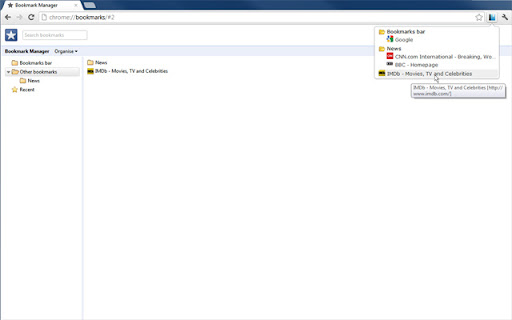
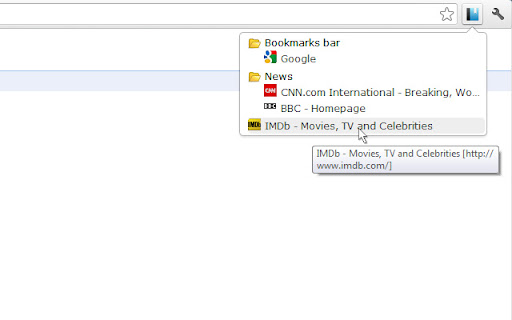
This extension adds a button to Chrome in the top right corner (next to the "three-dot" settings button). When you click the button you get a tree of your bookmarks with folders that you can open and close by clicking them. A simple -non obtrusive- sliding animation is applied to the opening and closing of folders.

You can open bookmarks in the following ways:
- click: open in current tab
- middle-click (scrollwheel): open in new tab and close minimal bookmarks tree
- ctrl+click: open in new tab and keep minimal bookmarks tree open

You can also right click a folder and click "Open all" to open all bookmarks in that folder in tabs.

Right click also let's you edit/delete bookmarks and folders.

The tree uses simple folder icons that show their state (open/close) and also shows the favicons for the websites you've bookmarked.

The extension remembers which folders were open, so you can leave your favorite folders open at all times.

Additionally the extension enables you to search through your bookmarks and bookmark folders easily by entering 'bm' into the URL bar (or "omnibox" as chrome calls it) and then type your search terms. It is not and will not be possible to search in the popup window itself because this wouldn't add anything to the extension; it would just duplicate behaviour.

The extension needs permission to view and edit your bookmarks, but will only ever edit bookmarks if you instruct it to, it will never change bookmarks on its own.

Minimal bookmarks tree is completely open source and available on github: https://github.com/rpkamp/chrome-minimal-bookmarks-tree

Any and all suggestions are welcome!
Technical
- Version
- 5.4.2
- Manifest
- V3
- Size
- 57.3KiB
- Min Chrome
- 111
- Languages
- 3
- Featured
- Yes
Metadata
- ID
- mohenkbngkbmdlkiemonbgdfgdjacaeb
- Developer ID
- u7b253f06b81b4fb53ed9caf4a4e76807
- Developer Email
- [email protected]
- Created
- May 17, 2012
- Last Updated (Store)
- Sep 20, 2024
- Last Scraped
- May 29, 2026
- Website
- —
- Support URL
- —
- Privacy Policy
- —
Similar extensions
Alternatives to Minimal Bookmarks Tree, ranked by description similarity.

Searchable Bookmarks Manager
Easily search through your bookmarks, straight from your browser's address bar!
530
★ 4.4

online / offline Bookmark Manager
Bookmark Viewer/Editor: no uploads reqd.(offline), full tab view.
2.0K
★ 4.5

Bookmark Commander
Dual-panel Bookmark Manager
360
★ 4.0

AnotherTab - New Tab page
Uses New Tab page to show bookmarks folder (Bookmarks Bar by default) for quick access to its items and allows to manage it
289
★ 4.7

Pretty Bookmarks
A pretty Google Chrome bookmark manager created with productivity with mind.
40
★ 3.0

Shoji Bookmark Lite - rebookmark
Simple, fast and working bookmark search
30
★ 4.7
Bookmark Sidebar
Adds a toggleable sidebar with all your bookmarks at the edge of your browser window.
300.0K
★ 4.5

warp
Open frequently used bookmarks fast without a single mouse click
5.0K
★ 5.0
Data sourced from the Chrome Web Store · last verified May 29, 2026.