
NanoKVM Capture
A Chrome extension that adds screenshot and video recording capabilities to NanoKVM.
As of June 2026, NanoKVM Capture has 46 users and a 5.00/5 rating from 2 reviews in the Developer Tools category.
Usersup 2.2 percent+2.2%
46
46
Ratingno change0%
5.00
2 reviews
Reviewsno change0%
2
Version
1.0.0
Manifest V3
History
3 snapshotsTracking since Apr 1, 2026.
View as table
| Date | Users | Rating | Reviews | Version |
|---|---|---|---|---|
| Apr 1, 2026 | 45 | 5.00 | 2 | 1.0.0 |
| May 3, 2026 | 48 | 5.00 | 2 | 1.0.0 |
| Jun 1, 2026 | 43 | 5.00 | 2 | 1.0.0 |
| Now | 46 | 5.00 | 2 | 1.0.0 |
Permissions & access
- Permissions
- scripting
- Host access
- http://*/*, https://*/*
Screenshots
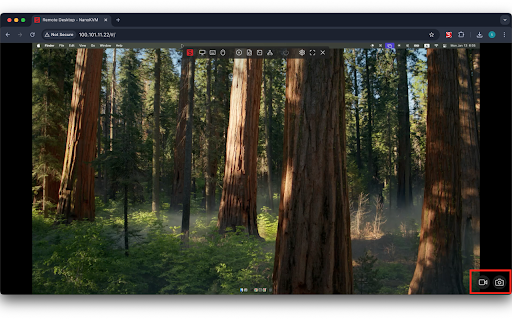
About
A Chrome extension that adds screenshot and video recording capabilities to NanoKVM.

## Features

- Screenshot Capture of NanoKVM Interface
  - High-quality PNG image capture
  - One-click saving
  - Automatic timestamped filenames
- Video Recording of NanoKVM Interface
  - High-quality WebM recording with VP9 codec
  - Start/stop recording at any time
  - Real-time recording duration display
  - Visual recording indicator
- Local Storage of Captured Media
  - Automatic saving with timestamped filenames
  - PNG format for screenshots
  - WebM format for videos
- Easy-to-use Interface Integrated with Chrome Browser
  - Simple and intuitive floating controls
  - Visual feedback for recording status

## Technical Details

- Video Format: WebM with VP9 codec
- Image Format: PNG
- Browser Support: Chrome with VP9 codec support
- Interface Detection: Automatic detection of NanoKVM interface
- Performance: Optimized for minimal resource usage
Technical
- Version
- 1.0.0
- Manifest
- V3
- Size
- 13.77KiB
- Min Chrome
- 88
- Languages
- 1
- Featured
- No
Metadata
- ID
- hhhflijfhlnddhneehnhojkpbjengbfh
- Developer ID
- u4f995ea4ffcbf2978cd0f526e6725246
- Developer Email
- [email protected]
- Created
- Jan 14, 2025
- Last Updated (Store)
- Jan 14, 2025
- Last Scraped
- Jun 1, 2026
- Website
- koeda.me
- Support URL
- —
Similar extensions
Alternatives to NanoKVM Capture, ranked by description similarity.

NanoKVM-USB viewer
Access Sipeed NanoKVM-USB through a browser extension
51

Chrome Step Recorder
Record user actions into manual steps with screenshots and page performance timings
4.0K
★ 4.3

Capture
Web page capture tool — take screenshots, record videos with audio, and create smooth auto-scroll recordings with keyframe control.
371

AiCan Rec Extension
Record a Chrome tab (with optional audio) to WebM via MediaRecorder. Minimal permissions for Chrome Web Store compliance.
1

TestBot Recorder
Record browser interactions and capture web elements with auto-generated locators for test automation.
51
★ 5.0

Screenshot Extension
Take Screenshot
—

SnapShot Pro
SnapShot Pro: Capture screenshots easily.
4

ShotMyPage - Full Page Screen Capture
Chrome full page screenshot and screen capture extension with professional editing tools and project management
224
★ 5.0
Data sourced from the Chrome Web Store · last verified Jun 1, 2026.