
GA4 Enhanced DebugView by Luratic
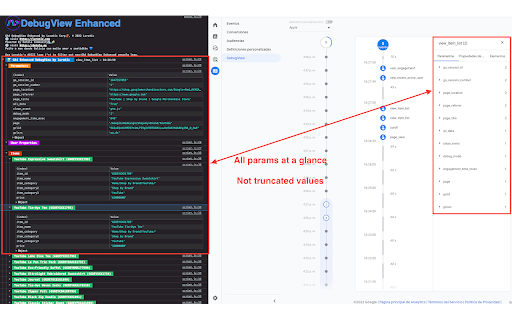
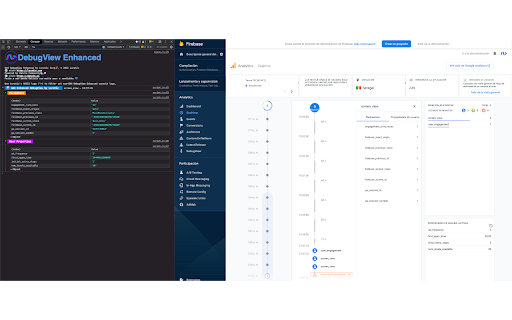
Prints on console all the params and their values when clicking over an event logged into the GA4/Firebase DebugView/Usersnapshot.
As of June 2026, GA4 Enhanced DebugView by Luratic has 2,000 users and a 5.00/5 rating from 5 reviews in the Developer Tools category.
Usersno change0%
2.0K
2,000
Ratingno change0%
5.00
5 reviews
Reviewsno change0%
5
Version
0.31
Manifest V3
Permissions & access
- Permissions
- storageactiveTabscriptingtabswebNavigation
- Host access
- https://analytics.google.com/*, https://console.firebase.google.com/*
Screenshots

About
DebugView Helper for Digital Analysts

The Google Analytics 4 (GA4) Enhanced DebugView by Luratic lets you to see all the params contained into an event at a glance.

Install the extension, visit the page where the Google Analytics 4 (GA4)/Firebase events timeline is showed, turn it on clicking over the extension icon and click whatever the event. It will be logged in the console.

You don't need to click over each param one by one and the values will not be truncated anymore.

GA4 DebugView Enhanced by Luratic Corp🦑, © 2022 Luratic
🌐 visit https://luratic.com
Powered by Datola Community🌊🍻
🌐 visit https://datola.es

Feito a man dende Galicia con moito amor e sentidiño 💙
Technical
- Version
- 0.31
- Manifest
- V3
- Size
- 45.79KiB
- Min Chrome
- 88
- Languages
- 1
- Featured
- No
Metadata
- ID
- hgkkhcgpdigijpbclngegpckcabpjjej
- Developer ID
- ue0387dd3c899330e1d899542550acd01
- Developer Email
- [email protected]
- Created
- Mar 16, 2022
- Last Updated (Store)
- Sep 2, 2022
- Last Scraped
- Jun 1, 2026
- Website
- luratic.com
- Support URL
- —
- Privacy Policy
- https://www.luratic.com/privacy-policy/
Similar extensions
Alternatives to GA4 Enhanced DebugView by Luratic, ranked by description similarity.

Google Analytics UTILS
Modify GA4 IDs, enable GA4 debug, block analytics/GTM and bypass CSP.
1.0K
★ 5.0

GA4 Network Inspector
Inspect GA4 network events, including event names, event parameters, ecommerce parameters, and consent rules.
94

Debugger for Google Analytics 4 (GA4)
Browser DevTools extension for debugging Google Analytics 4 (GA4) events.
50.0K
★ 4.0

Analytics LayerView
Visualize and debug analytics dataLayer events in a side panel for QA and development.
—

Analytics Data QA
Analytics Data QA: Data Validation, Made Easy and Fast!
16
★ 5.0

AH Debugger
Debug analytics and marketing pixels in real time with AH Debugger.
156
★ 5.0

AEP Requests Analyzer
Extension to parse Adobe Experience Platform analytics requests
37

Event Builder - Custom Event Generator
Auto-generate tracking event code for GA4 and Microsoft Clarity
4
Data sourced from the Chrome Web Store · last verified Jun 1, 2026.