
Youtube Ad Skip Key
Skip Youtube ads with a shortcut key/ button
As of June 2026, Youtube Ad Skip Key has 3,000 users and a 3.61/5 rating from 31 reviews in the Workflow & Planning category.
Usersno change0%
3.0K
3,000
Ratingup 1.1 percent+1.1%
3.61
31 reviews
Reviewsup 3.3 percent+3.3%
31
Version
2.2
Manifest V3
History
2 snapshotsTracking since May 3, 2026.
View as table
| Date | Users | Rating | Reviews | Version |
|---|---|---|---|---|
| May 3, 2026 | 3.0K | 3.57 | 30 | 2.2 |
| Jun 1, 2026 | 4.0K | 3.57 | 30 | 2.2 |
| Now | 3.0K | 3.61 | 31 | 2.2 |
Permissions & access
- Permissions
- storage
- Host access
- None declared
Screenshots



About
*** New version now only place focus on the skip button when pressing the shortcut key (Default to Z). You have to manually press *"Enter"* again to skip ads. This is to adapt to changes from YouTube. ***

* Other buttons such as YouTube Premium button can still be skipped with one click

Youtube Ad Skip Key is an extension that provides you a shortcut key/ button to skip youtube ads. It does not block ads.

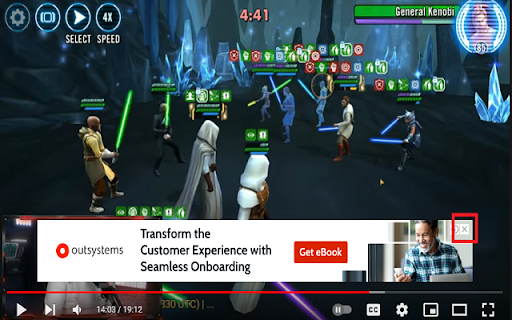
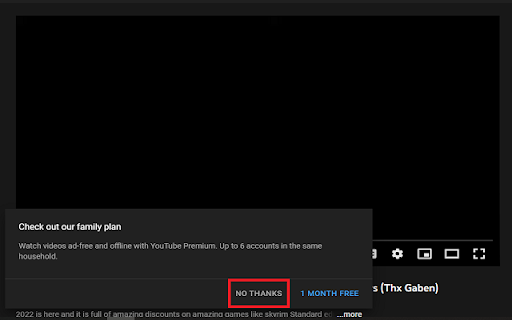
This extension simulates the process of clicking "Skip Ads", clicking the "x" button of those ads at the bottom of the Youtube player and clicking the "No Thanks" or "Skip Trial" of Youtube Premium ads.

This is for people who still want to support creators by watching ads, and sometimes don't want to skip ads right when the timer ends because some ads are interesting. It also closes those ads at the bottom and Youtube Premium ads that sometimes pop up.

The default shortcut key is 'Z'. This extension only supports typing keys such as "A-Z", "0-9", "-=[]\;'./", numpad keys, spacebar and enter key.

*The keys are based from QWERTY keyboard layout. However, it is based on the location not the value of the key itself. For example, users can press key from other languages that is supposed to be in the same location as QWERTY 'Z' key, so they don't need to change keyboard language back to English to skip ads.
*You must change tabs to the ad-playing youtube tab to be able to close the ad.
*You should avoid assigning shortcut to keys that are already assigned by Youtube such as A, C, D, F, I, J, K, L, M, N, O, P, S, T, W, "0-9", <, >, /, [, ], -, =, Numpad+, Numpad-, Numpad0-9 and Spacebar
*If you are also using Youtube Music, you should also avoid these keys: E, G, H, Q, R, ;
*It does not support combination of ALT, CTRL, SHIFT + supported keys.
Technical
- Version
- 2.2
- Manifest
- V3
- Size
- 18.18KiB
- Min Chrome
- 88
- Languages
- 1
- Featured
- Yes
Metadata
- ID
- hgijpdhbgbfknajdponodgdehhafcbbp
- Developer ID
- ue3205e477a100b70545556cdd8c1ed47
- Developer Email
- [email protected]
- Created
- Mar 19, 2022
- Last Updated (Store)
- Nov 16, 2024
- Last Scraped
- Jun 1, 2026
- Website
- —
- Support URL
- —
- Privacy Policy
- https://github.com/eltfshr/youtube-ad-skip-key
Similar extensions
Alternatives to Youtube Ad Skip Key, ranked by description similarity.

Auto Skip Youtube Ads
Auto Skip Youtube Ads
7.0K
★ 3.5

Instant Ad Skipper For Youtube™
Skip those skippable or unskippable video ads!
235
★ 4.0
YouTube Ad Auto-skipper
YouTube Ad Skipper is an extension that auto skips ads after YouTube provides a skip ad button. It does not block an ad.
100.0K
★ 3.9

AdSkipY
Skip advertising on YouTube
28
Youtube Video Skip Ad Trigger
A plugin for automatically pressing 'Skip Ads' button on youtube videos.
30.0K
★ 4.1

Ad Skip for YouTube
This exension automatically clicks Skip Ad button on Youtube and loop your Youtube videos.
2.0K
★ 4.0

Multi Skipper: Skip ads, intros & recaps [QVI]
Automatically skip ads on your favorite streaming platforms.
20.0K
★ 3.7

YT Remote
A chrome extension to control your YouTube tabs / playback from any website / tabs.
1.0K
★ 4.0
Data sourced from the Chrome Web Store · last verified Jun 1, 2026.