
Allego
Enables users to embed Allego content into Gmail messages or social sites and track audience activity.
As of June 2026, Allego has 727 users and a 5.00/5 rating from 1 reviews in the Workflow & Planning category.
Usersup 15.9 percent+15.9%
727
727
Ratingno change0%
5.00
1 reviews
Reviewsno change0%
1
Version
2.0.70
Manifest V3
90-day change · In the last 90 days this extension 1 version update.
History
9 snapshotsTracking since Apr 1, 2026.
View as table
| Date | Users | Rating | Reviews | Version |
|---|---|---|---|---|
| Apr 1, 2026 | 627 | 5.00 | 1 | 2.0.69 |
| Apr 16, 2026 | 633 | 5.00 | 1 | 2.0.69 |
| Apr 26, 2026 | 626 | 5.00 | 1 | 2.0.69 |
| May 7, 2026 | 663 | 5.00 | 1 | 2.0.69 |
| May 13, 2026 | 659 | 5.00 | 1 | 2.0.69 |
| May 19, 2026 | 685 | 5.00 | 1 | 2.0.70 |
| May 25, 2026 | 681 | 5.00 | 1 | 2.0.70 |
| Jun 1, 2026 | 684 | 5.00 | 1 | 2.0.70 |
| Jun 8, 2026 | 708 | 5.00 | 1 | 2.0.70 |
| Now | 727 | 5.00 | 1 | 2.0.70 |
Permissions & access
- Permissions
- activeTabstoragescripting
- Host access
- https://mail.google.com/
Screenshots

About
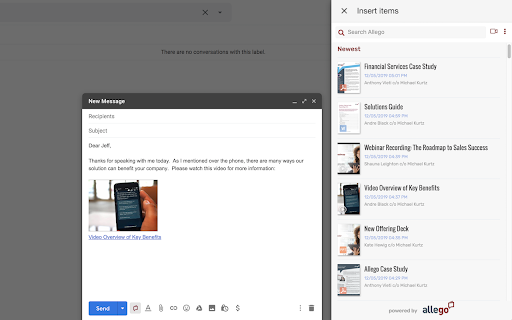
Embed your company’s Allego videos and other content in your Gmail messages, LinkedIn, Twitter, and more--or even create and share your own Allego videos, right within Chrome!

Allego for Chrome and Gmail enables sellers to share or create Allego content from anywhere on the Web, making it easier than ever to deliver personalized, agile content with external audiences via social selling or direct Gmail communications.

Simply click on the Allego extension icon to share an existing video or other content or use the Allego recorder to create a personalized video for your audience.   When the shared content has been viewed, you’ll receive immediate email notifications to help you prioritize follow-up, and detailed reporting within Allego to see the effectiveness of your content overall.

Features include:

- One-click access to Allego content or Allego’s video-creation environment
- Embed Allego content--both links and thumbnails--on  virtually any email or social site
- Instant search with autocomplete to find content, or the ability to scroll through existing assets
- Content previews before sending
- Email notifications and detailed reporting, including custom tracking codes for individual sharing activities
- The same permissions and controls from your existing Allego environment, including Single Sign-on
- Creation of custom tracking codes

Allego for Chrome and Gmail is available for all Allego customers that have enabled External Sharing.  If you do not have this option currently enabled, please contact us at [email protected].
Technical
- Version
- 2.0.70
- Manifest
- V3
- Size
- 352KiB
- Min Chrome
- 88
- Languages
- 12
- Featured
- No
Metadata
- ID
- hfimfjackejkinihmjhfckgcgcjadhab
- Developer ID
- uefbb9fea3133b7fc883af20da25a5086
- Developer Email
- [email protected]
- Created
- Oct 18, 2019
- Last Updated (Store)
- May 8, 2026
- Last Scraped
- Jun 8, 2026
- Website
- allego.com
- Support URL
- —
- Privacy Policy
- https://www.allego.com/privacy-policy/
Similar extensions
Alternatives to Allego, ranked by description similarity.

Video & Screen Recorder For Work | Covideo
Record video from your webcam & screen, share them instantly, track who’s watching!
2.0K
★ 5.0

vidREACH for Gmail
Insert a vidREACH video into a message draft with just a couple of clicks
47
★ 5.0

BombBomb Video - Webcam & Screen Recorder
Create, share, and track webcam and screen capture videos with the BombBomb Browser Extension.
30.0K
★ 4.8

Weezly - Create Sales Videos and Book Meetings
Create Automated AI Sales videos | Book Meetings, Send Sales Videos, Record & Close Deals
226
★ 4.2

Consensus SNAP™
Record, Send, and Track instant webcam and screen recording video right inside Chrome
20.0K
★ 4.7

SalesReach
The SalesReach Chrome Extension integrates seamlessly with your SalesReach account to enable you to quickly record videos…
70
★ 5.0

OrgOrg
Organize your organization
559
★ 5.0

SalesHood
Enhance your SalesHood experience by improving integrations with other systems.
4.0K
★ 4.3
Data sourced from the Chrome Web Store · last verified Jun 8, 2026.