
Pull Request Conversation
PR Conv. lets you swiftly add comments with prefixes for context in Pull Requests. © 2023 Digital Tectonics, LLC.
As of June 2026, Pull Request Conversation has 3 users in the Workflow & Planning category.
Usersno change0%
3
3
Ratingno change0%
—
— reviews
Reviewsno change0%
—
Version
1.0.1
Manifest V3
History
1 snapshotsTracking since Apr 1, 2026.
Not enough history yet for this metric — the chart fills in as we collect more snapshots.
View as table
| Date | Users | Rating | Reviews | Version |
|---|---|---|---|---|
| Apr 1, 2026 | — | — | — | 1.0.1 |
| Now | 3 | — | — | 1.0.1 |
Permissions & access
- Permissions
- None declared
- Host access
- None declared
Screenshots
About
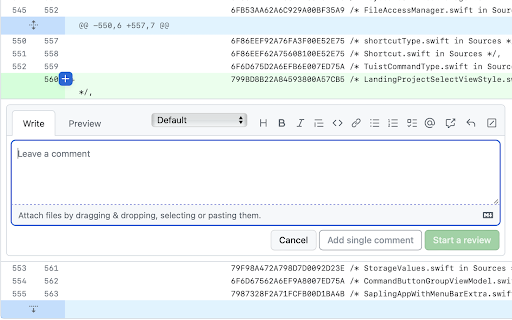
Introducing the Pull Request Conversation Chrome extension – your solution for enhancing collaboration and context in code reviews! This powerful tool enables you to seamlessly incorporate meaningful comments into your pull requests, using a variety of predefined prefixes tailored to different communication scenarios.

Streamlined Collaboration:
With Pull Request Conversation, you can effortlessly infuse your pull request discussions with additional context and clarity. Gone are the days of vague or misunderstood feedback – our extension empowers you to engage in targeted, productive conversations around your code changes.

Built-In Comment Prefixes:
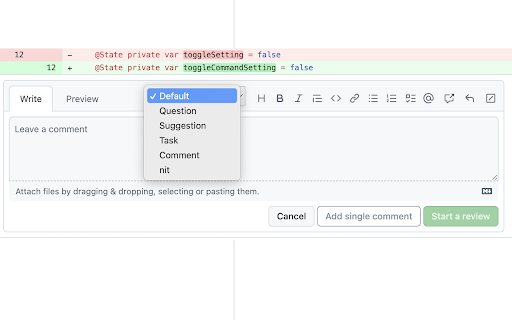
We've designed a set of intuitive prefixes that cater to a range of communication needs, making your comments more effective:

Default: Keep it simple with straightforward comments.
Question: Initiate discussions or request further information.
Suggestion: Propose alternative approaches to problem-solving.
Task: Address incomplete acceptance conditions or pending tasks.
Comment: Share insights without seeking active feedback.
Nit: Point out minor issues for consideration.
Enhanced Code Reviews:
Improve the code review process by offering detailed input using the appropriate prefix. Whether you're seeking advice, suggesting a new approach, highlighting incomplete criteria, or simply sharing observations, Pull Request Conversation ensures that your comments are tailored to your needs.

Efficiency and Clarity:
Increase the efficiency of your team's collaboration by eliminating ambiguity. Each comment you add comes with a specific intent, allowing reviewers to comprehend your perspective more swiftly and accurately.

Updates:
* Now with Dark Theme

Copyright Information:
© 2023 Digital Tectonics, LLC. All rights reserved.
Technical
- Version
- 1.0.1
- Manifest
- V3
- Size
- 433KiB
- Min Chrome
- 88
- Languages
- 1
- Featured
- No
Metadata
- ID
- hfhjpdkgodlhmgkjhhmdgfihgjmnjoba
- Developer ID
- u035ddd85ff626acbf4f023675eee654d
- Developer Email
- [email protected]
- Created
- Aug 10, 2023
- Last Updated (Store)
- Aug 15, 2023
- Last Scraped
- Jun 1, 2026
- Support URL
- —
- Privacy Policy
- —
Similar extensions
Alternatives to Pull Request Conversation, ranked by description similarity.

GitHub LGTM
Automatically adds a random pre-set approval comment when you approve a GitHub pull request.
3

GitHub comment minimizer
If several bots fight for attention in your GitHub pull requests, this will hide old bot comments visually in your timeline.
23
★ 4.7

ChatGPT Focus: AI Summarizer, Auto-Highlighter & Speed Reader
AI highlights to focus, skim, or skip. Read ChatGPT replies 5x faster without info overload.
39
★ 4.7

Collaborate.to
A robust bug tracking and visual feedback tool for your website. Collect, organize and act on your feedback without any effort
14
★ 5.0

LGTM - Approve!
Look Good To Me - Approve
10

GitHub Comment Collapser
Auto-collapse comments and reviews from specific GitHub users
14
★ 5.0

Copy Button for ChatGPT
Adds a native looking copy button for ChatGPT messages.
622
★ 3.0

CrossSocial Memo by Fusen
Revolutionize Your Social Media Engagement with Personalized User Notes
2
★ 5.0
Data sourced from the Chrome Web Store · last verified Jun 1, 2026.