
Meeting Cost Tracker
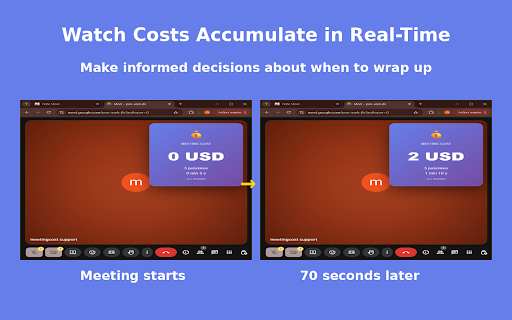
Track your meeting costs in real-time on Google Meet. Make better decisions about when to meet.
As of June 2026, Meeting Cost Tracker has — users and a 5.00/5 rating from 3 reviews in the Workflow & Planning category.
Usersno change0%
—
—
Ratingno change0%
5.00
3 reviews
Reviewsno change0%
3
Version
1.1.0
Manifest V3
History
3 snapshotsTracking since Apr 29, 2026.
View as table
| Date | Users | Rating | Reviews | Version |
|---|---|---|---|---|
| Apr 29, 2026 | 1 | 5.00 | 3 | 1.1.0 |
| May 8, 2026 | — | 5.00 | 3 | 1.1.0 |
| May 16, 2026 | 1 | 5.00 | 3 | 1.1.0 |
| Now | — | 5.00 | 3 | 1.1.0 |
Permissions & access
- Permissions
- storage
- Host access
- https://meet.google.com/*
Screenshots



About
💰 MEETING COST TRACKER - Stop Wasting Money on Unproductive Meetings

Track meeting costs in real-time on Google Meet. Make data-driven decisions. Save time & money. Free & private.

⚡ KEY FEATURES:
- Real-time cost tracking overlay on Google Meet
- Customizable team size and average salary settings
- Multi-currency support (EUR, USD, GBP)
- Automatic cost calculation based on meeting duration
- Visual color-coded alerts (green/orange/red)
- 100% private - all data stored locally on your device

📊 WHY USE MEETING COST TRACKER?
Studies show the average company wastes 37% of all meeting time. For a 50-person team, that's over €250,000 per year in lost productivity. Our extension helps you:

✓ Visualize the true cost of meetings instantly
✓ Make smarter decisions about meeting length and frequency
✓ Improve team efficiency and time management
✓ Track the budget impact of recurring meetings
✓ Encourage more focused and productive discussions

🎯 PERFECT FOR:
- Project Managers tracking team productivity
- Team Leads optimizing meeting schedules
- Startup Founders managing burn rate
- Operations Managers controlling costs
- Anyone responsible for meeting budgets and efficiency

🔒 PRIVACY-FOCUSED DESIGN:
Your data stays yours. All calculations happen locally in your browser. We never collect, store, or transmit any meeting data, participant information, or personal details to external servers.

⚙️ HOW IT WORKS:
1. Install the Meeting Cost Tracker extension
2. Click the extension icon and configure your settings (team size, average annual salary, currency)
3. Join any Google Meet video call
4. Watch the real-time cost tracker badge appear automatically on your screen
5. Make informed decisions about meeting length based on live cost data

💡 SMART VISUAL ALERTS:
The badge color changes based on meeting cost:
- 🟢 Green: Low cost meeting (efficient)
- 🟠 Orange: Medium cost meeting (monitor)
- 🔴 Red: High cost meeting (consider wrapping up)

🚀 START OPTIMIZING YOUR MEETINGS TODAY:
Download Meeting Cost Tracker now and transform how your team approaches meeting efficiency. Every minute counts - make sure it's worth it.

Free to use. No account required. No hidden costs.

📧 SUPPORT & FEEDBACK:
We're constantly improving! If you find this helpful or have suggestions, please leave a review or contact us. Your feedback helps us make Meeting Cost Tracker even better.

#MeetingProductivity #CostTracking #GoogleMeet #TeamEfficiency #TimeManagement #MeetingOptimization #ProductivityTools
Technical
- Version
- 1.1.0
- Manifest
- V3
- Size
- 44.08KiB
- Min Chrome
- 88
- Languages
- 1
- Featured
- No
Metadata
- ID
- heokphifkamhdlhfdnfccamndfflffai
- Developer ID
- u81dd860fcbfe573188f427a1ef00b8af
- Developer Email
- [email protected]
- Created
- Nov 9, 2025
- Last Updated (Store)
- Nov 11, 2025
- Last Scraped
- Jun 11, 2026
- Website
- —
- Support URL
- —
- Privacy Policy
- —
Similar extensions
Alternatives to Meeting Cost Tracker, ranked by description similarity.

Meeting Cost Tracker & Timer
Stop burning money. Track real-time meeting costs, calculate team man-hours, and export reports. The ultimate Google Meet ROI tool.
—

Meeting Cost Calculator
See the real cost of every meeting. Free live cost tracking plus optional Pro AI insights, CSV export, and 12-week trends.
—

Meeting Cost for Google Calendar™
Adds meeting costs to Google Calendar. Company configuration available through Flowtrace paid plans.
1.0K
★ 5.0

Meeting Cost Calculator
Real-time meeting cost calculator in a floating window that shows how much your meetings actually cost
1

MeetCost
See the real cost of your meetings, overlaid directly on Google Calendar.
3
★ 5.0

MeetingCost Live – Meeting Cost Tracker
See the real dollar cost of any meeting as it happens. Live ticker inside Google Meet, Zoom & Teams.
—
★ 5.0

Meeting Cost Calculator
Calculate the cost of a meeting in Google Calendar before sending the invite.
1

Meeting cost: Send an Email instead
Calendar meeting cost calculator
969
★ 4.4
Data sourced from the Chrome Web Store · last verified Jun 11, 2026.