
Pin2Me
Pin your website from any device, any browser! Support Import/Export without sign-in.
As of May 2026, Pin2Me has 2 users in the Workflow & Planning category.
Usersno change0%
2
2
Ratingno change0%
—
— reviews
Reviewsno change0%
—
Version
1.0.28
Manifest V3
Permissions & access
- Permissions
- identity
- Host access
- None declared
Screenshots

About
Pin2Me

Pin website to New Tab page from any device, any browser! Support Import/Export without sign-in.

Highlight
	- Dart/Light Theme
	- Drag & Drop to rearrange pinned sites
	- Import/Export
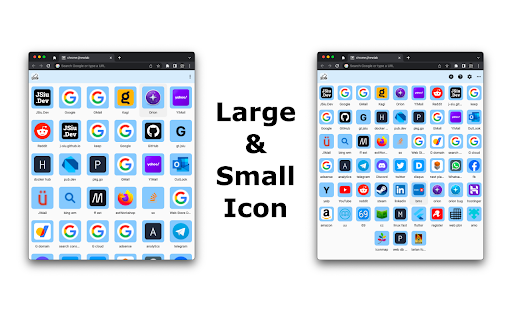
	- Large Icon
	- Sites are saved locally in your browser
	- Unlimited sites

Google Login(optional) enable following
	- Saved pinned sites in your Google Drive [AppData] folder
	- Synced between browsers
	- Access pinned sites from https://pin2me.dev/
		- For browsers/devices don't support add-on/extension

Import/Export Support
	- Apply setting from editor box
	- Copy to clipboard
	- Save to file (Pin2Me.json)
	- Import
		- Save pinned sites to your browser, and sync to your Google Drive 'AppData' folder if signed-in.
		- No upload to other server. This is the same when using https://pin2me.dev/ .

Import/Export Access
	1. Click 3-dot icon on upper right to expand menu items
	2. Click setting icon
	3. Click 'Advance' in pop-up dialog
	4. Click 'Import/Export' button

Import
	1. Open Pin2Me.json with text editor
	2. Copy and paste content into Import/Export editor box
	3. Click 'Apply'.

Preset Sites

	Pin2Me comes with a few preset sites. Their URLs and names cannot be change, but can moved and removed. To remove them:
	- One by One
		- Double click to open site setting
		- Click 'Delete'
	- Remove All
		1. Click 3-dot icon on upper right to expand menu items
		2. Click setting icon
		3. Click 'Advance' in pop-up dialog
		4. Click 'Remove Default Sites'

Planned
	- Drag & Drop for import
	- More platforms
	- Pinning from web page context menu
Technical
- Version
- 1.0.28
- Manifest
- V3
- Size
- 1.21MiB
- Min Chrome
- 88
- Languages
- 1
- Featured
- No
Metadata
- ID
- hclokpdkmfceobbckckjkdohdgeljlld
- Developer ID
- ue7776163751ab8f34c664d01f5fae9c4
- Developer Email
- [email protected]
- Created
- Aug 22, 2022
- Last Updated (Store)
- Sep 19, 2022
- Last Scraped
- May 26, 2026
- Website
- pin2me.dev
- Support URL
- https://github.com/J-Siu/pin2me/issues
- Privacy Policy
- —
Similar extensions
Alternatives to Pin2Me, ranked by description similarity.

Pin (by Anymode)
Shift+Click and grab anything from the web. Bid farewell to haunting tabs in your browser.
3

Pinny - Pin & Save Web Locations
Effortlessly save and revisit web page locations
21
★ 4.0

Tabme — Tab & Bookmark Manager | Save, Organize & Sync Tabs
The easiest way to save, organize & sync your tabs.
10.0K
★ 4.5

Save to Pinlink
One-click save to pinlink.eu
2
★ 5.0

Speed Dial 3
New Tab Page Replacement with neat Speed Dial or Notes, sync and organize bookmarks
30

Pinned Tab Sets
Save your pinned tabs as named sets and reload them in one click.
8
★ 5.0

Tabme Mini — Tab & Bookmark Manager | Save, Organize & Sync Tabs
The easiest way to manage tabs, bookmarks, and sticky notes – all in one Chrome extension
3.0K
★ 4.5

PinMyPrompt
Pin ChatGPT prompts to specific web pages for easy access.
10
Data sourced from the Chrome Web Store · last verified May 26, 2026.