
Google Maps QuickFinder
With Google Maps QuickFinder, you can seamlessly integrate Google Maps into your web browsing experience.
As of May 2026, Google Maps QuickFinder has 92 users and a 5.00/5 rating from 1 reviews in the Functionality & UI category.
Usersup 22.7 percent+22.7%
92
92
Ratingno change0%
5.00
1 reviews
Reviewsno change0%
1
Version
1.0
Manifest V3
History
2 snapshotsTracking since Apr 29, 2026.
View as table
| Date | Users | Rating | Reviews | Version |
|---|---|---|---|---|
| Apr 29, 2026 | 75 | — | — | 1.0 |
| May 26, 2026 | 88 | 5.00 | 1 | 1.0 |
| Now | 92 | 5.00 | 1 | 1.0 |
Permissions & access
- Permissions
- scriptingactiveTabcontextMenus
- Host access
- None declared
Screenshots

About
Discover Effortless Navigation with Google Maps QuickFinder

Tired of copying and pasting addresses into Google Maps every time you come across a location in your web browsing? Say goodbye to that hassle and welcome the convenience of the "Google Maps QuickFinder" Chrome extension! With Google Maps QuickFinder, you can seamlessly integrate Google Maps into your web browsing experience. Here's how it works:

Key Functionalities:

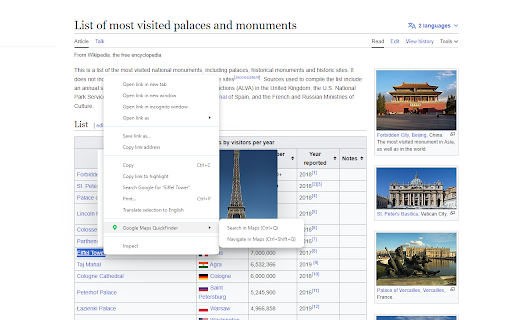
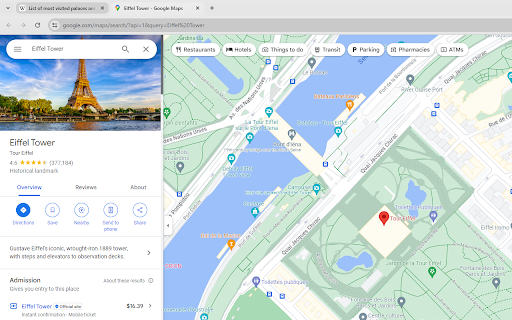
Instant Search: Simply highlight any text that contains an address or location on a web page and press Ctrl+Q (Command+Q for Mac), and watch as the extension instantly initiates a Google Maps search for that location. No more manual copying and pasting.

Effortless Navigation: Once you've found your desired location, press Ctrl+Shift+Q (Command+Shift+Q for Mac), and the extension will open Google Maps with the navigation ready to go. It's the fastest way to turn web page content into real-world directions.

Features:

Lightning-fast access to Google Maps from any webpage.
Effortless navigation to any address or location found in your browsing.
Intuitive keyboard shortcuts for a seamless user experience.
No more switching tabs or apps – everything you need is just a keystroke away.
Alternative option to access functions through context menu (right-click) or the extension icon.

Installation is a breeze:

Click the "Install" button to add the Google Maps QuickFinder extension to your Chrome browser.
Once installed, select any text with an address, press Ctrl+Q to search, or Ctrl+Shift+Q to navigate. It's that simple!

Make Google Maps an integral part of your browsing experience. Say hello to simplicity and speed with Google Maps QuickFinder. Install now and enjoy a smoother navigation experience on the web!
Technical
- Version
- 1.0
- Manifest
- V3
- Size
- 88.89KiB
- Min Chrome
- 88
- Languages
- 1
- Featured
- Yes
Metadata
- ID
- hcddmemphelldenncncbikmdfljcdebc
- Developer ID
- u4d3156e8caf1c8576eb61c878d935ceb
- Developer Email
- [email protected]
- Created
- Oct 27, 2023
- Last Updated (Store)
- Oct 27, 2023
- Last Scraped
- May 26, 2026
- Website
- —
- Support URL
- —
- Privacy Policy
- —
Similar extensions
Alternatives to Google Maps QuickFinder, ranked by description similarity.

Google Maps Button
Add a Google Maps button to Google search results
27

Search Selected Text in Google Maps
Right‑click or press Alt+M to search selected text in Google Maps.
76
★ 5.0

Google Maps Button Search
Restore direct map access from Google Search results with one click, bypassing recent EU regulation.
8.0K
★ 4.6

Maps Button for Google Search
Adds a convenient button to open locations directly in Google Maps from Google Search results and business panels
25

Keyboard Navigation Fix for Google Search
Enhance your Google search experience by enabling keyboard navigation for selecting search results effortlessly.
11

Chrome Quick Find
Instantly find bookmarks, folders, open tabs, and tab groups.
—

SearchBar
Focus on the search bar in web pages by pressing the '/' key.
173
★ 5.0

Google Search Maps Button
A browser extension that adds a Google Maps button to Google Search results.
—
Data sourced from the Chrome Web Store · last verified May 26, 2026.