Disable Browser Shortcuts
Take control of your browsing experience with Disable Chrome Shortcuts
As of June 2026, Disable Browser Shortcuts has 311 users and a 2.33/5 rating from 3 reviews in the Productivity category.
Usersdown 46.5 percent−46.5%
311
311
Ratingno change0%
2.33
3 reviews
Reviewsno change0%
3
Version
1.0.2
Manifest V3
90-day change · In the last 90 days this extension 1 version update.
History
4 snapshotsTracking since Apr 29, 2026.
View as table
| Date | Users | Rating | Reviews | Version |
|---|---|---|---|---|
| Apr 29, 2026 | 581 | 2.33 | 3 | 1.0.0 |
| May 26, 2026 | 567 | 2.33 | 3 | 1.0.0 |
| Jun 2, 2026 | 628 | 2.33 | 3 | 1.0.2 |
| Jun 8, 2026 | 284 | 2.33 | 3 | 1.0.2 |
| Now | 311 | 2.33 | 3 | 1.0.2 |
Changelog
- May 26, 2026description
Take control of your browsing experience with "Disable Chrome Shortcuts," the ultimate tool designed to help you manage keyboard shortcuts in Google Chrome. Whether you're looking to streamline your workflow or prevent accidental triggers of unwanted shortcuts, our extension offers a seamless solution.
Key Features:
Easy Access to Shortcuts Management: With a simple click on our extension icon, you can open a popup with a direct link (button) to the Chrome Shortcuts page (chrome://extensions/shortcuts). This feature provides a straightforward way for users to navigate and manage their Chrome shortcuts efficiently.
Streamlined User Experience: Designed with simplicity and ease of use in mind, our extension does not clutter your browser with unnecessary features. It offers a focused functionality that enhances your productivity and browsing comfort.

How It Works:
Popup Button: Click on the extension icon to open a popup. Inside, you'll find a button that, when clicked, reminds you to manually navigate to the Chrome Shortcuts page. This step is designed with user security in mind, adhering to Chrome's policy on modifying settings.

Why Choose Disable Chrome Shortcuts?
Efficiency: Streamline your browsing experience by managing your shortcuts effectively.
Convenience: Quick access to the shortcuts page from anywhere in Chrome.
Security: Designed with Chrome's security policies in mind, ensuring a safe user experience.
Whether you're a power user looking to optimize your browsing or someone who wants to avoid accidentally triggering shortcuts, "Disable Chrome Shortcuts" is the tool you need. Install now and take the first step towards a more controlled and customized browsing experience!

Icon sourced from flaticon.com and image sourced from freepik.com
Take full control of your Google Chrome browsing experience with Disable Chrome Shortcuts — the simple, lightweight extension built for users who want to disable Browser shortcuts in Chrome quickly and effortlessly.

Whether you're a power user optimizing your workflow, a gamer preventing accidental hotkey triggers, or someone who simply wants a cleaner, distraction-free browsing experience, this extension gives you instant access to Chrome's shortcut management page in just one click.

✅ Key Features:
⚡ One-Click Access to Shortcuts Management No more digging through Chrome settings. Click the extension icon and hit the button — you're taken directly to chrome://extensions/shortcuts, where you can view, edit, reassign, or disable any Chrome or extension keyboard shortcut instantly.
🧹 Clean & Lightweight No bloat, no background tracking, no unnecessary permissions. This extension does one thing and does it perfectly — giving you fast access to shortcut controls without slowing down your browser.
🔒 Privacy-First & Chrome Policy Compliant Built with Chrome's security guidelines in mind. No data is collected, no permissions are abused. Your browsing stays private and secure.
🖥️ Beginner-Friendly Interface A clean, minimal popup UI means anyone can use it — no technical knowledge required. Install, click, done.

________________________________________
🔍 How It Works:
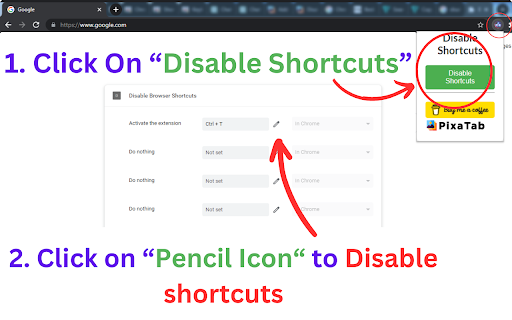
1.	Click the Disable Chrome Shortcuts icon in your toolbar
2.	Press the "Disable Shortcuts" button in the popup
3.	Chrome's keyboard shortcuts page opens instantly — reassign or clear any shortcut you want
________________________________________
💡 Perfect For:
•	Disabling conflicting Chrome keyboard shortcuts
•	Removing unwanted browser hotkeys
•	Managing extension shortcuts in Chrome
•	Fixing shortcut conflicts between Chrome and other apps
•	Customizing Chrome keyboard shortcuts for productivity
•	Gamers and streamers who need to block accidental Chrome hotkeys
________________________________________

Changelog:
UI Updated & Bugs Fixed
Permissions & access
- Permissions
- None declared
- Host access
- None declared
Screenshots
About
Take full control of your Google Chrome browsing experience with Disable Chrome Shortcuts — the simple, lightweight extension built for users who want to disable Browser shortcuts in Chrome quickly and effortlessly.

Whether you're a power user optimizing your workflow, a gamer preventing accidental hotkey triggers, or someone who simply wants a cleaner, distraction-free browsing experience, this extension gives you instant access to Chrome's shortcut management page in just one click.

✅ Key Features:
⚡ One-Click Access to Shortcuts Management No more digging through Chrome settings. Click the extension icon and hit the button — you're taken directly to chrome://extensions/shortcuts, where you can view, edit, reassign, or disable any Chrome or extension keyboard shortcut instantly.
🧹 Clean & Lightweight No bloat, no background tracking, no unnecessary permissions. This extension does one thing and does it perfectly — giving you fast access to shortcut controls without slowing down your browser.
🔒 Privacy-First & Chrome Policy Compliant Built with Chrome's security guidelines in mind. No data is collected, no permissions are abused. Your browsing stays private and secure.
🖥️ Beginner-Friendly Interface A clean, minimal popup UI means anyone can use it — no technical knowledge required. Install, click, done.

________________________________________
🔍 How It Works:
1.	Click the Disable Chrome Shortcuts icon in your toolbar
2.	Press the "Disable Shortcuts" button in the popup
3.	Chrome's keyboard shortcuts page opens instantly — reassign or clear any shortcut you want
________________________________________
💡 Perfect For:
•	Disabling conflicting Chrome keyboard shortcuts
•	Removing unwanted browser hotkeys
•	Managing extension shortcuts in Chrome
•	Fixing shortcut conflicts between Chrome and other apps
•	Customizing Chrome keyboard shortcuts for productivity
•	Gamers and streamers who need to block accidental Chrome hotkeys
________________________________________

Changelog:
UI Updated & Bugs Fixed
Technical
- Version
- 1.0.2
- Manifest
- V3
- Size
- 59.5KiB
- Min Chrome
- 88
- Languages
- 1
- Featured
- No
Metadata
- ID
- hbmhfhdmmfjcinagaihfijhngpkhdlnm
- Developer ID
- u65f8b6cb5cb8e76cc1487185c00e6f5f
- Developer Email
- [email protected]
- Created
- Feb 4, 2024
- Last Updated (Store)
- May 19, 2026
- Last Scraped
- Jun 8, 2026
- Website
- —
- Support URL
- —
- Privacy Policy
- —
Similar extensions
Alternatives to Disable Browser Shortcuts, ranked by description similarity.

Chrome Shortcuts – Open Sites & Pages Instantly via Custom Keyboard Hotkeys
Boost productivity by opening websites instantly using custom keyboard shortcuts you define.
121
★ 5.0

Quickeys - Custom Keyboard Shortcuts
Create and configure custom keyboard shortcuts for your browser
696
★ 4.4

Extension Manager
Comprehensive Chrome extension management with PIN/UNPIN, groups, analytics, and advanced features
14

Extensions switcher
This extension allows quickly enable and disabling of other extensions
195
★ 4.3

Right Click & Copy Enabler
Re-enables right-click and text copying on restricted websites.
—

My Shortcuts
Transform your new tab into a beautiful, organized dashboard. Create custom sections and access your favorite sites instantly.
24
★ 5.0

Allow Right Click
Activate this extension to restore right-click, copy, paste, cut and text selection on restricted websites.
299
★ 3.0

TripleKey Tabs Navigator
Custom keyboard shortcuts for quick tab navigation and URL access.
1
★ 5.0
Data sourced from the Chrome Web Store · last verified Jun 8, 2026.