
Quickeys - Custom Keyboard Shortcuts
Create and configure custom keyboard shortcuts for your browser
As of June 2026, Quickeys - Custom Keyboard Shortcuts has 696 users and a 4.43/5 rating from 7 reviews in the Productivity category.
Usersup 4.0 percent+4.0%
696
696
Ratingno change0%
4.43
7 reviews
Reviewsno change0%
7
Version
0.1.6
Manifest V3
History
9 snapshotsTracking since Apr 6, 2026.
View as table
| Date | Users | Rating | Reviews | Version |
|---|---|---|---|---|
| Apr 6, 2026 | 669 | 4.43 | 7 | 0.1.6 |
| Apr 19, 2026 | 778 | 4.43 | 7 | 0.1.6 |
| May 9, 2026 | 2.0K | 4.43 | 7 | 0.1.6 |
| May 20, 2026 | 1.0K | 4.43 | 7 | 0.1.6 |
| May 25, 2026 | 900 | 4.43 | 7 | 0.1.6 |
| May 30, 2026 | 688 | 4.43 | 7 | 0.1.6 |
| Jun 4, 2026 | 693 | 4.43 | 7 | 0.1.6 |
| Jun 8, 2026 | 692 | 4.43 | 7 | 0.1.6 |
| Jun 14, 2026 | 690 | 4.43 | 7 | 0.1.6 |
| Now | 696 | 4.43 | 7 | 0.1.6 |
Permissions & access
- Permissions
- storagedeclarativeNetRequest
- Host access
- <all_urls>
Screenshots

About
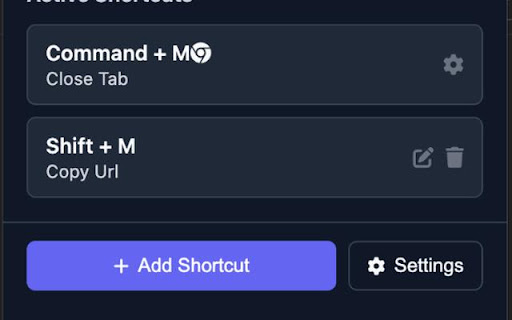
Quickeys gives you full control over your browser's keyboard shortcuts, allowing you to create custom shortcuts for any action you regularly perform.

KEY FEATURES

• Create Custom Shortcuts – Easily set up keyboard combinations for common actions like opening specific websites, navigating pages, or controlling media.
• Site-Specific Shortcuts – Configure shortcuts that work only on specific websites – perfect for your most-used web applications.
• Advanced Browser Controls – Access hard-to-reach browser functions with simple keyboard combinations, including tab management, window controls, and navigation tools.
• Clipboard & Media Actions – Copy URLs, page titles, or selected text with a single keystroke. Control media playback across any website.
• Dark Mode & Accessibility – Toggle dark mode on any site, adjust font sizes, and use other accessibility features with custom shortcuts.
• Custom JavaScript Execution – For power users, run custom JavaScript on any page with a keyboard shortcut.
• Clean, User-Friendly Interface – Manage all your shortcuts from an intuitive dashboard with search and filtering capabilities.
• Seamless Integration – Works alongside Chrome's native shortcuts system, giving you the best of both worlds.

SHORTCUTS AVAILABLE

Navigation
• Go Back
• Go Forward
• Reload Page
• Clear Cache & Reload
• Scroll to Top
• Scroll to Bottom
• Scroll Down
• Scroll Up
• Open Website 1
• Open Website 2
• Open Website 3
• Open Website 4
• Navigate to Path

Tabs
• New Tab
• Close Current Tab
• Close All Tabs to the Right
• Next Tab
• Previous Tab
• First Tab
• Last Tab
• Duplicate Tab
• Pin/Unpin Tab
• Mute/Unmute Tab
• Open in Incognito

Windows
• New Window
• Close Window
• Toggle Fullscreen
• Minimize Window
• Maximize Window

Website
• Click Element
• Fill Form Field
• Submit Form
• Focus Element
• Toggle Element Visibility
• Toggle Element Outlines

Clipboard
• Copy Current URL
• Copy Page Title
• Copy Selected Text
• Copy All Links on Page
• Paste and Navigate

Media
• Play/Pause Media
• Mute/Unmute Media
• Volume Up
• Volume Down
• Skip Forward
• Skip Backward

Accessibility
• Increase Font Size
• Decrease Font Size
• Toggle Dark Mode
• Toggle Reader Mode
• Speak Selected Text
• Stop Speaking

Chrome Pages
• Open Bookmarks
• Open History
• Open Downloads
• Open Extensions
• Open Settings

Google Services Shortcuts

Advanced
• Custom JavaScript

---

Quickeys respects your privacy and only requests permissions for the specific features you choose to use. Always adding new shortcuts, feel free to leave suggestions for shortcuts you'd like to see.
Technical
- Version
- 0.1.6
- Manifest
- V3
- Size
- 1.97MiB
- Min Chrome
- 88
- Languages
- 1
- Featured
- Yes
Metadata
- ID
- biphbdgnppemddehflmppkimnjhhkohp
- Developer ID
- u2759666e371dcc95e265fe4231eacc7e
- Developer Email
- [email protected]
- Created
- Apr 22, 2025
- Last Updated (Store)
- Mar 24, 2026
- Last Scraped
- Jun 14, 2026
- Website
- —
- Support URL
- —
- Privacy Policy
- https://haseebmalik18.github.io/quickeys-privacy-policy/
Similar extensions
Alternatives to Quickeys - Custom Keyboard Shortcuts, ranked by description similarity.

Quickie - Chrome Shortcut Launcher
One-click access to Chrome's most useful shortcuts and tools.
8
★ 5.0

QuickPath - URL Shortcuts
Type 'q' + Tab + shortcut into your search bar.
7
★ 5.0

Chrome Shortcuts – Open Sites & Pages Instantly via Custom Keyboard Hotkeys
Boost productivity by opening websites instantly using custom keyboard shortcuts you define.
121
★ 5.0

QuickFire by MuteDeck
Create custom keyboard shortcuts to click any button or element on any webpage.
16

Shortcut2URL
Press Ctrl+Shift+S or click the extension icon to search and open websites with custom shortcuts. E.g. 'gh' to open GitHub!
9
★ 5.0

KeyBinds - Keyboard Shortcuts for Web Pages
Create custom keyboard shortcuts for any button, link, or clickable element on web pages.
109
★ 4.0

Quick Links
Save and search your links instantly using the omnibox.
—

WebKey - Productivity Shortcuts
Multi-website browser extension with custom keyboard shortcuts and productivity enhancements for Gmail, Platzi, Notion, and more.
—
Data sourced from the Chrome Web Store · last verified Jun 14, 2026.