
ICRT Episodes Timestamp
在 ICRT 文章中,可以邊聽,邊加入時間戳記,方便快速跳到該時間點重播,並可以匯出為 SRT 格式的字幕檔。
As of May 2026, ICRT Episodes Timestamp has 9 users in the Education category.
Usersdown 25.0 percent−25.0%
9
9
Ratingno change0%
—
— reviews
Reviewsno change0%
—
Version
1.0
Manifest V3
History
2 snapshotsTracking since Apr 29, 2026.
View as table
| Date | Users | Rating | Reviews | Version |
|---|---|---|---|---|
| Apr 29, 2026 | 12 | — | — | 1.0 |
| May 25, 2026 | 13 | — | — | 1.0 |
| Now | 9 | — | — | 1.0 |
Permissions & access
- Permissions
- None declared
- Host access
- None declared
Screenshots



About
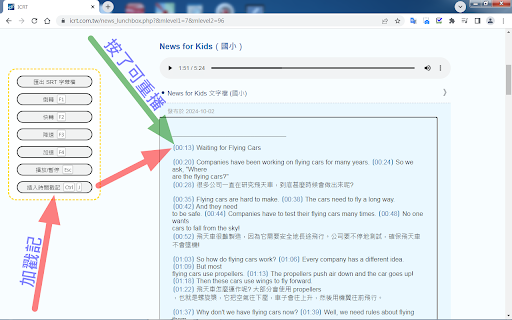
打開 ICRT 以下的頁面時,即可出現擴充功能的區塊:
* ICRT News Lunchbox
  https://www.icrt.com.tw/news_lunchbox.php?&mlevel1=7&mlevel2=96

* ICRT 在 SoundOn 有全文者(例如 EZ News, New for Kids ...)
  https://player.soundon.fm/search?q=icrt

擴充功能讓全文可以編輯,增強聲音播放的功能,並能邊聽邊插入時間戳記,按一下加好的戳記,即可由該時間點重播聲音;最後還可以匯出為 SRT 格式的字幕檔。

鍵盤快速鍵功能:
* F1 : 倒轉
* F2 : 快轉
* F3 : 降速
* F4 : 加速
* Esc : 播放或暫停
* Ctrl + J : 插入時間戳記

搖桿按鈕控制功能:
* 右側的上: 播放/暫停
* 右側的下: 插入時間戳記
* 右側的左: 倒轉
* 右側的右: 快轉
* 左側的左: 減速
* 左側的右: 加速
* 左側的下: 跳到下一句

匯出的 SRT 字幕檔可以使用 HTML5 FUN Audio Player 來播放,請參考:
https://gsyan888.blogspot.com/2024/07/html5-fun-audio-player.html
Technical
- Version
- 1.0
- Manifest
- V3
- Size
- 20.46KiB
- Min Chrome
- 88
- Languages
- 1
- Featured
- No
Metadata
- ID
- hbdndgbehjpklbjnicbfjmbdlpkmjjcm
- Developer ID
- u032d53bada55e2d87b91b2016815e248
- Developer Email
- [email protected]
- Created
- Oct 2, 2024
- Last Updated (Store)
- Oct 2, 2024
- Last Scraped
- May 25, 2026
- Website
- —
- Support URL
- —
- Privacy Policy
- —
Similar extensions
Alternatives to ICRT Episodes Timestamp, ranked by description similarity.

读给我听 - TTS语音朗读器
一键朗读网页文字,自然语音清晰流畅。让阅读更轻松,随时随地听内容。
50

Rayo: AI Flashcards
Save vocabulary from any webpage to your Flashcard app
3
★ 5.0

Chrome NOTE Toolbox
一個結合 AI、註記與雲端儲存的自主學習工具。
111

AudioPilot-AI听力学习助手
看视频学外语,听不懂随时问,一键获取翻译结果。
6

盲文悬浮注音
鼠标悬停中文字即可显示现行盲文注音(声母/韵母/声调 → Unicode Braille)
2

新闻联播
新闻联播文字版浏览器扩展
—

識讀粵拼 Jyutping Viewer
一鍵為網頁中的簡繁體中文加上粵拼(Jyutping),支援複製文字與拼音,讓粵語學習更輕鬆。
172
★ 5.0

粵語懸浮詞典
滑鼠懸停中文字即可顯示粵語發音(粵拼/Yale)同埋英文解釋,支援 AI 語境翻譯
20
Data sourced from the Chrome Web Store · last verified May 25, 2026.