
AlwaysOnTop Sticky Note, Memo
AlwaysOnTop Sticky Note, Memo(pip)
As of May 2026, AlwaysOnTop Sticky Note, Memo has 1,000 users and a 3.67/5 rating from 3 reviews in the Productivity category.
Usersno change0%
1.0K
1,000
Ratingno change0%
3.67
3 reviews
Reviewsno change0%
3
Version
1.0
Manifest V3
Permissions & access
- Permissions
- activeTabscriptingstoragecontextMenus
- Host access
- https://*/*
Screenshots



About
AlwaysOnTop Sticky Note, Memo.(by pip)

1. Functions
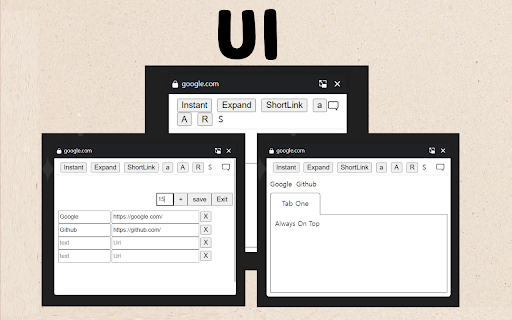
You can always use a memo pop-up window with the features above.

2. Functions
It is recommended for those who move a lot, such as Word, Excel, and web pages.

1) You can always bring up a notepad from above. It's always up there no matter what program you turn on.
2) You can adjust the size of the notepad and the size of the handwriting.
3) You can add a link to visit your favorite page immediately.
4) You can click the 'Instant' menu to create additional pop-up notepads.
5) You can open and turn off the notepad with just the keyboard by setting the shortcut key.
6) Shortcuts have been added to the menu that appears when you right-click.
7) If you use the whale browser, you can also use the 'Always Above' function on the notepad that you have floated as Instant. (If you press the top left pin shape in the Instant window, the function always applies to the top.)

3. How to use the full screen
1) Press Instant to open Notepad in a new window.
2) Press F11 to open the notepad on full screen.

When used as a full screen, it can be used as a whiteboard.


4. How to open not-browser programs (ex.Excel) right on top of it all the time
1) chrome://extensions/shortcuts
2) Set to 'Global' and 'All' in the shortcut setting.
3) You can also use shortcuts in other programs to open Notepad.

5. Precautions
1) It is available on most web pages, but sometimes it is not. In this case, you can open a notepad by opening another web page.
2) Because it uses the PIP, the webpage that opened the notepad must be fixed.


* Please refer to the following for future updates, information, and inquiries.
https://utilzip.com
Technical
- Version
- 1.0
- Manifest
- V3
- Size
- 69.98KiB
- Min Chrome
- 88
- Languages
- 37
- Featured
- No
Metadata
- ID
- gnnmgnpkkiekhlejbekcholfoickmlba
- Developer ID
- u54b0de067ac78e71c412a903c7e67533
- Developer Email
- [email protected]
- Created
- Jun 5, 2024
- Last Updated (Store)
- Jun 5, 2024
- Last Scraped
- May 29, 2026
- Website
- —
- Support URL
- https://utilzip.com
- Privacy Policy
- https://utilzip.com/privacy
Similar extensions
Alternatives to AlwaysOnTop Sticky Note, Memo, ranked by description similarity.

Floating Sticky Note
A simple floating memo that stays on every page. Syncs position, size, and text across tabs.
7

Pin Sticky Notes
Add sticky notes to any webpage.
5

Notepad for Google Chrome
A quick side‑panel notepad that autosaves locally.
461
★ 5.0

Memo Notepad
Memo Notepad helps you quickly take rough notes, without ever switching the context.
195
★ 4.0

Notic: Always on top Floating Notes
Browser integration for Notic — save pages, selections, images, and screenshots to your notes with reader mode
62
★ 1.0

Hover Notepad
A semi-transparent notepad for every website
152
★ 1.0

Floating Notepad
A draggable floating notepad for quick notes.
41

Quick Side Memo
痒い所に手が届くメモ帳です。
7
Data sourced from the Chrome Web Store · last verified May 29, 2026.