
Memo Notepad
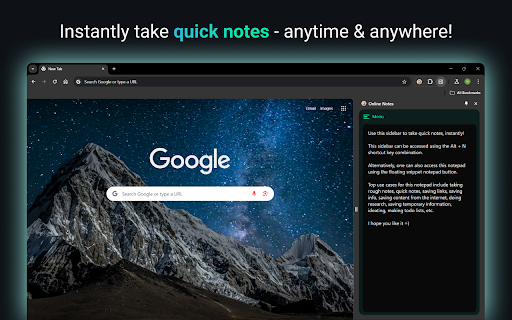
Memo Notepad helps you quickly take rough notes, without ever switching the context.
As of June 2026, Memo Notepad has 195 users and a 4.00/5 rating from 1 reviews in the Productivity category.
Usersup 9.6 percent+9.6%
195
195
Ratingno change0%
4.00
1 reviews
Reviewsno change0%
1
Version
1.0.0
Manifest V3
History
5 snapshotsTracking since Apr 1, 2026.
View as table
| Date | Users | Rating | Reviews | Version |
|---|---|---|---|---|
| Apr 1, 2026 | 178 | 4.00 | 1 | 1.0.0 |
| Apr 21, 2026 | 187 | 4.00 | 1 | 1.0.0 |
| May 6, 2026 | 174 | 4.00 | 1 | 1.0.0 |
| May 18, 2026 | 189 | 4.00 | 1 | 1.0.0 |
| Jun 1, 2026 | 190 | 4.00 | 1 | 1.0.0 |
| Now | 195 | 4.00 | 1 | 1.0.0 |
Permissions & access
- Permissions
- sidePanelunlimitedStoragestoragebackground
- Host access
- *://*/*
Screenshots
About
Memo Notepad: Speedy Notes Inside Your Browser
Writing a quick idea should not derail your flow. Memo Notepad lets you jot thoughts without leaving the page. This guide shows how the extension saves time, powers focus, and keeps every note one tap away.

Digital Work Demands Faster Note-Taking
Research by RescueTime shows knowledge workers switch windows 566 times a day. Each switch costs about two seconds. That adds up to 18 minutes lost daily - nearly 100 hours a year. Cutting even half those flips feels like reclaiming a vacation week. A browser-based notepad removes many of those needless jumps.

What Makes Memo Notepad Special?

One-Tap Access
Press Alt + N. A tidy pad slides into the Chrome side panel. No tab hunt, no desktop shuffle.

Context Stays Visible
Your article, spreadsheet, or dashboard remains in view. You type notes while the source material stays on screen.

Feather-Light Code
The package weighs under 150 KB. It loads in under 50 milliseconds on most machines, based on internal benchmarks.

Keyboard First
Every major action has a shortcut. Mouse fans can still click the floating button.

Features
Sidepanel editor
-  Write while you read; no window juggling
Auto-save every second
-  Never worry about hitting “Save”
Local storage first
-  Notes stay on your device for privacy

How To Install and Start Writing
- Open the Chrome Web Store.
- Search Memo Notepad Chrome Extension.
- Hit Add to Chrome.
- Press Alt + N on any page and begin typing.
Tip: Pin the icon to the toolbar for visual reassurance, though shortcuts remain faster.

Use Cases That Shine

Students Burning Through Readings
Highlight a quote, press the shortcut, paste it, add your thought. Stay in the same tab the entire lecture.

Product Managers in Meetings
Keep Jira open, list action items in the side panel, copy straight into tickets later. Zero formatting chaos.

Writers Catching Sparks
Spot a compelling phrase on Twitter? Capture it instantly. The browser note becomes the seed of your next blog.

Everyday Shoppers
Plan a grocery list while browsing recipes. Drag the note into a delivery app when you finish.

Popular Questions
Is Memo Notepad free?
Yes. All core features remain free forever.

Does it slow Chrome?
No. Memo Notepad is super lightweight.

Where are notes stored?
By default, in Chrome local storage on your machine.

Can I change the shortcut?
Open Chrome Extensions → Keyboard Shortcuts and set any key combo you prefer.

Ready To Try It?
Adding Memo Notepad takes less than a minute and could save you hours this year. Write a thought right where it appears. Reduce tab overload. Keep focus sharp.

Install now and let ideas flow without friction.
Technical
- Version
- 1.0.0
- Manifest
- V3
- Size
- 156KiB
- Min Chrome
- 114
- Languages
- 1
- Featured
- No
Metadata
- ID
- ijnhpobnmoedhgifhodnagnkeoopnfkn
- Developer ID
- u7200c62c409f8a704b152dffa8635a2a
- Developer Email
- [email protected]
- Created
- Aug 9, 2024
- Last Updated (Store)
- Jun 25, 2025
- Last Scraped
- Jun 1, 2026
- Website
- qcknotepad.com
- Privacy Policy
- —
Similar extensions
Alternatives to Memo Notepad, ranked by description similarity.

Note Pad — Online Notepad & Quick Memo
Quick note pad online — type, save, and access your notes instantly. No account needed, no cloud, just a simple notes pad.
314
★ 4.0

Quick Chrome Notes
Use Quick Chrome Notes, an instant web scratchpad for Chrome. Capture thoughts fast. Everything auto saves locally automatically.
113
★ 5.0

Quick Note 📝
Quickly jot down your important things!!
7

Dragon Notepad
A simple extension to quickly take notes in your browser.
9

QuickNote Tab
Replace new tab with a streamlined Notion page for quick note-taking
1
★ 5.0
Memo Notepad
Boost productivity with Memo Notepad Chrome Extension for easy online note-taking and text editing.
10.0K
★ 4.7

Sticky Notes
Quick, draggable sticky notes on any site—stay organized without leaving your tab.
14
★ 5.0

Notepad Text Editor
Fast online notepad and text editor for quick notes and writing
37
★ 2.0
Data sourced from the Chrome Web Store · last verified Jun 1, 2026.