
Lockmagic Gmail Encryption
Send secure, end to end encrypted email messages to anyone in the world while maintaining control of your shared content
As of May 2026, Lockmagic Gmail Encryption has 2,000 users and a 4.50/5 rating from 10 reviews in the Communication category.
Usersno change0%
2.0K
2,000
Ratingno change0%
4.50
10 reviews
Reviewsno change0%
10
Version
5.18
Manifest V3
History
1 snapshotsTracking since May 1, 2026.
View as table
| Date | Users | Rating | Reviews | Version |
|---|---|---|---|---|
| May 1, 2026 | 2.0K | 4.50 | 10 | 5.18 |
| Now | 2.0K | 4.50 | 10 | 5.18 |
Permissions & access
- Permissions
- scripting
- Host access
- https://mail.google.com/, https://inbox.google.com/, https://mail-attachment.googleusercontent.com/, https://www.lockmagic.com/, https://docs.google.com/, https://drive.google.com/, https://*.googleusercontent.com/, https://*.google.com/
Screenshots


About
★🔓 Seamless End-to-End Encryption
- Patented identity-based client-side email encryption.
- Simple to use, quick and secure.

★ Effortless Email Encryption
- Users don't have to change the way they work.
- Fully integrated inside GMail UI for best user experience.
- Recipients internal or external don't have to install any software.

★ Enables compliance and data privacy regulations - FERPA, CCPA, HIPAA, and more
- Doctors, Teachers, Accountants, Lawyers, and others are using LockMagic to protect sensitive information to meet regulatory compliance.

★ Data Privacy
- Data stays private in your local device at all times.
- You don't have to trust Gmail or any messaging system with your sensitive emails.

★ 🔏 Seamless Secure Sharing
- Send encrypted messages and attachments while maintaining control to anyone in the world
- Seamless secure forwarding enables collaboration with others without impacting business workflows and people productivity

★ Stay in control of your data
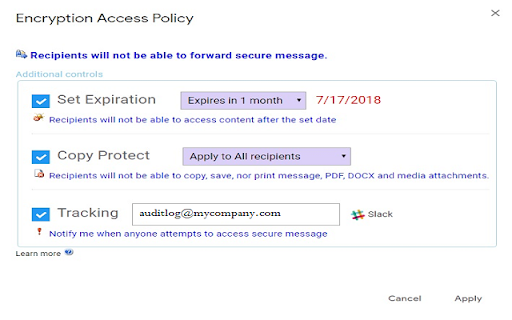
- Set message expiration, revoke messages anytime, copy protect message and attachments, disable forwarding and more.

★ One-Click Encryption
- With a single click the entire message is encrypted before it is sent.
- Attach large files of any size.

★ 🌐 Always-On Protection
- Email messages are sent and stored encrypted at all times.
-  Blocks recipients from forwarding secure messages to unintended people.
- Automatic encryption of reply messages.
- Download and store encrypted messages anywhere.

★ 📳 Stay Informed
- Learn who, when and where your email messages are viewed in a world map.
- Receive read receipt and email notifications whenever your messages are viewed.
- Receive instant notifications on your mobile phone.

★ ⛔ Recall, unsend and revoke access to secure messages at any time.

★ ⏳ Set expiry time to control messages lifetime to create self destructing messages.


Learn more at https://www.lockmagic.com/gext/help.html or contact us at [email protected]

By clicking the “Install” button above, or by otherwise downloading or installing the Lockmagic Gmail Encryption Extension referenced above, you consent to be bound by the Lockmagic Terms of Usage
(https://www.lockmagic.com/doc/terms.pdf).  If you are installing the Lockmagic Gmail Encryption Extension, or otherwise accepting the Lockmagic Terms of Usage, on behalf of an entity, you represent to Lockmagic that you have the legal authority to do so.
Technical
- Version
- 5.18
- Manifest
- V3
- Size
- 1.62MiB
- Min Chrome
- 88
- Languages
- 1
- Featured
- Yes
Metadata
- ID
- gmginoamabjegaokkopplmenagbgdojn
- Developer ID
- uf653eb659ea529b16f1e159a599f990b
- Developer Email
- [email protected]
- Created
- Aug 21, 2017
- Last Updated (Store)
- Nov 26, 2024
- Last Scraped
- May 29, 2026
- Website
- https://www.lockmagic.com/
- Support URL
- http://www.lockmagic.com/gext/help.html
- Privacy Policy
- https://www.lockmagic.com/doc/privacy.pdf
Similar extensions
Alternatives to Lockmagic Gmail Encryption, ranked by description similarity.

Reef Mailer
Reef Mailer – Secure your Gmail with one click
Send private emails. Keep control. Stay secure.
Reef Mailer is a powerful Chrome…
2
★ 5.0
SendSafely Encryption for Chrome and Gmail
Chrome extension that provides end-to-end encryption for Gmail. Encrypt private emails and securely share files up to 10GB.
40.0K
★ 4.9

FlowCrypt: Encrypt Gmail with PGP
Simple end-to-end encryption to secure email and attachments on Google.
70.0K
★ 4.7

Mailvelope - Secure your email with PGP
Protect your email conversations and attachments on Gmail, Nextcloud, Outlook & more with PGP and end-to-end encryption.
200.0K
★ 4.4

Gmail App - Mail Application for Gmail™
Use Gmail app for Windows and Mac to boost productivity. Get notifications and read emails in Gmail desktop app for macOS and PC.
100.0K
★ 4.4

MailProtect: Protect your Gmail privacy for free.
The ultimate Gmail privacy guardian — 100% free
1.0K
★ 4.0

Mail Merge for Gmail - Mailmeteor
Free mail merge with email tracker and auto follow-ups.
60.0K
★ 4.8

Temporary Mail Generator by Marij Maryam
Generate disposable email addresses instantly. Protect your privacy with temporary emails from Mail.tm.
13
★ 5.0
Data sourced from the Chrome Web Store · last verified May 29, 2026.