
Secure Signature
Secure Signature for Web
As of June 2026, Secure Signature has 3 users in the Workflow & Planning category.
Usersup 50.0 percent+50.0%
3
3
Ratingno change0%
—
— reviews
Reviewsno change0%
—
Version
1.0.2
Manifest V3
90-day change · In the last 90 days this extension 1 version update.
History
9 snapshotsTracking since Apr 1, 2026.
View as table
| Date | Users | Rating | Reviews | Version |
|---|---|---|---|---|
| Apr 1, 2026 | 2 | — | — | 1.0.1 |
| Apr 16, 2026 | — | — | — | 1.0.1 |
| Apr 27, 2026 | 2 | — | — | 1.0.2 |
| May 4, 2026 | 2 | — | — | 1.0.2 |
| May 10, 2026 | — | — | — | 1.0.2 |
| May 15, 2026 | 1 | — | — | 1.0.2 |
| May 28, 2026 | 4 | — | — | 1.0.2 |
| Jun 4, 2026 | 3 | — | — | 1.0.2 |
| Jun 9, 2026 | 2 | — | — | 1.0.2 |
| Now | 3 | — | — | 1.0.2 |
Permissions & access
- Permissions
- downloadsstoragenativeMessagingactiveTabscriptingoffscreencookies
- Host access
- *://*/*, file:///*
Screenshots
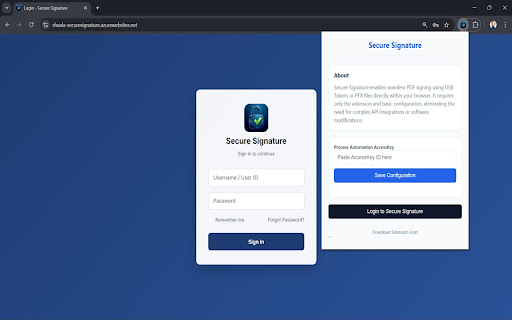


About
Secure Signature – Easy & Safe PDF Signing

Secure Signature makes signing PDF documents simple, fast, and secure—no technical knowledge required. It works quietly in the background and helps you sign important documents without changing your usual work process.

How it helps you:

Automatic PDF Signing
When you download a PDF that needs a signature, Secure Signature automatically detects it and signs it for you. No extra steps.

Two Easy Signing Options

Company-Managed Signing:
Your organization can sign documents using securely stored digital certificates—ideal for offices and teams.

Personal USB Token / Smart Card Signing:
If you use a USB token or smart card, Secure Signature connects securely and signs the document using your device.

Safe & Authorized
Documents are signed only after proper checks to ensure the right user is signing the right document. This keeps your files secure and trustworthy.

Instant Confirmation
You’ll immediately see a message confirming whether the document was signed successfully or if any action is needed.

No Extra Downloads or Uploads
The unsigned PDF is automatically replaced with the signed version—saving time and avoiding confusion.

Important Note

To work properly, Secure Signature needs a small companion application installed on your computer. This application safely handles the signing process in the background.
Technical
- Version
- 1.0.2
- Manifest
- V3
- Size
- 482KiB
- Min Chrome
- 88
- Languages
- 1
- Featured
- No
Metadata
- ID
- gkkpcpcpmnccgealcnmndedegpckcmlb
- Developer ID
- ued8591cbfa5ec2ef9d193003417250fa
- Developer Email
- [email protected]
- Created
- Jan 31, 2026
- Last Updated (Store)
- Apr 6, 2026
- Last Scraped
- Jun 9, 2026
- Support URL
- —
- Privacy Policy
- https://app.shaala-securesignature.com/Home/Privacy
Similar extensions
Alternatives to Secure Signature, ranked by description similarity.

Legally Binding Electronic Signatures
Super simple signatures
Upload a document now — get it legally signed blazing fast
Are you struggling to sign
documents…
22

One Signer
Sign your PDF files digitally with free online PDF signer Chrome Extension.
389
Digital Signature for PDF Files
Create beautiful signature with ease and optionally put in a PDF file.
10.0K
★ 1.4

SignNow - Sign and Fill PDF & Word Documents
Sign PDF and Word documents from the web by clicking "Open in SignNow" from any document in your browser.
20.0K
★ 4.0
Подписать документ ПДФ электронной подписью
SIG - Подписать PDF ПДФ документ или договор электронной подписью ГОСТ 2012
3.0K

KAiZEN eSign
Digitally sign your documents with KAiZEN - Safe, Secure & Certified eSigning solution.
48
★ 4.9

DocMadeEasy
Free online PDF tools
724
★ 5.0

Duetto PDF Signature Tool
Add handwriting-style signatures to PDF documents
—
Data sourced from the Chrome Web Store · last verified Jun 9, 2026.