
Tab Shelf - Side panel vertical tabs
Vertical tab management from your side panel with support for tab groups, multiple windows, and much more.
As of June 2026, Tab Shelf - Side panel vertical tabs has 20,000 users and a 4.39/5 rating from 67 reviews in the Functionality & UI category.
Usersup 150.0 percent+150.0%
20.0K
20,000
Ratingup 0.2 percent+0.2%
4.39
67 reviews
Reviewsup 3.1 percent+3.1%
67
Version
2026.3.0
Manifest V3
90-day change · In the last 90 days this extension gained 12.0K users, 3 version updates.
History
9 snapshotsTracking since Apr 16, 2026.
View as table
| Date | Users | Rating | Reviews | Version |
|---|---|---|---|---|
| Apr 16, 2026 | 8.0K | 4.38 | 65 | 2026.1.2 |
| Apr 22, 2026 | 10.0K | 4.38 | 65 | 2026.1.2 |
| May 7, 2026 | 10.0K | 4.38 | 65 | 2026.2.0 |
| May 11, 2026 | 10.0K | 4.38 | 65 | 2026.2.1 |
| May 17, 2026 | 20.0K | 4.38 | 65 | 2026.2.1 |
| May 23, 2026 | 20.0K | 4.38 | 66 | 2026.2.1 |
| May 27, 2026 | 10.0K | 4.38 | 66 | 2026.2.1 |
| Jun 6, 2026 | 10.0K | 4.39 | 67 | 2026.2.1 |
| Jun 20, 2026 | 10.0K | 4.39 | 67 | 2026.3.0 |
| Now | 20.0K | 4.39 | 67 | 2026.3.0 |
Changelog
- Jun 6, 2026description
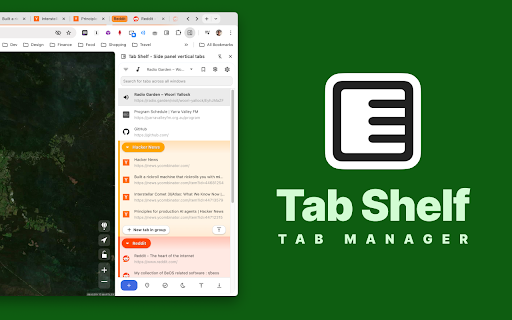
Tab Shelf is a versatile, vertical tab manager for Chrome. It provides an alternate, more feature-packed alternative to the Chrome, Edge, and Brave vertical tabs feature.

🤔 WHY VERTICAL TABS?

Whether you're frantically doing research for a paper, queuing up articles to read, or you just love hoarding tabs, tab management can be a pain. Having all your tabs squeezed at the top of your window makes it hard to remember what tabs you have and to quickly navigate between them.

Being able to persistently view all your tabs in a convenient, colorful, and customizable vertical view takes that headache away!

⭐️ FEATURES

- View and manage your tabs conveniently from the side panel.
- Use rules to automatically group tabs from specific websites (or right-click on a tab and choose to group all tabs from the same site).
- Save and restore tab groups, windows, and browser sessions.
- Quickly search or filter your tabs by group, window, or whether they've got audio playing.
- Duplicate tab detection and deletion (optional).
- Sleep your tabs to save memory and energy. You can also set tabs opened in the background to sleep after a specified period of time.
- Sync your settings and grouping rules via your Google account across your other computers.
- Light and dark themes to match your browser, plus 20 accent colors to give your Tab Shelf some flair. Also includes Roomy, Comfortable, and Compact display density options.
- Choose from amongst 20 colors to differentiate your tab groups and windows.

🌏 TRANSLATIONS

Tab Shelf is available in 17 languages.

🔐 PRIVACY POLICY

Please read Tab Shelf's privacy policy (which can be found at: https://www.tabshelf.com/privacy-policy) to understand how Tab Shelf prioritizes responsible permissions usage and user privacy. Tab Shelf does not and will never collect your data.

🛠️ USAGE

You can launch Tab Shelf in a number of ways:
1. Opening the Chrome side panel via the toolbar button (on the right-hand side, next to your profile button) and selecting Tab Shelf.
2. Pinning the Tab Shelf extension button to the toolbar. This allows you to open Tab Shelf in a single click.

You can also use the default keyboard shortcut to quickly open Tab Shelf:
* On Windows/Linux: Ctrl + Shift + O
* On macOS: Command + Shift + O

For a more detailed user guide, please visit:
https://tabshelf.com/user-guide

Disclaimer: This extension requires at least Chrome 114 in order for side panel integration to work. Other Chromium-based browsers are not officially supported.

=======================
CHANGELOG - v2026.2.1
=======================

IMPROVEMENTS

- Handles large tab sessions more smoothly by rendering fewer off-screen tab rows, including large pinned-tab sets.
- Tab rows now keep extra action buttons lightweight until they are needed, such as on hover, focus, or selection.
- Tab Tray now uses less memory when disabled or minimized.
- Background tab updates now avoid unnecessary processing when browser changes are only cosmetic.
- Tab search, saved-session actions, and favicon handling now use lighter data paths to reduce memory use during long browsing sessions.
- Selection checkboxes now look and behave more consistently across tab rows, saves, bookmarks, grouping rules, and grouping rule sites.

BUG FIXES

- Fixed noisy tab updates causing avoidable background work.
- Fixed selected tab rows rerendering unnecessarily when unrelated selection state changed.
- Fixed favicon cache growth being limited only by entry count instead of approximate retained size.
- Fixed disabled Tab Tray still doing avoidable background UI work.
- Fixed some split-view drag-and-drop confirmation paths retaining stale drop state after failure.
- Fixed selection controls losing right-click menu handling when secondary row actions were hidden.

=======================
CHANGELOG - v2026.2.0
=======================

NEW FEATURES

- Background mode - run Tab Shelf without keeping the side panel. Clicking the toolbar icon now opens a compact action menu where you can access Tab Shelf's saved collections, tab grouping rules, and duplicate tab detection features.
- Redesigned Saves modal with clearer collection format, nested session contents, contextual restore options, and multi-select actions.
- Redesigned Grouping Rules modal with a clearer rules-and-sites structure and smoother workflows for creating rules, adding sites, and managing existing rules.

IMPROVEMENTS

- Saves is more predictable when browsing collections, with improved filtering, sorting, deletion feedback, and cleaner saved collection names.
- Grouping rule changes now sync more reliably between Tab Shelf views and browser storage.
- Notifications now respect action-notification preferences more consistently while always showing critical messages.

BUG FIXES

- Fixed tab group collapse/expand state getting out of sync during startup or reloads.
- Fixed creating a new tab group from selected tabs across multiple windows.
- Fixed duplicate-tab and audible-tab filters getting stuck after the last matching tab disappeared.
- Fixed grouping-rule issues that could leave rules out of sync or apply changes too broadly.
- Fixed first-install and layout issues on the welcome page.
Tab Shelf is a versatile, vertical tab manager for Chrome. It provides an alternate, more feature-packed alternative to the Chrome, Edge, and Brave vertical tabs feature.

🤔 WHY VERTICAL TABS?

Whether you're frantically doing research for a paper, queuing up articles to read, or you just love hoarding tabs, tab management can be a pain. Having all your tabs squeezed at the top of your window makes it hard to remember what tabs you have and to quickly navigate between them.

Being able to persistently view all your tabs in a convenient, colorful, and customizable vertical view takes that headache away!

⭐️ FEATURES

- View and manage your tabs conveniently from the side panel.
- Use rules to automatically group tabs from specific websites (or right-click on a tab and choose to group all tabs from the same site).
- Save and restore tab groups, windows, and browser sessions.
- Quickly search or filter your tabs by group, window, or whether they've got audio playing.
- Duplicate tab detection and deletion (optional).
- Sleep your tabs to save memory and energy. You can also set tabs opened in the background to sleep after a specified period of time.
- Sync your settings and grouping rules via your Google account across your other computers.
- Light and dark themes to match your browser, plus 20 accent colors to give your Tab Shelf some flair. Also includes Roomy, Comfortable, and Compact display density options.
- Choose from amongst 20 colors to differentiate your tab groups and windows.

🌏 TRANSLATIONS

Tab Shelf is available in 17 languages.

🔐 PRIVACY POLICY

Please read Tab Shelf's privacy policy (which can be found at: https://www.tabshelf.com/privacy-policy) to understand how Tab Shelf prioritizes responsible permissions usage and user privacy. Tab Shelf does not and will never collect your data.

🛠️ USAGE

You can launch Tab Shelf in a number of ways:
1. Opening the Chrome side panel via the toolbar button (on the right-hand side, next to your profile button) and selecting Tab Shelf.
2. Pinning the Tab Shelf extension button to the toolbar. This allows you to open Tab Shelf in a single click.

You can also use the default keyboard shortcut to quickly open Tab Shelf:
* On Windows/Linux: Ctrl + Shift + O
* On macOS: Command + Shift + O

For a more detailed user guide, please visit:
https://tabshelf.com/user-guide

Disclaimer: This extension requires at least Chrome 114 in order for side panel integration to work. Other Chromium-based browsers are not officially supported.

=======================
CHANGELOG - v2026.3.0
=======================

NEW FEATURES

- Tab grid layout - switch the main tab list from rows to compact tiles, with pinned tabs, grouped tabs, window headers, selection, drag-and-drop, and context menus still working in the new layout.
- Save selected tabs directly to a collection from the tab context menu, either by choosing an existing collection or creating a new one.
- Saved collections can now be managed more directly, with options to change collection type and collection color.
- The audible-tabs button can now (optionally) cycle focus between audible tabs instead of only filtering them, with separate scope options for the active window or all windows.
- Added an option to automatically collapse tab groups that do not contain the active tab.

IMPROVEMENTS

- Context menus now scroll when there are too many actions to fit on screen, making long tab, window, and toolbar menus easier to use.
- Saves and Grouping Rules can now remember filter and sorting preferences between visits when their persistence settings are enabled.
- Settings with multiple choices now use clearer radio-style pickers, including updated visual pickers for display mode and tab-list density.
- Localization system overhauled to reduce memory and CPU load.

BUG FIXES

- Fixed issue where newly created saved collections are not persisting.
- Fixed fresh installs creating duplicate Saves bookmark folders in some cases, and added repair handling for existing duplicate roots.
- Fixed saved collection metadata issues such as out-of-sync names after renames and stale or orphaned metadata being left behind.

EXPERIMENTAL

- Scroll to Focus Mode - use mouse wheel gestures over the tab list to move focus between visible tabs, with settings for disabled, always-on, Alt + wheel, or Ctrl + wheel behavior.
- May 7, 2026description
Tab Shelf is a versatile, vertical tab manager for Chrome. It provides an alternate, more feature-packed alternative to the Chrome, Edge, and Brave vertical tabs feature.

🤔 WHY VERTICAL TABS?

Whether you're frantically doing research for a paper, queuing up articles to read, or you just love hoarding tabs, tab management can be a pain. Having all your tabs squeezed at the top of your window makes it hard to remember what tabs you have and to quickly navigate between them.

Being able to persistently view all your tabs in a convenient, colorful, and customizable vertical view takes that headache away!

⭐️ FEATURES

- View and manage your tabs conveniently from the side panel.
- Use rules to automatically group tabs from specific websites (or right-click on a tab and choose to group all tabs from the same site).
- Save and restore tab groups, windows, and browser sessions.
- Quickly search or filter your tabs by group, window, or whether they've got audio playing.
- Duplicate tab detection and deletion (optional).
- Sleep your tabs to save memory and energy. You can also set tabs opened in the background to sleep after a specified period of time.
- Sync your settings and grouping rules via your Google account across your other computers.
- Light and dark themes to match your browser, plus 20 accent colors to give your Tab Shelf some flair. Also includes Roomy, Comfortable, and Compact display density options.
- Choose from amongst 20 colors to differentiate your tab groups and windows.

🌏 TRANSLATIONS

Tab Shelf is available in 17 languages.

🔐 PRIVACY POLICY

Please read Tab Shelf's privacy policy (which can be found at: https://www.tabshelf.com/privacy-policy) to understand how Tab Shelf prioritizes responsible permissions usage and user privacy. Tab Shelf does not and will never collect your data.

🛠️ USAGE

You can launch Tab Shelf in a number of ways:
1. Opening the Chrome side panel via the toolbar button (on the right-hand side, next to your profile button) and selecting Tab Shelf.
2. Pinning the Tab Shelf extension button to the toolbar. This allows you to open Tab Shelf in a single click.

You can also use the default keyboard shortcut to quickly open Tab Shelf:
* On Windows/Linux: Ctrl + Shift + O
* On macOS: Command + Shift + O

For a more detailed user guide, please visit:
https://tabshelf.com/user-guide

Disclaimer: This extension requires at least Chrome 114 in order for side panel integration to work. Other Chromium-based browsers are not officially supported.

=======================
CHANGELOG - v2026.2.0
=======================

NEW FEATURES

- Background mode - run Tab Shelf without keeping the side panel. Clicking the toolbar icon now opens a compact action menu where you can access Tab Shelf's saved collections, tab grouping rules, and duplicate tab detection features.
- Redesigned Saves modal with clearer collection format, nested session contents, contextual restore options, and multi-select actions.
- Redesigned Grouping Rules modal with a clearer rules-and-sites structure and smoother workflows for creating rules, adding sites, and managing existing rules.

IMPROVEMENTS

- Saves is more predictable when browsing collections, with improved filtering, sorting, deletion feedback, and cleaner saved collection names.
- Grouping rule changes now sync more reliably between Tab Shelf views and browser storage.
- Notifications now respect action-notification preferences more consistently while always showing critical messages.

BUG FIXES

- Fixed tab group collapse/expand state getting out of sync during startup or reloads.
- Fixed creating a new tab group from selected tabs across multiple windows.
- Fixed duplicate-tab and audible-tab filters getting stuck after the last matching tab disappeared.
- Fixed grouping-rule issues that could leave rules out of sync or apply changes too broadly.
- Fixed first-install and layout issues on the welcome page.
Tab Shelf is a versatile, vertical tab manager for Chrome. It provides an alternate, more feature-packed alternative to the Chrome, Edge, and Brave vertical tabs feature.

🤔 WHY VERTICAL TABS?

Whether you're frantically doing research for a paper, queuing up articles to read, or you just love hoarding tabs, tab management can be a pain. Having all your tabs squeezed at the top of your window makes it hard to remember what tabs you have and to quickly navigate between them.

Being able to persistently view all your tabs in a convenient, colorful, and customizable vertical view takes that headache away!

⭐️ FEATURES

- View and manage your tabs conveniently from the side panel.
- Use rules to automatically group tabs from specific websites (or right-click on a tab and choose to group all tabs from the same site).
- Save and restore tab groups, windows, and browser sessions.
- Quickly search or filter your tabs by group, window, or whether they've got audio playing.
- Duplicate tab detection and deletion (optional).
- Sleep your tabs to save memory and energy. You can also set tabs opened in the background to sleep after a specified period of time.
- Sync your settings and grouping rules via your Google account across your other computers.
- Light and dark themes to match your browser, plus 20 accent colors to give your Tab Shelf some flair. Also includes Roomy, Comfortable, and Compact display density options.
- Choose from amongst 20 colors to differentiate your tab groups and windows.

🌏 TRANSLATIONS

Tab Shelf is available in 17 languages.

🔐 PRIVACY POLICY

Please read Tab Shelf's privacy policy (which can be found at: https://www.tabshelf.com/privacy-policy) to understand how Tab Shelf prioritizes responsible permissions usage and user privacy. Tab Shelf does not and will never collect your data.

🛠️ USAGE

You can launch Tab Shelf in a number of ways:
1. Opening the Chrome side panel via the toolbar button (on the right-hand side, next to your profile button) and selecting Tab Shelf.
2. Pinning the Tab Shelf extension button to the toolbar. This allows you to open Tab Shelf in a single click.

You can also use the default keyboard shortcut to quickly open Tab Shelf:
* On Windows/Linux: Ctrl + Shift + O
* On macOS: Command + Shift + O

For a more detailed user guide, please visit:
https://tabshelf.com/user-guide

Disclaimer: This extension requires at least Chrome 114 in order for side panel integration to work. Other Chromium-based browsers are not officially supported.

=======================
CHANGELOG - v2026.2.1
=======================

IMPROVEMENTS

- Handles large tab sessions more smoothly by rendering fewer off-screen tab rows, including large pinned-tab sets.
- Tab rows now keep extra action buttons lightweight until they are needed, such as on hover, focus, or selection.
- Tab Tray now uses less memory when disabled or minimized.
- Background tab updates now avoid unnecessary processing when browser changes are only cosmetic.
- Tab search, saved-session actions, and favicon handling now use lighter data paths to reduce memory use during long browsing sessions.
- Selection checkboxes now look and behave more consistently across tab rows, saves, bookmarks, grouping rules, and grouping rule sites.

BUG FIXES

- Fixed noisy tab updates causing avoidable background work.
- Fixed selected tab rows rerendering unnecessarily when unrelated selection state changed.
- Fixed favicon cache growth being limited only by entry count instead of approximate retained size.
- Fixed disabled Tab Tray still doing avoidable background UI work.
- Fixed some split-view drag-and-drop confirmation paths retaining stale drop state after failure.
- Fixed selection controls losing right-click menu handling when secondary row actions were hidden.

=======================
CHANGELOG - v2026.2.0
=======================

NEW FEATURES

- Background mode - run Tab Shelf without keeping the side panel. Clicking the toolbar icon now opens a compact action menu where you can access Tab Shelf's saved collections, tab grouping rules, and duplicate tab detection features.
- Redesigned Saves modal with clearer collection format, nested session contents, contextual restore options, and multi-select actions.
- Redesigned Grouping Rules modal with a clearer rules-and-sites structure and smoother workflows for creating rules, adding sites, and managing existing rules.

IMPROVEMENTS

- Saves is more predictable when browsing collections, with improved filtering, sorting, deletion feedback, and cleaner saved collection names.
- Grouping rule changes now sync more reliably between Tab Shelf views and browser storage.
- Notifications now respect action-notification preferences more consistently while always showing critical messages.

BUG FIXES

- Fixed tab group collapse/expand state getting out of sync during startup or reloads.
- Fixed creating a new tab group from selected tabs across multiple windows.
- Fixed duplicate-tab and audible-tab filters getting stuck after the last matching tab disappeared.
- Fixed grouping-rule issues that could leave rules out of sync or apply changes too broadly.
- Fixed first-install and layout issues on the welcome page.
- Apr 22, 2026description
Tab Shelf is a feature-packed, versatile, vertical tab manager for Chrome.

🤔 WHY VERTICAL TABS?

Whether you're frantically doing research for a paper, queuing up articles to read, or you just love hoarding tabs, tab management can be a pain. Having all your tabs squeezed at the top of your window makes it hard to remember what tabs you have and to quickly navigate between them.

Being able to persistently view all your tabs in a convenient, colorful, and customizable vertical view takes that headache away!

⭐️ FEATURES

- View and manage your tabs conveniently from the side panel.
- Use rules to automatically group tabs from specific websites (or right-click on a tab and choose to group all tabs from the same site).
- Save and restore tab groups, windows, and browser sessions.
- Quickly search or filter your tabs by group, window, or whether they've got audio playing.
- Duplicate tab detection and deletion (optional).
- Sleep your tabs to save memory and energy. You can also set tabs opened in the background to sleep after a specified period of time.
- Sync your settings and grouping rules via your Google account across your other computers.
- Light and dark themes to match your browser, plus 20 accent colors to give your Tab Shelf some flair. Also includes Roomy, Comfortable, and Compact display density options.
- Choose from amongst 20 colors to differentiate your tab groups and windows.

🌏 TRANSLATIONS

Tab Shelf is available in 17 languages.

🔐 PRIVACY POLICY

Please read Tab Shelf's privacy policy (which can be found at: https://www.tabshelf.com/privacy-policy) to understand how Tab Shelf prioritizes responsible permissions usage and user privacy. Tab Shelf does not and will never collect your data.

🛠️ USAGE

You can launch Tab Shelf in a number of ways:
1. Opening the Chrome side panel via the toolbar button (on the right-hand side, next to your profile button) and selecting Tab Shelf.
2. Pinning the Tab Shelf extension button to the toolbar. This allows you to open Tab Shelf in a single click.

You can also use the default keyboard shortcut to quickly open Tab Shelf:
* On Windows/Linux: Ctrl + Shift + O
* On macOS: Command + Shift + O

For a more detailed user guide, please visit:
https://tabshelf.com/user-guide

Disclaimer: This extension requires at least Chrome 114 in order for side panel integration to work. Other Chromium-based browsers are not officially supported.

=======================
CHANGELOG - v2026.1.2
=======================

IMPROVEMENTS

- Improved auto-scroll behavior so Tab Shelf more reliably jumps to your active tab when the side panel opens.
- Improved scrolling to active tabs in long tab lists and collapsed groups.

BUG FIXES

- Fixed an issue where the tab group does not appear when a tab is added to it via grouping rules.
- Fixed an issue where Tab Shelf could sometimes fail to scroll to the active tab after launch or updates.
- Fixed layout overlap issues while using selection mode where the tab mute/unmute button appears over the tab selection checkbox.

=======================
CHANGELOG - v2026.1.1
=======================

NEW FEATURES

- Collapse or expand all tab groups at once from the Action Bar.
- New search settings to control whether matching tab groups and windows auto-expand while searching (Never / Auto-expand / Temporarily auto-expand).

IMPROVEMENTS

- Re-implemented tab list virtualization for better performance across density modes.
- Performance optimizations including favicon caching and reduced re-renders in the tab list.
- Persist tab list sorting order per window and prevent sort order resets during session updates.
- Moved Duplicate and Audible tab filter buttons back to the top bar (next to the search button).
- Duplicate tab indication now uses a favicon badge instead of changing the tab background.
- Optimistically refresh tab group collapse/expand state to avoid stale UI on some Chromium forks (e.g. Brave).
- Selection mode checkboxes for window and tab group headers now keep a consistent position.

BUG FIXES

- Fixed tab group colors not updating correctly (including color picker state).
- Fixed an issue where double-clicking a tab item could create a phantom new tab.
- Fixed "Add to Tab Tray" actions showing when Tab Tray is disabled.
- Fixed duplicate tab detection in incognito windows caused by internal URLs (e.g. `about:blank`).

=======================
CHANGELOG - v2026.1.0
=======================

NEW FEATURES

- Tab Tray - temporarily pin tabs to a dedicated tray for quick access across your session. Tray tabs persist until you close the tab or close the session, where the tray tabs will be moved to an archive section.
	- Drag-and-drop tabs from the tab list into the Tab Tray.
	- Search within the Tab Tray to quickly find tray tabs.
	- Right-click context menus on Tab Tray items for quick actions.
- Support for Chrome's new split view mode. Use controls between two paired tabs to swap, separate, reload, sleep, or close paired tabs.
- Pop-up mode - open Tab Shelf in a pop-up window in the browser toolbar instead of the side panel.
- Auto-scroll to active tab - automatically scroll the tab list to the current active tab when switching tabs via the tab strip or keyboard shortcuts.
- User Guide - access a built-in guide to learn about features and how to use Tab Shelf.
- New tab reposition options in tab context menus:
	- Move tab(s) to another window; quickly move selected tabs to any other open window from the context menu.
	- Reposition ungrouped tabs; move ungrouped tabs to the start or end of the tab list.
	- Sleep/Close tabs in group; sleep or close all tabs within the same group, tabs to the left/right within the group, or other tabs in the group.
- Search in grouping rules modal - quickly find and filter rules in large rule sets.

IMPROVEMENTS

- Redesigned the Saves modal navigation with a dropdown filter menu for easier navigation between saved sessions, windows, and tab groups.
- Consolidated filter and sort controls into the search bar for a cleaner interface.
- Unified tooltip behavior across the entire extension for a more consistent experience.
- Centralized grouping rule execution via service workers for improved performance and to allow rules to run when Tab Shelf is not open.
- Improved rendering performance for tab lists and context menus.

BUG FIXES

- Fixed styling and drag-and-drop issues when dragging tabs over the window filter.
- Fixed an issue where moving tabs to a window without grouping would incorrectly group already-grouped tabs.
- Fixed a regression where exiting the duplicate tab filter would cause the user to be trapped in filtering mode.
- Fixed an issue where restoring pinned tabs to a configured URL without a protocol (e.g. `www.google.com`) would fail to navigate.
- Fixed an issue where accent color mappings would not initialize correctly on new installs or with empty storage.

DEPRECATED

- Removed the "Reduce spacing in pinned tabs compact view" setting - the compact view now uses a consistent, optimized layout.
- Removed the "Number of tabs per row in compact view" setting - the compact view now automatically adjusts based on available space.
Tab Shelf is a versatile, vertical tab manager for Chrome. It provides an alternate, more feature-packed alternative to the Chrome, Edge, and Brave vertical tabs feature.

🤔 WHY VERTICAL TABS?

Whether you're frantically doing research for a paper, queuing up articles to read, or you just love hoarding tabs, tab management can be a pain. Having all your tabs squeezed at the top of your window makes it hard to remember what tabs you have and to quickly navigate between them.

Being able to persistently view all your tabs in a convenient, colorful, and customizable vertical view takes that headache away!

⭐️ FEATURES

- View and manage your tabs conveniently from the side panel.
- Use rules to automatically group tabs from specific websites (or right-click on a tab and choose to group all tabs from the same site).
- Save and restore tab groups, windows, and browser sessions.
- Quickly search or filter your tabs by group, window, or whether they've got audio playing.
- Duplicate tab detection and deletion (optional).
- Sleep your tabs to save memory and energy. You can also set tabs opened in the background to sleep after a specified period of time.
- Sync your settings and grouping rules via your Google account across your other computers.
- Light and dark themes to match your browser, plus 20 accent colors to give your Tab Shelf some flair. Also includes Roomy, Comfortable, and Compact display density options.
- Choose from amongst 20 colors to differentiate your tab groups and windows.

🌏 TRANSLATIONS

Tab Shelf is available in 17 languages.

🔐 PRIVACY POLICY

Please read Tab Shelf's privacy policy (which can be found at: https://www.tabshelf.com/privacy-policy) to understand how Tab Shelf prioritizes responsible permissions usage and user privacy. Tab Shelf does not and will never collect your data.

🛠️ USAGE

You can launch Tab Shelf in a number of ways:
1. Opening the Chrome side panel via the toolbar button (on the right-hand side, next to your profile button) and selecting Tab Shelf.
2. Pinning the Tab Shelf extension button to the toolbar. This allows you to open Tab Shelf in a single click.

You can also use the default keyboard shortcut to quickly open Tab Shelf:
* On Windows/Linux: Ctrl + Shift + O
* On macOS: Command + Shift + O

For a more detailed user guide, please visit:
https://tabshelf.com/user-guide

Disclaimer: This extension requires at least Chrome 114 in order for side panel integration to work. Other Chromium-based browsers are not officially supported.

=======================
CHANGELOG - v2026.2.0
=======================

NEW FEATURES

- Background mode - run Tab Shelf without keeping the side panel. Clicking the toolbar icon now opens a compact action menu where you can access Tab Shelf's saved collections, tab grouping rules, and duplicate tab detection features.
- Redesigned Saves modal with clearer collection format, nested session contents, contextual restore options, and multi-select actions.
- Redesigned Grouping Rules modal with a clearer rules-and-sites structure and smoother workflows for creating rules, adding sites, and managing existing rules.

IMPROVEMENTS

- Saves is more predictable when browsing collections, with improved filtering, sorting, deletion feedback, and cleaner saved collection names.
- Grouping rule changes now sync more reliably between Tab Shelf views and browser storage.
- Notifications now respect action-notification preferences more consistently while always showing critical messages.

BUG FIXES

- Fixed tab group collapse/expand state getting out of sync during startup or reloads.
- Fixed creating a new tab group from selected tabs across multiple windows.
- Fixed duplicate-tab and audible-tab filters getting stuck after the last matching tab disappeared.
- Fixed grouping-rule issues that could leave rules out of sync or apply changes too broadly.
- Fixed first-install and layout issues on the welcome page.
Permissions & access
- Permissions
- storagetabstabGroupssidePanelfaviconcommandsbookmarks
- Host access
- None declared
Screenshots


About
Tab Shelf is a versatile, vertical tab manager for Chrome. It provides an alternate, more feature-packed alternative to the Chrome, Edge, and Brave vertical tabs feature.

🤔 WHY VERTICAL TABS?

Whether you're frantically doing research for a paper, queuing up articles to read, or you just love hoarding tabs, tab management can be a pain. Having all your tabs squeezed at the top of your window makes it hard to remember what tabs you have and to quickly navigate between them.

Being able to persistently view all your tabs in a convenient, colorful, and customizable vertical view takes that headache away!

⭐️ FEATURES

- View and manage your tabs conveniently from the side panel.
- Use rules to automatically group tabs from specific websites (or right-click on a tab and choose to group all tabs from the same site).
- Save and restore tab groups, windows, and browser sessions.
- Quickly search or filter your tabs by group, window, or whether they've got audio playing.
- Duplicate tab detection and deletion (optional).
- Sleep your tabs to save memory and energy. You can also set tabs opened in the background to sleep after a specified period of time.
- Sync your settings and grouping rules via your Google account across your other computers.
- Light and dark themes to match your browser, plus 20 accent colors to give your Tab Shelf some flair. Also includes Roomy, Comfortable, and Compact display density options.
- Choose from amongst 20 colors to differentiate your tab groups and windows.

🌏 TRANSLATIONS

Tab Shelf is available in 17 languages.

🔐 PRIVACY POLICY

Please read Tab Shelf's privacy policy (which can be found at: https://www.tabshelf.com/privacy-policy) to understand how Tab Shelf prioritizes responsible permissions usage and user privacy. Tab Shelf does not and will never collect your data.

🛠️ USAGE

You can launch Tab Shelf in a number of ways:
1. Opening the Chrome side panel via the toolbar button (on the right-hand side, next to your profile button) and selecting Tab Shelf.
2. Pinning the Tab Shelf extension button to the toolbar. This allows you to open Tab Shelf in a single click.

You can also use the default keyboard shortcut to quickly open Tab Shelf:
* On Windows/Linux: Ctrl + Shift + O
* On macOS: Command + Shift + O

For a more detailed user guide, please visit:
https://tabshelf.com/user-guide

Disclaimer: This extension requires at least Chrome 114 in order for side panel integration to work. Other Chromium-based browsers are not officially supported.

=======================
CHANGELOG - v2026.3.0
=======================

NEW FEATURES

- Tab grid layout - switch the main tab list from rows to compact tiles, with pinned tabs, grouped tabs, window headers, selection, drag-and-drop, and context menus still working in the new layout.
- Save selected tabs directly to a collection from the tab context menu, either by choosing an existing collection or creating a new one.
- Saved collections can now be managed more directly, with options to change collection type and collection color.
- The audible-tabs button can now (optionally) cycle focus between audible tabs instead of only filtering them, with separate scope options for the active window or all windows.
- Added an option to automatically collapse tab groups that do not contain the active tab.

IMPROVEMENTS

- Context menus now scroll when there are too many actions to fit on screen, making long tab, window, and toolbar menus easier to use.
- Saves and Grouping Rules can now remember filter and sorting preferences between visits when their persistence settings are enabled.
- Settings with multiple choices now use clearer radio-style pickers, including updated visual pickers for display mode and tab-list density.
- Localization system overhauled to reduce memory and CPU load.

BUG FIXES

- Fixed issue where newly created saved collections are not persisting.
- Fixed fresh installs creating duplicate Saves bookmark folders in some cases, and added repair handling for existing duplicate roots.
- Fixed saved collection metadata issues such as out-of-sync names after renames and stale or orphaned metadata being left behind.

EXPERIMENTAL

- Scroll to Focus Mode - use mouse wheel gestures over the tab list to move focus between visible tabs, with settings for disabled, always-on, Alt + wheel, or Ctrl + wheel behavior.
Technical
- Version
- 2026.3.0
- Manifest
- V3
- Size
- 2.17MiB
- Min Chrome
- 88
- Languages
- 1
- Featured
- Yes
Metadata
- ID
- gkiobnohamhihbaipacecjfljepjjlmg
- Developer ID
- u1218aecd771c77e30bce5b1ff4c51354
- Developer Email
- [email protected]
- Created
- Jun 14, 2023
- Last Updated (Store)
- Jun 3, 2026
- Last Scraped
- Jun 20, 2026
- Website
- tabshelf.com
- Support URL
- —
- Privacy Policy
- https://tabshelf.com/privacy-policy
Similar extensions
Alternatives to Tab Shelf - Side panel vertical tabs, ranked by description similarity.

Tabbiy - Auto Group & Sidebar Tab Manager
The ultimate sidebar tab manager! Auto-group, customize titles, save, hibernate & switch tabs fast for a clutter-free browser.
2.0K
★ 4.7

Tab Manager Plus for Chrome
Quickly find open tabs, see all windows in one view, find duplicates and limit tabs per window. The best Tab Manager for Chrome.
200.0K
★ 4.7

Tabistant
Tab assistant. 🤵🐾 Vertical tabs, tab previews, suspend inactive tabs, archive tabs for reading later, with custom themes.
2
★ 2.0

Quick Tabs
A keyboard centric most recently used (MRU) ordered page list plugin with seek and switch functionality inspired by IntelliJ IDEA
30.0K
★ 4.5

Thready - Vertical Tabs
Vertical tabs, bookmarks, history and readling list in side panel.
1.0K
★ 4.1

Clutter Free - Prevent duplicate tabs
Reduce tab clutter - prevent duplicate tabs, quickly search & switch tabs, and more...
30.0K
★ 3.7

Tab Control
The holy grail of tab managers
431
★ 3.8

Tab Manager in Side Panel
Compatible with built-in and adds more easy-to-use features, lives in side panel
1.0K
★ 4.5
Data sourced from the Chrome Web Store · last verified Jun 20, 2026.