
Cloud File Renamer Pro
Rename Files on OneDrive, Google Drive, Dropbox and Amazon S3
As of June 2026, Cloud File Renamer Pro has 713 users and a 3.67/5 rating from 3 reviews in the Workflow & Planning category.
Usersup 3.3 percent+3.3%
713
713
Ratingno change0%
3.67
3 reviews
Reviewsno change0%
3
Version
1.2
Manifest V3
History
3 snapshotsTracking since Apr 1, 2026.
View as table
| Date | Users | Rating | Reviews | Version |
|---|---|---|---|---|
| Apr 1, 2026 | 690 | 3.67 | 3 | 1.2 |
| May 3, 2026 | 699 | 3.67 | 3 | 1.2 |
| Jun 3, 2026 | 719 | 3.67 | 3 | 1.2 |
| Now | 713 | 3.67 | 3 | 1.2 |
Permissions & access
- Permissions
- None declared
- Host access
- None declared
Screenshots
About
What is the Cloud File Renamer (CFR) Chrome Extension?
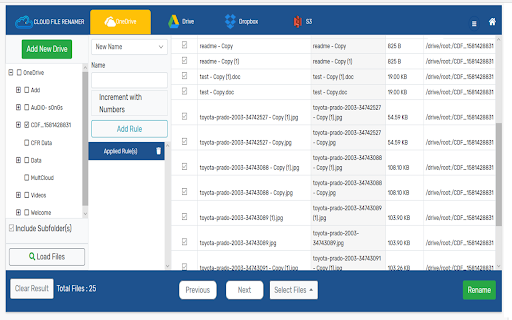
This extension lets you easily access and review   your Cloud File Renamer account. In a few clicks, you can  review added cloud drives ,  renaming jobs performed and open the Web Service  and mass rename files, photos, songs, and videos.

NOTE: The web-service allows you to load your files, add Renaming Rules, and preview the filenames. It will not rename your files until you become a Pro Subscriber.

What is the purpose of CFR?

CFR is a cloud-based application to bulk rename files on the Cloud. The online renaming utility supports Google Drive™, Microsoft OneDrive, Dropbox, and Amazon S3. You can change file names without even downloading the files to your computer, tablet, or the smartphone.

How to Create a CFR Software-as-a-Service (SaaS) Account?
Before you can start renaming files, you need to create an account on the website. The Cloud File Renamer app allows you to Signup using the following options:

Signup with Google
Signup with Microsoft
Signup using your Email

Once you have created an account, you will see the application’s dashboard. From that interface, you can load any of the supported Cloud Drives’ files for renaming at once.
Adding Cloud Drives and Loading Files for Renaming
After creating the account, you can follow the standard OAuth Login Verification-Procedure to let the CFR access and view your Google Drive™, OneDrive, Dropbox, or Amazon S3 files. Once a Cloud Drive is added, you will see its folders. Simply select one or more folders to load the files into the CFR app.

Is It Secure?
The Cloud File Renamer SaaS uses a secure and authentic procedure to access your files. It utilizes the official APIs and protects your information through a strong 256-bit encryption mechanism. The application doesn’t store your password and files. It also doesn’t view the content of your files.

What Are the Renaming Rules?

The Renaming Rules are the different ways for setting new names of the files. The online file renamer has useful rules such as:

New Name
Replace Text
Remove Text
Trim Text
Suffix
Prefix
Numbering
Insert At
Lower Case
Upper Case
Title Case
Swap

Uninstalling The Extension

See the Vertical Dotted-Lines on top-right of your Chrome browser. Click to customize > then click on More Tools > Extensions > Find the CFR extension and click on Remove.
Terminating the Account
To terminate your CFR  account, Sign In to the application and Click on My Account option. In the User Details column, click on the Terminate Account button.
Privacy Policy
https://www.cloudfilerenamer.com/privacy-policy
Terms of Service
https://www.cloudfilerenamer.com/terms-of-service
FAQs
https://www.cloudfilerenamer.com/faqs
Support
https://www.cloudfilerenamer.com/Support/form
Pricing
https://www.cloudfilerenamer.com/Pricing/index

Google Drive™, Dropbox, OneDrive, and Amazon S3 logos are the trademarks owned by their respective companies.
Technical
- Version
- 1.2
- Manifest
- V3
- Size
- 74.63KiB
- Min Chrome
- 88
- Languages
- 1
- Featured
- No
Metadata
- ID
- gjhojlhdipaimceapibdofdehkhokien
- Developer ID
- u7bbb3d3534fd17689269b88b051e4f37
- Developer Email
- [email protected]
- Created
- Apr 8, 2020
- Last Updated (Store)
- Dec 7, 2022
- Last Scraped
- Jun 3, 2026
- Privacy Policy
- https://www.cloudduplicatefinder.com/privacy-policy
Similar extensions
Alternatives to Cloud File Renamer Pro, ranked by description similarity.
Cloud Duplicate Finder
Easily find duplicate photos, songs and all files from the cloud storage
8.0K
★ 3.5

Move Files from Box to Google Drive
This extension lets you directly transfer files from Box to Google Drive without download and upload.
521
★ 3.7
Bulk Renamer for Drive
Rename multiple files in a Google Drive folder!
5.0K
★ 2.7

Cloudmark - Collaborative Bookmark Manager
Cloudmark is a collaborative bookmark manager that allows you to save and organize your bookmarks in the cloud.
40
★ 5.0

Transfer Google Photos to another Account
This extension lets you directly transfer photos from one Google Photos to another account with no download and upload.
779

Simple Tab Renamer
Quickly rename your Chrome tabs with a click
160
★ 3.4

MultCloud Save - Save Webpage as PDF
Save webpages in Chrome as PDF or images and save to the cloud or local.
1.0K
★ 2.9

Parent Website Controller
Blocks every website except for ones specified in the app.
5
Data sourced from the Chrome Web Store · last verified Jun 3, 2026.