Lazy Shortcuts
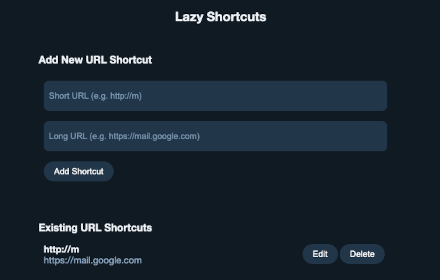
Lazy Shortcuts allows you to create local custom short URLs.
As of June 2026, Lazy Shortcuts has — users in the Productivity category.
Usersno change0%
—
—
Ratingno change0%
—
— reviews
Reviewsno change0%
—
Version
1.0
Manifest V3
Permissions & access
- Permissions
- declarativeNetRequestWithHostAccess
- Host access
- *://*/*
Screenshots

About
Lazy Shortcuts is an open-source extension that allows you to create URL shortcuts for yourself.

For example, you can type m/ and be redirected to https://mail.google.com or go/lazy-shortcuts/ to go to https://github.com/nitobuendia/lazy-shortcuts


To learn how to use or run locally check: https://github.com/nitobuendia/lazy-shortcuts
Technical
- Version
- 1.0
- Manifest
- V3
- Size
- 134KiB
- Min Chrome
- 88
- Languages
- 1
- Featured
- No
Metadata
- ID
- giihbojjbjngbgdjncphgfnfacnabece
- Developer ID
- u2e9d349c6ec74969c6152ca28a28033d
- Developer Email
- [email protected]
- Created
- Jul 22, 2025
- Last Updated (Store)
- Jul 22, 2025
- Last Scraped
- Jun 1, 2026
- Website
- —
Similar extensions
Alternatives to Lazy Shortcuts, ranked by description similarity.

LinkLite
Navigate the web faster with custom URL shortcuts
6
★ 5.0

JumpTo
Quick navigation using shortlinks - works across browsers
6
★ 5.0

Quick URL Shortcuts V2
Create custom shortcuts and dynamic searches in the address bar to quickly navigate the web.
—

GO- URL Shortcuts
Create custom URL shortcuts using the omnibox keyword 'go'.
14
★ 1.0

My Quick Links
Create and manage custom short links for quick access to your favorite sites. Example: 'my gmail' -> https://mail.google.com
11

Shortcut2URL
Press Ctrl+Shift+S or click the extension icon to search and open websites with custom shortcuts. E.g. 'gh' to open GitHub!
9
★ 5.0

My Web Shortcuts
Click buttons in websites with keyboard shortcuts to navigate faster
990
★ 4.7

Shortcut Link
Quickly open sites with short codes
3
Data sourced from the Chrome Web Store · last verified Jun 1, 2026.