
YouTube Screen Locker
No more accidental clicks while you're watching videos.
As of June 2026, YouTube Screen Locker has 1,000 users and a 3.14/5 rating from 7 reviews in the Productivity category.
Usersno change0%
1.0K
1,000
Ratingdown 10.3 percent−10.3%
3.14
7 reviews
Reviewsup 16.7 percent+16.7%
7
Version
1.1
Manifest V3
History
1 snapshotsTracking since Jun 3, 2026.
View as table
| Date | Users | Rating | Reviews | Version |
|---|---|---|---|---|
| Jun 3, 2026 | 1.0K | 3.50 | 6 | 1.1 |
| Now | 1.0K | 3.14 | 7 | 1.1 |
Permissions & access
- Permissions
- activeTabstorage
- Host access
- *://*.youtube.com/*
Screenshots


About
Introducing the YouTube Screen Locker Extension

Problem: Are you tired of accidental clicks and taps ruining your video watching experience? Whether it's your pet, a curious child, or just an accidental nudge from you, these interruptions can be frustrating.

Solution: Our YouTube Screen Locker is here to ensure your video sessions remain undisturbed!

Features:
- Simple Setup - Just install the plugin, and you're ready to go. No login needed.
- Compatible with Mac, Windows, and Linux.
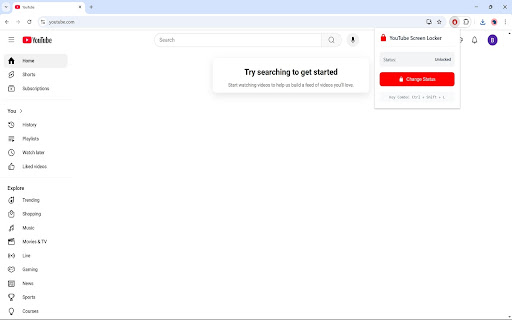
- Activate or deactivate the lock with a simple keyboard shortcut or a click on our logo.
- Works both in fullscreen and windowed mode.

How to Use:
To Lock the Screen (Two ways)
- Keyboard Shortcut: Press "Ctrl + Shift + L" on Windows or "Cmd + Shift + L" on Mac while viewing a video.
- Extension Icon: Alternatively, click on the extension's icon in your Chrome toolbar.

Upon Locking
- A temporary notification bar labeled "Screen Locked" will appear at the bottom right of your screen for 5 seconds. You can make this bar reappear by hovering your cursor over that area

To Unlock the Screen (Two ways)
- Keyboard Shortcut: Use the same keys, "Ctrl + Shift + L" on Windows or "Cmd + Shift + L" on Mac.
- Extension Icon: Click the extension icon again to unlock the screen.

******************************************************************
Changelog:
1.1 (1/8/2025)
- Fixed an issue where the status would not update when changed using the key combination for the first time.
Technical
- Version
- 1.1
- Manifest
- V3
- Size
- 16.38KiB
- Min Chrome
- 88
- Languages
- 1
- Featured
- No
Metadata
- ID
- gigphmfpfhfjiaagigcpfpbdiipmibnf
- Developer ID
- u87e4ff1c6caa5b507e421babfcbee59a
- Developer Email
- [email protected]
- Created
- Dec 7, 2024
- Last Updated (Store)
- Jan 9, 2025
- Last Scraped
- Jun 3, 2026
- Website
- —
- Support URL
- —
- Privacy Policy
- https://www.bluewavetrading.us/privacy-policy
Similar extensions
Alternatives to YouTube Screen Locker, ranked by description similarity.

Page Locker
Blurs all tabs on hotkey press for quick privacy.
122
★ 5.0

LockMate: Screen Lock Extension
Secure your browser with customizable passcodes and auto-lock private domains for enhanced privacy.
221

Remove YouTube Recommended Video's
Block all distraction on YouTube like (Comments,related Videos, homepage, trending, tabs, searchbar, trending and many other)
14
★ 5.0

YouTube Inline Fullscreen
Make the most out of your screen space with a single click!
9.0K
★ 4.4

Simple YouTube Windowed Fullscreen
Open YouTube videos in fullscreen in it's own window (windowed fullscreen)
4.0K
★ 4.0

ShortsLock — YouTube Shorts Redirect
Redirect YouTube Shorts to the normal Watch page to avoid the Shorts feed. Includes a temporary unlock pass.
3

YouTube ContinueOn
Generate a QR code for your current YouTube video to resume playback on another device seamlessly.
73
★ 4.3

Zen Lock
Adds a blurred lock screen overlay with timed locking.
9
Data sourced from the Chrome Web Store · last verified Jun 3, 2026.