
YouTube Inline Fullscreen
Make the most out of your screen space with a single click!
As of June 2026, YouTube Inline Fullscreen has 9,000 users and a 4.44/5 rating from 85 reviews in the Productivity category.
Usersup 12.5 percent+12.5%
9.0K
9,000
Ratingup 0.2 percent+0.2%
4.44
85 reviews
Reviewsup 6.3 percent+6.3%
85
Version
1.3.10
Manifest V3
90-day change · In the last 90 days this extension gained 1.0K users, 2 version updates.
History
8 snapshotsTracking since Apr 5, 2026.
View as table
| Date | Users | Rating | Reviews | Version |
|---|---|---|---|---|
| Apr 5, 2026 | 8.0K | 4.43 | 80 | 1.3.8 |
| Apr 16, 2026 | 7.0K | 4.43 | 80 | 1.3.8 |
| Apr 26, 2026 | 6.0K | 4.43 | 81 | 1.3.8 |
| May 2, 2026 | 7.0K | 4.43 | 81 | 1.3.8 |
| May 11, 2026 | 7.0K | 4.43 | 81 | 1.3.9 |
| May 18, 2026 | 8.0K | 4.43 | 81 | 1.3.10 |
| Jun 2, 2026 | 8.0K | 4.42 | 83 | 1.3.10 |
| Jun 21, 2026 | 8.0K | 4.43 | 84 | 1.3.10 |
| Now | 9.0K | 4.44 | 85 | 1.3.10 |
Changelog
- May 11, 2026description
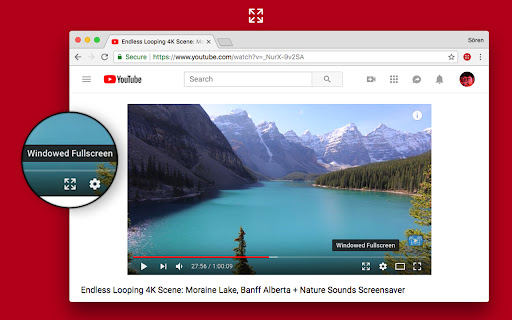
This extension gives you a true fullscreen YouTube experience without forcing your browser into fullscreen mode. Enjoy videos that fully use your screen real estate, while still keeping comments, suggestions, and other features accessible.

Features:

- Inline Fullscreen: Expand the video to fill your browser window, no borders or sidebars.
- Responsive Layout: Keep comments, recommendations, and other elements within reach.
- Fast Toggle: Instantly switch modes with a custom button in the player or a quick keyboard shortcut.
- Customizable Settings: Click the extension icon to fine-tune the behavior to your liking.

Keyboard Shortcut:

- Press "d" to toggle inline fullscreen mode.

*Note*: After installing, please reload YouTube for the new player button to appear.


-

Changelog

1.3.9
- Pressing "t" now exits fullscreen mode
- Made auto enable and theater mode detection more robust.

1.3.8
- Pressing escape now exits fullscreen mode

1.3.7
- Updated searchbar hide logic to mirror new design

1.3.6
- Auto fullscreen bugfix

1.3.5
- Searchbar hide bugfix
- Made auto fullscreen more reliable
- Fixed a case where the button would not be added

1.3.4

- Player button tooltip now shows correct shortcut

1.3.3
- Now ignoring modifier keys for shortcuts
- Made shortcut editable

1.3.2
- Changed fullscreen shortcut from w to d to avoid conflicts with YouTube’s default shortcuts

1.3.1
- Added "Show Player Button" preference
- Settings now take effect immediately after changing them
- Now checking if content scripts are installed when opening the settings popup
- Fixed a bug where autoEnable would fail if player is in default mode
- Fixed theater mode preference not being properly restored


1.3.0
- Added Settings screen when clicking extension icon
- Added Automatic Fullscreen option
- Searchbar automatically shows/hides when in fullscreen. Similar to the seekbar.
This extension gives you a true fullscreen YouTube experience without forcing your browser into fullscreen mode. Enjoy videos that fully use your screen real estate, while still keeping comments, suggestions, and other features accessible.

Features:

- Inline Fullscreen: Expand the video to fill your browser window, no borders or sidebars.
- Responsive Layout: Keep comments, recommendations, and other elements within reach.
- Fast Toggle: Instantly switch modes with a custom button in the player or a quick keyboard shortcut.
- Customizable Settings: Click the extension icon to fine-tune the behavior to your liking.

Keyboard Shortcut:

- Press "d" to toggle inline fullscreen mode.

*Note*: After installing, please reload YouTube for the new player button to appear.


-

Changelog

1.3.10
- Pressing "t" while fullscreen is active now changes player mode

1.3.9
- Pressing "t" now exits fullscreen mode
- Made auto enable and theater mode detection more robust.

1.3.8
- Pressing escape now exits fullscreen mode

1.3.7
- Updated searchbar hide logic to mirror new design

1.3.6
- Auto fullscreen bugfix

1.3.5
- Searchbar hide bugfix
- Made auto fullscreen more reliable
- Fixed a case where the button would not be added

1.3.4

- Player button tooltip now shows correct shortcut

1.3.3
- Now ignoring modifier keys for shortcuts
- Made shortcut editable

1.3.2
- Changed fullscreen shortcut from w to d to avoid conflicts with YouTube’s default shortcuts

1.3.1
- Added "Show Player Button" preference
- Settings now take effect immediately after changing them
- Now checking if content scripts are installed when opening the settings popup
- Fixed a bug where autoEnable would fail if player is in default mode
- Fixed theater mode preference not being properly restored


1.3.0
- Added Settings screen when clicking extension icon
- Added Automatic Fullscreen option
- Searchbar automatically shows/hides when in fullscreen. Similar to the seekbar.
- May 2, 2026description
This extension gives you a true fullscreen YouTube experience without forcing your browser into fullscreen mode. Enjoy videos that fully use your screen real estate, while still keeping comments, suggestions, and other features accessible.

Features:

- Inline Fullscreen: Expand the video to fill your browser window, no borders or sidebars.
- Responsive Layout: Keep comments, recommendations, and other elements within reach.
- Fast Toggle: Instantly switch modes with a custom button in the player or a quick keyboard shortcut.
- Customizable Settings: Click the extension icon to fine-tune the behavior to your liking.

Keyboard Shortcut:

- Press "d" to toggle inline fullscreen mode.

*Note*: After installing, please reload YouTube for the new player button to appear.


-

Changelog

1.3.8
- Pressing escape now exits fullscreen mode

1.3.7
- Updated searchbar hide logic to mirror new design

1.3.6
- Auto fullscreen bugfix

1.3.5
- Searchbar hide bugfix
- Made auto fullscreen more reliable
- Fixed a case where the button would not be added

1.3.4

- Player button tooltip now shows correct shortcut

1.3.3
- Now ignoring modifier keys for shortcuts
- Made shortcut editable

1.3.2
- Changed fullscreen shortcut from w to d to avoid conflicts with YouTube’s default shortcuts

1.3.1
- Added "Show Player Button" preference
- Settings now take effect immediately after changing them
- Now checking if content scripts are installed when opening the settings popup
- Fixed a bug where autoEnable would fail if player is in default mode
- Fixed theater mode preference not being properly restored


1.3.0
- Added Settings screen when clicking extension icon
- Added Automatic Fullscreen option
- Searchbar automatically shows/hides when in fullscreen. Similar to the seekbar.
This extension gives you a true fullscreen YouTube experience without forcing your browser into fullscreen mode. Enjoy videos that fully use your screen real estate, while still keeping comments, suggestions, and other features accessible.

Features:

- Inline Fullscreen: Expand the video to fill your browser window, no borders or sidebars.
- Responsive Layout: Keep comments, recommendations, and other elements within reach.
- Fast Toggle: Instantly switch modes with a custom button in the player or a quick keyboard shortcut.
- Customizable Settings: Click the extension icon to fine-tune the behavior to your liking.

Keyboard Shortcut:

- Press "d" to toggle inline fullscreen mode.

*Note*: After installing, please reload YouTube for the new player button to appear.


-

Changelog

1.3.9
- Pressing "t" now exits fullscreen mode
- Made auto enable and theater mode detection more robust.

1.3.8
- Pressing escape now exits fullscreen mode

1.3.7
- Updated searchbar hide logic to mirror new design

1.3.6
- Auto fullscreen bugfix

1.3.5
- Searchbar hide bugfix
- Made auto fullscreen more reliable
- Fixed a case where the button would not be added

1.3.4

- Player button tooltip now shows correct shortcut

1.3.3
- Now ignoring modifier keys for shortcuts
- Made shortcut editable

1.3.2
- Changed fullscreen shortcut from w to d to avoid conflicts with YouTube’s default shortcuts

1.3.1
- Added "Show Player Button" preference
- Settings now take effect immediately after changing them
- Now checking if content scripts are installed when opening the settings popup
- Fixed a bug where autoEnable would fail if player is in default mode
- Fixed theater mode preference not being properly restored


1.3.0
- Added Settings screen when clicking extension icon
- Added Automatic Fullscreen option
- Searchbar automatically shows/hides when in fullscreen. Similar to the seekbar.
Permissions & access
- Permissions
- scriptingstorage
- Host access
- *://youtube.com/*, *://www.youtube.com/*
Screenshots

About
This extension gives you a true fullscreen YouTube experience without forcing your browser into fullscreen mode. Enjoy videos that fully use your screen real estate, while still keeping comments, suggestions, and other features accessible.

Features:

- Inline Fullscreen: Expand the video to fill your browser window, no borders or sidebars.
- Responsive Layout: Keep comments, recommendations, and other elements within reach.
- Fast Toggle: Instantly switch modes with a custom button in the player or a quick keyboard shortcut.
- Customizable Settings: Click the extension icon to fine-tune the behavior to your liking.

Keyboard Shortcut:

- Press "d" to toggle inline fullscreen mode.

*Note*: After installing, please reload YouTube for the new player button to appear.


-

Changelog

1.3.10
- Pressing "t" while fullscreen is active now changes player mode

1.3.9
- Pressing "t" now exits fullscreen mode
- Made auto enable and theater mode detection more robust.

1.3.8
- Pressing escape now exits fullscreen mode

1.3.7
- Updated searchbar hide logic to mirror new design

1.3.6
- Auto fullscreen bugfix

1.3.5
- Searchbar hide bugfix
- Made auto fullscreen more reliable
- Fixed a case where the button would not be added

1.3.4

- Player button tooltip now shows correct shortcut

1.3.3
- Now ignoring modifier keys for shortcuts
- Made shortcut editable

1.3.2
- Changed fullscreen shortcut from w to d to avoid conflicts with YouTube’s default shortcuts

1.3.1
- Added "Show Player Button" preference
- Settings now take effect immediately after changing them
- Now checking if content scripts are installed when opening the settings popup
- Fixed a bug where autoEnable would fail if player is in default mode
- Fixed theater mode preference not being properly restored


1.3.0
- Added Settings screen when clicking extension icon
- Added Automatic Fullscreen option
- Searchbar automatically shows/hides when in fullscreen. Similar to the seekbar.
Technical
- Version
- 1.3.10
- Manifest
- V3
- Size
- 34.81KiB
- Min Chrome
- 88
- Languages
- 1
- Featured
- Yes
Metadata
- ID
- mfpkbigjnlcgngkdbmnchfnenfmibkig
- Developer ID
- u3e1428e890e68905f18899ec37c2260e
- Developer Email
- [email protected]
- Created
- Sep 7, 2016
- Last Updated (Store)
- May 8, 2026
- Last Scraped
- Jun 21, 2026
- Website
- —
- Privacy Policy
- —
Similar extensions
Alternatives to YouTube Inline Fullscreen, ranked by description similarity.

YouTube Clean Fullscreen
Transform YouTube fullscreen into clean, distraction-free viewing experience by hiding all controls and overlays
65
★ 5.0

YouTube windowed fullscreen
Enjoy the full-screen immersion of YouTube while conveniently viewing your browser tabs and system tray
131
★ 5.0

YouTube Simple View: Hide distractions & more
Focus tool for YouTube: control distracting elements settings to stay focused.
113
★ 4.0
'Improve YouTube!' 🎧 (for YouTube & Videos)
YouTube, tidy & smart? Supercharge YouTube! Give it strong features, filter only the videos you want & exactly the look you like
400.0K
★ 4.5

YouTube Feed Customizer
Customizes the YouTube feed layout, with a minimalistic UI and a focus on usability.
29
★ 5.0

YouTube Windowed FullScreen Pro
One click to go full screen, or windowed!
61

YouTube Enhancer
YouTube Enhancer is a simple extension that adds some useful features to YouTube.
2.0K
★ 4.5

Simple YouTube Windowed Fullscreen
Open YouTube videos in fullscreen in it's own window (windowed fullscreen)
4.0K
★ 4.0
Data sourced from the Chrome Web Store · last verified Jun 21, 2026.