
AuraNotes
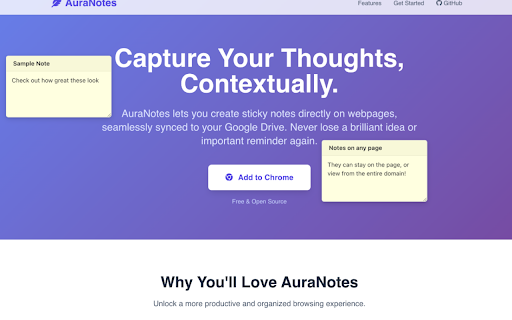
Create contextual sticky notes on webpages and sync them seamlessly with Google Drive.
As of June 2026, AuraNotes has 3 users in the Productivity category.
Usersdown 25.0 percent−25.0%
3
3
Ratingno change0%
—
— reviews
Reviewsno change0%
—
Version
1.0
History
4 snapshotsTracking since Apr 21, 2026.
View as table
| Date | Users | Rating | Reviews | Version |
|---|---|---|---|---|
| Apr 21, 2026 | 4 | — | — | 1.0 |
| May 7, 2026 | 4 | — | — | 1.0 |
| May 18, 2026 | — | — | — | 1.0 |
| Jun 1, 2026 | 4 | — | — | 1.0 |
| Now | 3 | — | — | 1.0 |
Permissions & access
- Permissions
- None declared
- Host access
- None declared
Screenshots
About
Transform Your Browsing with AuraNotes: Smart Web Notes Synced to Google Drive!

Ever wished you could jot down a thought, reminder, or key piece of information directly on a webpage and have it waiting for you when you return? With AuraNotes, you can!

AuraNotes lets you create persistent, contextual sticky notes on any website. Whether you're researching, studying, or just browsing, your insights stay connected to their source.

Key Features:
- Contextual Note-Taking: Place notes exactly where you need them. They're linked to the specific URL, a URL without parameters, or the entire domain, ensuring they appear when you revisit.
- Seamless Google Drive Sync: All your notes are securely backed up and synchronized across your devices using your own Google Drive. Your data remains under your control.
- Flexible Storage Options: You choose where AuraNotes stores its data file in your Google Drive:
    - Hidden App Folder (Recommended): Keeps your main Drive view clean and uncluttered.
    - Visible "/AuraNotes/" Folder: Allows direct access to the notes file and Drive's version history.
- Intuitive & User-Friendly:
- Easily create, edit, drag, and resize notes.
- Minimize notes to keep your workspace tidy.
- Content within notes is automatically linkified for quick navigation.
- Privacy-Focused: AuraNotes respects your privacy. Your notes are stored on your Google Drive, not on third-party servers.
- Lightweight & Performant: Designed to be unobtrusive and efficient, ensuring a smooth browsing experience.
- Offline Access: Your notes are available locally even when you're offline, thanks to IndexedDB storage. Changes sync when you're back online.

How it Works:
- Install: Add AuraNotes from the Chrome Web Store.
- Connect: Authorize with your Google Drive account and pick your preferred storage location (hidden or visible folder).
- Note: Click the AuraNotes icon on any webpage to add a new note. It's that simple!

Stop losing track of valuable information and brilliant ideas. Get AuraNotes today and experience a smarter, more organized way to interact with the web!

AuraNotes is open source.
Technical
- Version
- 1.0
- Manifest
- —
- Size
- 59.79KiB
- Min Chrome
- 88
- Languages
- 1
- Featured
- No
Metadata
- ID
- giedeabohdekbodafdjdbiacfcnapjfo
- Developer ID
- ude9c86320980b6805fe20e38f5ccb432
- Developer Email
- [email protected]
- Created
- Jun 8, 2025
- Last Updated (Store)
- Jun 8, 2025
- Last Scraped
- Jun 1, 2026
- Website
- —
- Support URL
- johnvilsack.com/auranotes
- Privacy Policy
- https://johnvilsack.com/auranotes/privacy.html
Similar extensions
Alternatives to AuraNotes, ranked by description similarity.

Sticky Notes
Quick, draggable sticky notes on any site—stay organized without leaving your tab.
14
★ 5.0

WebPage Notes
Take notes for specific web pages and domains
31

Better Notes
Beautiful, context-aware notes anchored to highlighted text on any webpage.
14
★ 5.0

Page Notes
Attach notes to any webpage — they're right there when you come back. Syncs via your own Google Drive. No third-party servers.
10.0K
★ 4.6

Posty Note It
Add sticky notes to any webpage to remind yourself of stuff. Privacy policy: https://snappyseotools.com/privacy-policy/
27
★ 5.0

Sticky notes
Add sticky notes to your favorite web pages.
4

NeoNote
Persistent, Neubrutalist sticky notes for the web.
2

AB Sticky Notes
Create, manage, and sync sticky notes directly on webpages
—
Data sourced from the Chrome Web Store · last verified Jun 1, 2026.