
QuickAccess Sidebar
Customizable sidebar to open Gmail, ChatGPT, WhatsApp and any custom URL. Add icons, set shortcuts, and stay focused.
As of June 2026, QuickAccess Sidebar has 81 users and a 4.60/5 rating from 5 reviews in the Workflow & Planning category.
Usersno change0%
81
81
Ratingdown 8.0 percent−8.0%
4.60
5 reviews
Reviewsup 25.0 percent+25.0%
5
Version
1.3
Manifest V3
History
5 snapshotsTracking since Apr 19, 2026.
View as table
| Date | Users | Rating | Reviews | Version |
|---|---|---|---|---|
| Apr 19, 2026 | — | 5.00 | 4 | 1.3 |
| Apr 29, 2026 | 70 | 5.00 | 4 | 1.3 |
| May 10, 2026 | 75 | 5.00 | 4 | 1.3 |
| May 23, 2026 | 831 | 5.00 | 4 | 1.3 |
| Jun 5, 2026 | — | 4.60 | 5 | 1.3 |
| Now | 81 | 4.60 | 5 | 1.3 |
Permissions & access
- Permissions
- storageactiveTabtabs
- Host access
- <all_urls>
Screenshots
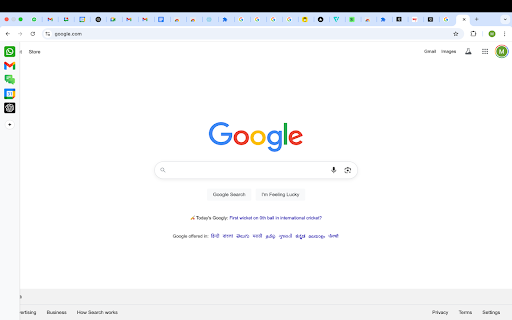
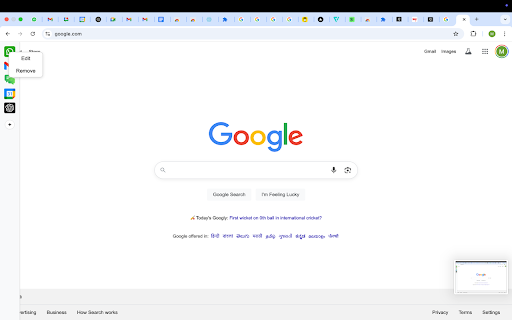

About
🚀 QuickAccess Sidebar v1.3 - Major Update

New Features:
🌙 Dark Mode: Toggle between light and dark themes
📍 Position Control: Move sidebar to left or right side
⏰ Auto-Hide Toggle: Keep sidebar always visible or auto-hide
⚙️ Settings Panel: Easy access to all customization options

*Please restart the browser once so the sidebar loads on all tabs*
*You will see the sidebar only when you take the cursor to the left edge of the screen or if you use any shortcut*
*To edit shortcuts, go to chrome://extensions/shortcuts*

QuickAccess Sidebar is a lightweight, customizable sidebar for quick access to your most-used web tools.

Add shortcuts to:
- Gmail
- WhatsApp Web
- Google Calendar
- ChatGPT
- Any other URL

Features:
- Up to 10 configurable shortcuts
- Custom icons
- Keyboard shortcut support
- Persistent across sessions
- Auto-collapses after opening - designed to stay out of your way

📌 Notes:
- All shortcuts are opened as pinned tabs within the browser. There is no option within chrome for opened tabs to not show up as a tab
- To edit shortcuts, go to: `chrome://extensions/shortcuts`
- The sidebar collapses automatically after use.
  This is intentional - loading websites inside the extension frame causes compatibility issues.
  We’ve optimized for a smooth, unobtrusive experience.

No ads. No tracking. No clutter.
Technical
- Version
- 1.3
- Manifest
- V3
- Size
- 113KiB
- Min Chrome
- 88
- Languages
- 1
- Featured
- No
Metadata
- ID
- gicelbgejdlljbdpnoddmookdbeigcbl
- Developer ID
- u09b8adb47daf0c9e0babb6e132e00387
- Developer Email
- [email protected]
- Created
- Jun 17, 2025
- Last Updated (Store)
- Oct 23, 2025
- Last Scraped
- Jun 5, 2026
- Website
- —
- Support URL
- —
Similar extensions
Alternatives to QuickAccess Sidebar, ranked by description similarity.
Sidebar Tabs — Open Any Website (ChatGPT, Todoist, Notion) in Side Panel
Open and pin any website in sidebar — such as ChatGPT, Gemini, Claude, Todoist, Notion and more.
3.0K
★ 4.1

Speedy - Minimalist New Tab Page
Speedy - Minimalist New Tab: Fast, beautiful, customizable new tab with clock, quick links, notes & stunning backgrounds.
—

Sidebar Pro – Productivity Sidebar for Chrome
A productivity sidebar extension for Chrome to quickly access bookmarks, tools, websites, and extensions without switching tabs.
15

Minimalist Speed Dial - New Tab Shortcuts
Minimalist speed dial new tab with a customizable shortcuts grid—add lots of shortcuts fast.
186
★ 5.0

Assist Tab
Your assistant in every new tab — timer, todos, weather, quotes & shortcuts. Stay on track. Privacy-first, no account required.
10
★ 5.0

SideTab Pro - Vertical Tabs, Bookmarks and Reading List
One-stop Vertical Tabs, Bookmarks, and Reading List manager in the sidepanel
20.0K
★ 4.6

Vertical Tabs | Quick Tabs Management
Management your tabs with sidebar, easy to do quick search, pin, group, drag, close your tabs.
—

Speed Dial 2 New tab
Speed Dial 2 is an easy-to-use extension that lets you save and organize your most visited websites and customize your new tab page.
300.0K
★ 4.1
Data sourced from the Chrome Web Store · last verified Jun 5, 2026.