
Tabs to Nap
Pone tus pestañas a dormir para darle un respiro a tu RAM.
As of June 2026, Tabs to Nap has 12 users and a 5.00/5 rating from 1 reviews in the Productivity category.
Usersno change0%
12
12
Ratingno change0%
5.00
1 reviews
Reviewsno change0%
1
Version
1.1.5
Manifest V3
History
4 snapshotsTracking since Apr 19, 2026.
View as table
| Date | Users | Rating | Reviews | Version |
|---|---|---|---|---|
| Apr 19, 2026 | 12 | 5.00 | 1 | 1.1.5 |
| Apr 29, 2026 | 12 | 5.00 | 1 | 1.1.5 |
| May 10, 2026 | 10 | 5.00 | 1 | 1.1.5 |
| May 23, 2026 | 13 | 5.00 | 1 | 1.1.5 |
| Now | 12 | 5.00 | 1 | 1.1.5 |
Permissions & access
- Permissions
- tabsstoragealarmscontextMenus
- Host access
- <all_urls>
Screenshots


About
Too many tabs open? Is your computer slowing down and the battery draining in a flash? Tabs to Nap is the solution!

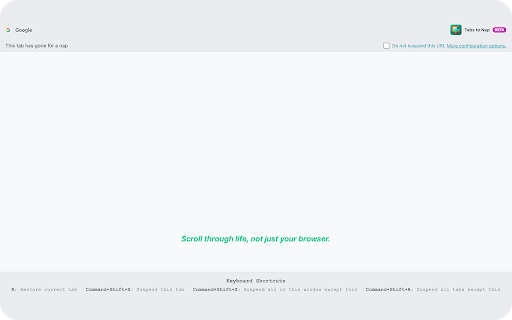
  Tabs to Nap is a lightweight, open-source extension designed to free up your computer's RAM. It puts the tabs you aren't using to "nap," replacing them with a
  minimal, clean waiting page. When you need a tab again, just one click or a press of the 'R' key will restore it instantly. It's fast and feather-light.

  ---

  Key Features

   * Extreme Memory Savings: Reduces RAM usage for each suspended tab by up to 95%, making your browser and entire computer significantly faster.
   * Automatic Suspension: Set a timer (defaults to 5 minutes, change it anytime!) to automatically suspend inactive tabs.
   * Whitelist: Add important sites (like your email or music player) to a whitelist to ensure they never get suspended.
   * Keyboard Shortcuts: Suspend the current tab, all other tabs in the window, or all tabs in your browser with simple keyboard shortcuts.
   * Context Menu: Quickly access suspension features with a simple right-click.
   * Minimalist Design: A clean, distraction-free interface focused on getting the job done.

  ---

  Privacy and Transparency

  Your privacy is our top priority. Well, maybe not the absolute top, but it's important. We want to be completely transparent about the permissions the
  extension requests and why they are necessary:

   * `tabs`: To be able to suspend and restore your tabs.
   * `storage`: To save your personal settings (suspension time and whitelist) only on your computer.
   * `alarms`: To make the automatic suspension timer work.
   * `contextMenus`: To display the extension's options in the right-click menu.
   * `host_permissions`: To allow the extension to run on any page you visit.

  Tabs to Nap does not collect, store, or send any personal or browsing data to external servers. All your information and settings are stored exclusively on
  your computer.

  ---

  Install Tabs to Nap today and give your computer a well-deserved break!
Technical
- Version
- 1.1.5
- Manifest
- V3
- Size
- 383KiB
- Min Chrome
- 88
- Languages
- 4
- Featured
- No
Metadata
- ID
- ghddlgjinefkhkldkcbcibacfaclodih
- Developer ID
- uc4494b8bb78d7341ada4d563af822c01
- Developer Email
- [email protected]
- Created
- Aug 11, 2025
- Last Updated (Store)
- Oct 28, 2025
- Last Scraped
- Jun 5, 2026
- Website
- —
- Support URL
- —
- Privacy Policy
- https://tabstonap.com/privacy-en
Similar extensions
Alternatives to Tabs to Nap, ranked by description similarity.

TabNap
Automatically nap inactive tabs and archive them to the far left.
—

NapTab
Optimizes memory by suspending inactive tabs using LRU cache and WASM.
35
★ 4.9

Tab Suspender - Free Up Memory & Boost Performance (Open Source)
Suspend tabs to save memory and CPU by replacing them with lightweight pages
79

Tab Snoozer – Save Memory & Battery by Pausing Inactive Tabs
Reduce memory usage and extend battery life by automatically snoozing unused tabs after inactivity.
487
★ 5.0

Tab Suspender Pro
Auto-suspend inactive tabs to save memory. Smart protection for audio, video calls, and forms. Keyboard shortcuts included.
8.0K
★ 4.8

SynapseSave - Snooze Your Tabs
Snooze tabs to specific times. Free your RAM. Save your sanity.
8
★ 4.7

RamSaver - Tab Memory Manager
Automatically suspend inactive tabs to free RAM. Keep Chrome fast with smart tab sleeping, whitelists, and live memory stats.
63
★ 5.0

TabHibernate
Intelligently hibernates inactive tabs to save memory while preserving their state
42
Data sourced from the Chrome Web Store · last verified Jun 5, 2026.