
LangSwitch
Detect mistyped keyboard layout and suggest local conversion.
As of June 2026, LangSwitch has 7 users and a 5.00/5 rating from 5 reviews in the Productivity category.
Usersup 250.0 percent+250.0%
7
7
Ratingno change0%
5.00
5 reviews
Reviewsno change0%
5
Version
0.2.1
Manifest V3
History
7 snapshotsTracking since Apr 1, 2026.
View as table
| Date | Users | Rating | Reviews | Version |
|---|---|---|---|---|
| Apr 1, 2026 | 2 | — | — | 0.2.1 |
| Apr 17, 2026 | 3 | 5.00 | 2 | 0.2.1 |
| Apr 27, 2026 | 6 | 5.00 | 5 | 0.2.1 |
| May 4, 2026 | 6 | 5.00 | 5 | 0.2.1 |
| May 10, 2026 | 4 | 5.00 | 5 | 0.2.1 |
| Jun 4, 2026 | 5 | 5.00 | 5 | 0.2.1 |
| Jun 9, 2026 | 6 | 5.00 | 5 | 0.2.1 |
| Now | 7 | 5.00 | 5 | 0.2.1 |
Permissions & access
- Permissions
- activeTabstoragetabs
- Host access
- None declared
Screenshots


About
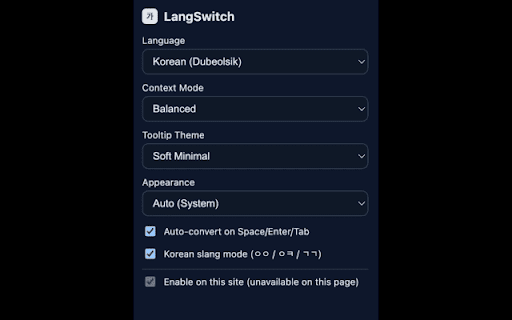
LangSwitch helps fix mistyped keyboard-layout input directly in editable text fields.

It supports three input modes:
Korean (English-key to Hangul, Dubeolsik)
Chinese (Pinyin)
Japanese (Romaji)

When typed text looks like a layout mistake, LangSwitch shows a suggestion tooltip.
You can apply the suggestion manually or enable automatic conversion on Space, Enter, or Tab.
After an automatic conversion, pressing Backspace can restore the original typed text.

Settings include:
Context modes: Strict, Balanced, Aggressive
Per-site enable or disable
Appearance modes: Light, Dark, Auto
Multiple tooltip themes

All processing happens locally in the extension. Typed content is not sent to external servers.
The extension does not operate on password fields.
Technical
- Version
- 0.2.1
- Manifest
- V3
- Size
- 1017KiB
- Min Chrome
- 88
- Languages
- 1
- Featured
- No
Metadata
- ID
- ghcnjdedecljclligiejibkaccclafpa
- Developer ID
- uda41ca2355fc8f252b40818023b4fa62
- Developer Email
- [email protected]
- Created
- Mar 18, 2026
- Last Updated (Store)
- Mar 26, 2026
- Last Scraped
- Jun 9, 2026
- Website
- —
- Support URL
- https://github.com/mijnap1/langswitch/issues
Similar extensions
Alternatives to LangSwitch, ranked by description similarity.

Language Switcher
Instantly fix text typed in the wrong language. Supports custom mappings, smart auto-detection, language cycles, and shortcuts.
133
★ 3.3

SmartKeyFixer
Fix mistyped Hebrew, English, French, or Spanish text automatically.
10

Hebrew-English Keyboard Fixer
Auto-detect and fix Hebrew-English keyboard mistakes in real-time
3

Smart Direction Changer
Changes text direction in fields from default (LTR) to Auto or RTL for proper Hebrew/Arabic text display
88
★ 5.0
Keyboard Converter
Fix keyboard layout mismatches between languages. Automatically detects and corrects text typed in the wrong keyboard layout.
52
★ 5.0

Language Flipper
Flip text typed in the wrong keyboard layout (multilingual, e.g., EN↔HE).
6
★ 5.0

SwitchLang
Sitenin dilini tek tıkla değiştir.
6

Composing Keydown Handler
Composing Keydown Handler for Chrome
Take control over your input, no matter the language.
The "Composing Keydown Handler"…
19
★ 5.0
Data sourced from the Chrome Web Store · last verified Jun 9, 2026.