
SpaceMouse Driver for SketchUp Web
Use your SpaceMouse inside the SketchUp Web app
As of June 2026, SpaceMouse Driver for SketchUp Web has 2,000 users and a 4.10/5 rating from 10 reviews in the Workflow & Planning category.
Usersno change0%
2.0K
2,000
Ratingup 2.5 percent+2.5%
4.10
10 reviews
Reviewsup 11.1 percent+11.1%
10
Version
0.0.2
Manifest V3
History
2 snapshotsTracking since May 3, 2026.
View as table
| Date | Users | Rating | Reviews | Version |
|---|---|---|---|---|
| May 3, 2026 | 2.0K | 4.00 | 9 | 0.0.2 |
| Jun 2, 2026 | 2.0K | 4.00 | 9 | 0.0.2 |
| Now | 2.0K | 4.10 | 10 | 0.0.2 |
Permissions & access
- Permissions
- storage
- Host access
- None declared
Screenshots

About
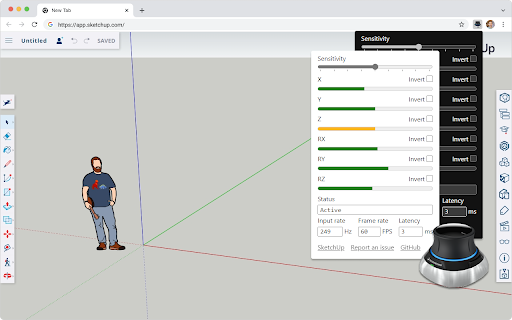
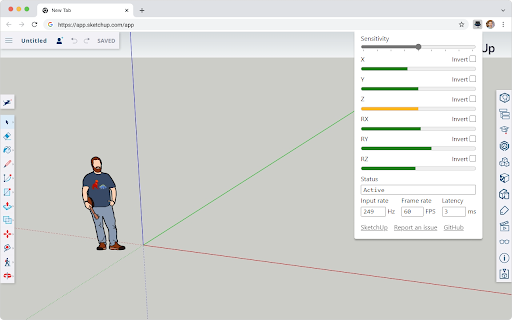
This extension brings your 3DConnexion SpaceMouse to the SketchUp Web app. Once installed, it auto-activates and gives you 5 degrees of freedom for direct manipulation.

- Move Up/Down, Left/Right, Back/Forward
- Pitch Up/Down
- Yaw Clockwise/Counterclockwise

You can also customize the overall sensitivity and invert individual axis.

This project is free and open source. You can learn more about the project, report a bug, or suggest an idea on GitHub: https://github.com/chuanqisun/spacemouse-anywhere

**Disclaimer**
This project is not endorsed by Trimble or 3Dconnexion, though I'm happy to collaborate with both companies to improve the user experience.
Technical
- Version
- 0.0.2
- Manifest
- V3
- Size
- 81.22KiB
- Min Chrome
- 88
- Languages
- 1
- Featured
- Yes
Metadata
- ID
- ggjjgcdhnigahiokgcknccnkcddgjknf
- Developer ID
- u4901eee3bf2a7ba097a30314e916b213
- Developer Email
- [email protected]
- Created
- Dec 13, 2022
- Last Updated (Store)
- Dec 14, 2022
- Last Scraped
- Jun 2, 2026
- Website
- —
- Privacy Policy
- —
Similar extensions
Alternatives to SpaceMouse Driver for SketchUp Web, ranked by description similarity.

SpaceMouse in TinkerCAD
Use SpaceMouse/SpaceNavigator/Gamepad in TinkerCAD. This script is unofficial and endorsed neither by Autodesk nor 3DConnexion.
1.0K
★ 3.5

Mouse Pinch-To-Zoom
Zoom in on a specific part of the website, like you would with a touchpad gesture!
10.0K
★ 4.7

Custom Shortcuts for Google Earth Web
Modify keyboard shortcuts to make browsing Google Earth Web more fluid.
180

Scroll-Anywhere
Scroll the webpage as if the scrollbar is right under your pointer by holding down the middle mouse button anywhere on the webpage.
44
★ 3.3

FlowMouse - Mouse Gestures
A privacy-focused, open-source mouse gesture extension for seamless browsing. Enjoy responsive gestures and super drag support.
30.0K
★ 4.9

WEBX Recordings Controls Automator
Control Webex meeting recordings with keyboard shortcuts. Use arrows to skip forward/backward, up to adjust playback speed.
2.0K
★ 5.0

Tab Resize - split screen layouts
The ORIGINAL Tab Resize. Split Screen made easy. Resize the CURRENT tab and tabs to the RIGHT into layouts on separate windows.
1.0M
★ 4.3

Command Stick
A simple gesture-based joystick menu
110
Data sourced from the Chrome Web Store · last verified Jun 2, 2026.