
WEBX Recordings Controls Automator
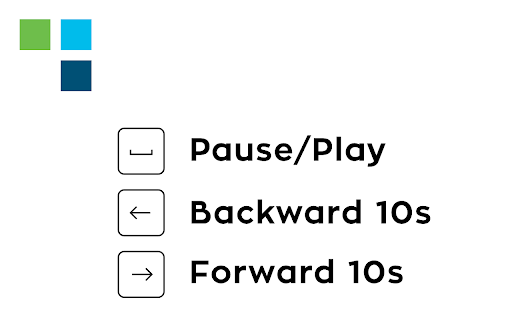
Control Webex meeting recordings with keyboard shortcuts. Use arrows to skip forward/backward, up to adjust playback speed.
As of May 2026, WEBX Recordings Controls Automator has 2,000 users and a 5.00/5 rating from 91 reviews in the Workflow & Planning category.
Usersno change0%
2.0K
2,000
Ratingno change0%
5.00
91 reviews
Reviewsno change0%
91
Version
6.1
Manifest V3
History
2 snapshotsTracking since Apr 20, 2026.
View as table
| Date | Users | Rating | Reviews | Version |
|---|---|---|---|---|
| Apr 20, 2026 | 2.0K | 5.00 | 91 | 6.1 |
| May 5, 2026 | 2.0K | 5.00 | 91 | 6.1 |
| Now | 2.0K | 5.00 | 91 | 6.1 |
Permissions & access
- Permissions
- storageactiveTabtabs
- Host access
- None declared
Screenshots


About
Huge thanks to Samuele de Ciechi for updating the Extension with the latest Webex's Upgrades in 2025!

DISCLAIMER:

This extension allows you to use your keyboard inputs to pause/play your meeting recording, forward 10 seconds or backward 10 seconds using arrows. Use arrow up/arrow down to speed up/slow down the recording and press "f" to open the full-screen viewer. Press "c" to open/close the chat. Press "p" to open/close the participants panel.

Designed for Cisco Webex online recordings video player.

All trademarks belong to their respective owners
Technical
- Version
- 6.1
- Manifest
- V3
- Size
- 20.65KiB
- Min Chrome
- 88
- Languages
- 2
- Featured
- No
Metadata
- ID
- lgkgpifjihgnoknjpnnldhhenefjpadi
- Developer ID
- ueac52dfd92a9e929623e1b8a2c463b64
- Developer Email
- [email protected]
- Created
- Mar 8, 2021
- Last Updated (Store)
- Aug 28, 2025
- Last Scraped
- May 30, 2026
- Website
- https://www.andreacarpi.it/
- Support URL
- —
- Privacy Policy
- https://www.andreacarpi.it/legal/
Similar extensions
Alternatives to WEBX Recordings Controls Automator, ranked by description similarity.

Webex time skip
skip time using left and right arrow on webex recordings video player .
16

Playback Controls
Skip YouTube ads / Control video playbacks using keyboard shortcuts
497
★ 4.6

Screen & Webcam recorder - Flonnect
Allows Screen Recording from your Webcam and Desktop
100.0K
★ 4.6

First Logical [Cheers Connect] Screen Capture
An extension that allows you to use First Logical [Cheers Connect] Screen Capture Tool.
7

Udemy Enhancer
A useful tool to improve the user experience of Udemy.
1.0K
★ 5.0

ETH improvements
Video Player features:
Improves the video player that is used for lecture recordings by adding new controls:
-up arrow increases…
145
★ 5.0

ATG Meet Recorder
ATG Meet Recorder - Figma UI + Screen/Mic Recording + Upload + History + Overlay
223
★ 4.8
Record Google Meet
Seamlessly Record Google Meet. Video call capturing is that easy! Create a Google Meet recording even when it is unavailable
50.0K
★ 3.5
Data sourced from the Chrome Web Store · last verified May 30, 2026.