
ColorFont Master
Elevate design experience with ColorFont Master - the essential Chrome extension for seamless color and font handling. Install now!
As of May 2026, ColorFont Master has 141 users and a 4.56/5 rating from 9 reviews in the Developer Tools category.
Usersup 13.7 percent+13.7%
141
141
Ratingno change0%
4.56
9 reviews
Reviewsno change0%
9
Version
1.0
Manifest V3
History
3 snapshotsTracking since Apr 1, 2026.
View as table
| Date | Users | Rating | Reviews | Version |
|---|---|---|---|---|
| Apr 1, 2026 | 124 | 4.56 | 9 | 1.0 |
| May 1, 2026 | 132 | 4.56 | 9 | 1.0 |
| May 31, 2026 | 137 | 4.56 | 9 | 1.0 |
| Now | 141 | 4.56 | 9 | 1.0 |
Permissions & access
- Permissions
- activeTabscripting
- Host access
- None declared
Screenshots
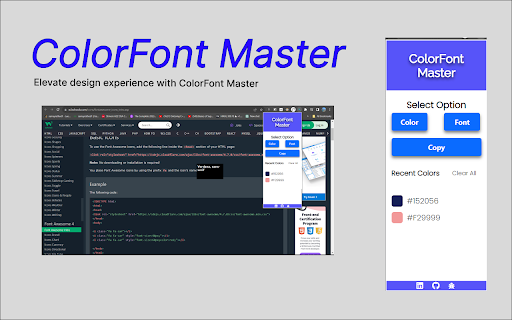
About
Unlock the full potential of web design with ColorFont Master, a powerful Chrome extension designed for creatives, developers, and design enthusiasts. This feature-rich extension seamlessly integrates into your browsing experience, providing essential tools for working with colors and fonts on the web.

Key Features:

Eyedropper Tool:

Instantly capture the color of any element on a webpage with our intuitive Eyedropper tool.
Effortlessly pick colors from images, backgrounds, or any design element, and copy the color code to your clipboard.

Font Identifier:

Explore the world of typography with our Font Identifier feature.
Identify and preview fonts used on any webpage with a single click.
Uncover the styling secrets of text elements to inspire and inform your own design choices.

User-Friendly Interface:

Seamlessly access ColorFont Master from your Chrome toolbar for quick and convenient usage.
Intuitive design ensures a user-friendly experience, making it easy for both beginners and seasoned designers to harness its capabilities.
Customization and Personalization:

Tailor the extension to your workflow with customizable settings.
Adjust preferences, such as the display of color codes or the format of font identification results, to match your design preferences.

Efficient Workflows:

Streamline your design workflows by eliminating the need for external tools.
Enhance productivity by having color and font information at your fingertips without leaving your browser.

Privacy and Security:

ColorFont Master prioritizes user privacy and operates in accordance with Chrome extension security guidelines.
No unnecessary data is collected, ensuring a secure and reliable extension experience.

Get Started Today:
Elevate your web design capabilities with ColorFont Master. Whether you're a web designer, developer, or anyone passionate about aesthetics, this extension is your go-to tool for mastering colors and fonts on the web.

Install ColorFont Master now and transform the way you design and create on the web!
Technical
- Version
- 1.0
- Manifest
- V3
- Size
- 554KiB
- Min Chrome
- 88
- Languages
- 1
- Featured
- No
Metadata
- ID
- ggcaimdnkaainkgamjjdkoimamgmfmcb
- Developer ID
- u1cf6ad1a30b1708eb8e32c9e96a49b2b
- Developer Email
- [email protected]
- Created
- Dec 13, 2023
- Last Updated (Store)
- Dec 13, 2023
- Last Scraped
- May 31, 2026
- Website
- —
- Support URL
- —
- Privacy Policy
- —
Similar extensions
Alternatives to ColorFont Master, ranked by description similarity.

DesignPicker - Color Picker & Font Detector
A smart developer tool that supports color picking and font detecting, making develop design easier.
2.0K
★ 5.0

Font Master
Inspect any font on any website. Hover to see font details, click to lock and copy CSS.
4

Advanced color picker
Helps developers and designers to pick colors
47
★ 5.0

Color Picker
A color picker extension
6
★ 5.0

Font Detector
Detects font details on any webpage to find Fonr family, height and more
77
★ 1.0

Font Detective
Hover over text to see font style, size, weight, and other typography details
5

Color Grabber
Quickly pick precise HEX, RGB & HLS colors from any webpage with Color Grabber — fast eyedropper, color history, and easy copy.
109

Website Color Picker
Website Color Picker: Pick colors from any page
—
Data sourced from the Chrome Web Store · last verified May 31, 2026.