
Screenshot for Street View
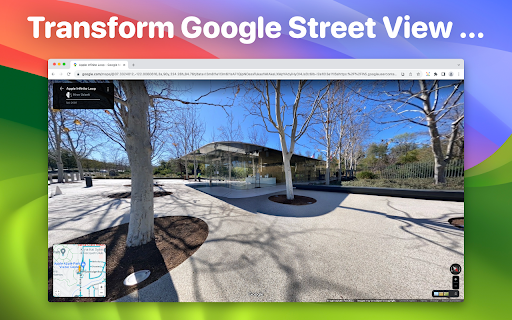
Effortlessly screenshot Google Street View
As of June 2026, Screenshot for Street View has 6,000 users and a 3.10/5 rating from 21 reviews in the Workflow & Planning category.
Usersup 20.0 percent+20.0%
6.0K
6,000
Ratingdown 9.1 percent−9.1%
3.10
21 reviews
Reviewsup 23.5 percent+23.5%
21
Version
1.4
Manifest V3
90-day change · In the last 90 days this extension gained 1.0K users, 1 version update.
History
8 snapshotsTracking since Apr 16, 2026.
View as table
| Date | Users | Rating | Reviews | Version |
|---|---|---|---|---|
| Apr 16, 2026 | 5.0K | 3.41 | 17 | 1.3 |
| Apr 22, 2026 | 5.0K | 3.41 | 17 | 1.4 |
| Apr 26, 2026 | 6.0K | 3.39 | 18 | 1.4 |
| May 7, 2026 | 5.0K | 3.39 | 18 | 1.4 |
| May 11, 2026 | 6.0K | 3.39 | 18 | 1.4 |
| May 14, 2026 | 5.0K | 3.39 | 18 | 1.4 |
| May 23, 2026 | 6.0K | 3.26 | 19 | 1.4 |
| Jun 10, 2026 | 6.0K | 3.15 | 20 | 1.4 |
| Now | 6.0K | 3.10 | 21 | 1.4 |
Permissions & access
- Permissions
- activeTabscriptingdownloads
- Host access
- None declared
Screenshots

About
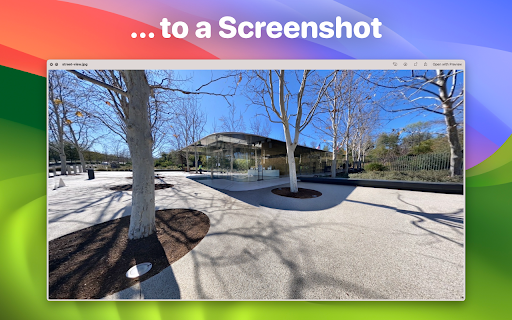
Capture clean, UI-free images from Google Street View in a single click.

Screenshot for Street View lets you save high-quality snapshots of any location in Street View - without menus, buttons, or on-screen clutter. Simply position the view exactly how you want it, click once, and download a beautiful, distraction-free image ready to share, print, or archive.

Why you’ll love it
- One-click capture: No editing or cropping required
- No interface elements: Clean screenshots without the Street View UI
- Works completely offline: All processing happens on your device
- 100% private: No uploads, no cloud servers, no data collection

Whether you’re reliving a favourite trip, gathering references for creative work, or scouting destinations for your next adventure, you can preserve the world’s most stunning streetscapes directly from your browser.

You can even verify the privacy promise yourself — run the extension while offline and see that it works without an internet connection.

Note: Some elements (such as embedded street names or map artefacts) are part of the original Street View imagery and cannot be removed.

Google and Street View are registered trademarks of Google LLC.
Technical
- Version
- 1.4
- Manifest
- V3
- Size
- 49.62KiB
- Min Chrome
- 88
- Languages
- 1
- Featured
- Yes
Metadata
- ID
- gfigbnegonaobkaeogipogddnegakipa
- Developer ID
- u6eb7aae140f963d0af5a7ea15f8d1087
- Developer Email
- [email protected]
- Created
- Aug 3, 2023
- Last Updated (Store)
- Apr 14, 2026
- Last Scraped
- Jun 21, 2026
- Website
- bilaal.co.uk
- Privacy Policy
- —
Similar extensions
Alternatives to Screenshot for Street View, ranked by description similarity.

Easy Screenshot
Capture full-page screenshots instantly. Manually select any part of the page to capture exactly what you need.
4

Webpage Screenshot - Entire page screenshot!
Since 2015 The most popular tool for your day to day. Whole page screenshot, sharing and much more.
200.0K
★ 4.7

Easy Screenshot
Capture parts of the screen
19
★ 1.0

ScreenLink - Share Screenshots Instantly
Take screenshots and instantly get shareable Google Drive links
17

Full Page Screenshot
Capture full-page screenshots of any webpage
687
★ 1.0

Quick Snap
Quick Snap: Capture screenshots, upload them in google drive seamlessly.
219
★ 5.0

ClickShot
ClickShot: Click to capture.
14
★ 5.0

Screenshot - Webpage Screen Capture
Convenient screenshot tool. Capture, edit and save them to jpeg, gif or png, drop comments and share.
60.0K
★ 4.4
Data sourced from the Chrome Web Store · last verified Jun 21, 2026.