
Screenshot - Webpage Screen Capture
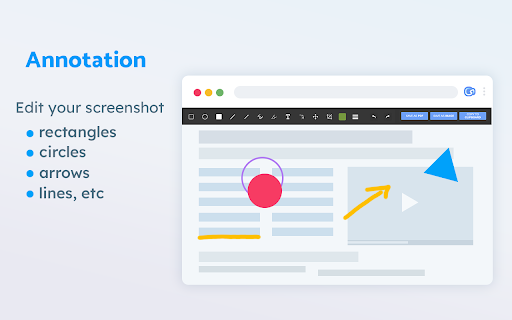
Convenient screenshot tool. Capture, edit and save them to jpeg, gif or png, drop comments and share.
As of June 2026, Screenshot - Webpage Screen Capture has 60,000 users and a 4.41/5 rating from 1,063 reviews in the Workflow & Planning category.
Usersup 20.0 percent+20.0%
60.0K
60,000
Ratingdown 0.5 percent−0.5%
4.41
1.1K reviews
Reviewsup 0.3 percent+0.3%
1.1K
Version
1.4.1
Manifest V3
90-day change · In the last 90 days this extension gained 10.0K users.
History
5 snapshotsTracking since Apr 1, 2026.
View as table
| Date | Users | Rating | Reviews | Version |
|---|---|---|---|---|
| Apr 1, 2026 | 50.0K | 4.43 | 1.1K | 1.4.1 |
| Apr 18, 2026 | 60.0K | 4.43 | 1.1K | 1.4.1 |
| Apr 28, 2026 | 60.0K | 4.43 | 1.1K | 1.4.1 |
| May 8, 2026 | 60.0K | 4.42 | 1.1K | 1.4.1 |
| May 20, 2026 | 50.0K | 4.42 | 1.1K | 1.4.1 |
| Now | 60.0K | 4.41 | 1.1K | 1.4.1 |
Permissions & access
- Permissions
- storagetabCapturetabsdownloadsoffscreen
- Host access
- <all_urls>
Screenshots


About
Screenshot  is an all-in-one platform for all your needs. Just choose what you need now!

This handy tool integrates seamlessly into your browser, providing a quick and efficient way to capture the content you see on your screen.

All for Free & No sign in needed!

Here are some features:
     ▸ Whole Page screen capture -  No matter how long the page is, you can turn the page into a picture for easy editing and sharing.
    ▸ Visible Area screen capture - Fast capture the viewable area of the current web page.
   ▸ Selected Area screen capture - Select and capture anything you want.

Our extension is not only feature-rich but also incredibly user-friendly. You'll be capturing screenshots in no time. Best of all, it's completely free, so there are no hidden costs or subscriptions to worry about.

If you have any questions, suggestions or feature requests, feel free to submit to our Screeshot team.
Technical
- Version
- 1.4.1
- Manifest
- V3
- Size
- 1.9MiB
- Min Chrome
- 88
- Languages
- 3
- Featured
- Yes
Metadata
- ID
- okkffdhbfplmbjblhgapnchjinanmnij
- Developer ID
- uc26f8522ca986f2ebe5696b7d1adda7e
- Developer Email
- [email protected]
- Created
- Oct 12, 2021
- Last Updated (Store)
- Nov 2, 2025
- Last Scraped
- Jun 3, 2026
- Website
- https://screenweb.net/
- Support URL
- —
- Privacy Policy
- https://screenweb.net/privacy-policy.html
Similar extensions
Alternatives to Screenshot - Webpage Screen Capture, ranked by description similarity.

Recorder & Screenshot | Sitespedia - Screen Video Recorder & Screenshot
Take screenshots entirely or partially of websites, annotate them, and manage them in a centralized place.
6

Easy Screenshot
Capture full-page screenshots instantly. Manually select any part of the page to capture exactly what you need.
4

Simple Screen Capture: Full Page Screenshot
Simple Screen Capture is a handy Chrome Extension that allows you to effortlessly capture full page screenshots with just a click.
5.0K
★ 4.3

ClickShot
ClickShot: Click to capture.
14
★ 5.0

Screenety - Screen Recorder & Annotation Tool
Screenshot tool
154
★ 5.0

Screenshot Master: Full Page Capture
Easy, free and full-featured screenshot app to capture, edit and save your screenshots.
60.0K
★ 4.7

Free Snipping Tool
Professional snipping tool with full page, selection, and scrolling capture capabilities
40.0K
★ 3.9

Full Page Screenshot - Screen Capture
Screenshot tool for making a full page or partial screen capture with further edit, text adding and download.
3.0K
★ 4.3
Data sourced from the Chrome Web Store · last verified Jun 3, 2026.