
Highlight stop-words on Indeed page
Helps to filter irrelevant jobs and description on Indeed's JobSearch page with highlight feature and changing settings
As of May 2026, Highlight stop-words on Indeed page has 12 users and a 5.00/5 rating from 1 reviews in the Productivity category.
Usersno change0%
12
12
Ratingno change0%
5.00
1 reviews
Reviewsno change0%
1
Version
0.63
Manifest V3
History
2 snapshotsTracking since May 1, 2026.
View as table
| Date | Users | Rating | Reviews | Version |
|---|---|---|---|---|
| May 1, 2026 | 12 | 5.00 | 1 | 0.63 |
| May 31, 2026 | 13 | 5.00 | 1 | 0.63 |
| Now | 12 | 5.00 | 1 | 0.63 |
Permissions & access
- Permissions
- storage
- Host access
- None declared
Screenshots
About
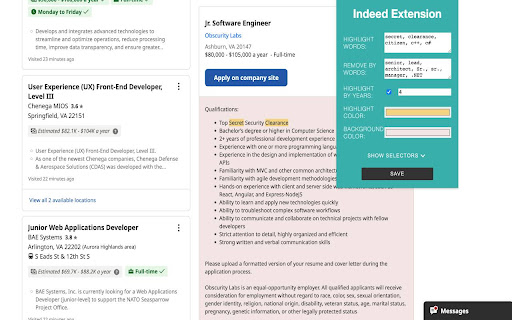
Indeed Highlighter Filter is a Chrome extension designed to help you efficiently navigate through job listings by removing job descriptions by words in titles, highlighting irrelevant years of experience and words. With a user-friendly interface, Indeed Highlighter Filter allows you to customize your job search experience to your preferences and requirements, making it easier to find the perfect opportunity.

Features:

Highlight Irrelevant Words: The extension identifies and highlights words in job listings that may not be relevant to your search criteria, allowing you to quickly skim through postings and focus on what matters most.

Highlight Experience that is greater than your set limit.

Scrolling to the first highlighted word.

Remove Job Descriptions by Titles: If you're looking for specific job titles, the extension can automatically remove job descriptions that don't match your preferences, streamlining your search process.

Customizable Interface: extension provides a user-friendly interface for adjusting colors, stopwords, selectors, and years. Tailor the extension to your personal preferences, ensuring a seamless and enjoyable job search experience.

Make your job search more efficient and enjoyable with Indeed Highlight Filter. By filtering and highlighting content based on your preferences, this Chrome extension streamlines the process of finding your dream job. Download Smart Job Filter today and take control of your job search journey!
Technical
- Version
- 0.63
- Manifest
- V3
- Size
- 29.83KiB
- Min Chrome
- 88
- Languages
- 1
- Featured
- No
Metadata
- ID
- gfigabehmogcpkcliadhlphhpmpaflaj
- Developer ID
- uca18c6b8c6b1b0206548e177e1821eea
- Developer Email
- [email protected]
- Created
- Apr 28, 2023
- Last Updated (Store)
- Apr 28, 2023
- Last Scraped
- May 31, 2026
- Website
- —
- Support URL
- —
- Privacy Policy
- —
Similar extensions
Alternatives to Highlight stop-words on Indeed page, ranked by description similarity.

Indeed Country Switcher
A browser extension that allows users to switch their country on Indeed job search platform.
439
★ 1.0

JobLense: LinkedIn Jobs Words Highlighter
Highlights specific words instantly on LinkedIn Jobs.
50
★ 5.0

LinkedIn Jobs Filtering Plus
An enhanced LinkedIn job search tool with advanced filters for faster, more precise job discovery.
51
★ 5.0

JobSieve - LinkedIn Job Filter
Filter and customize your LinkedIn job search with powerful blacklists, whitelists, and smart filtering options.
—
★ 4.5

JobHunter
Simple job search automation for job seekers
6

filter-in
Quick and powerful filters for LinkedIn to enhance your job search
4

Job Search Optimizer for Seek
Hide applied and viewed jobs on Seek.
37

Indeed Job Filter
A Chrome extension to filter Indeed job listings.
346
★ 3.0
Data sourced from the Chrome Web Store · last verified May 31, 2026.