
imagy tools
imagy tools gives you faster access to our various image editing tools.
As of June 2026, imagy tools has 937 users and a 5.00/5 rating from 3 reviews in the art category.
Usersup 3.7 percent+3.7%
937
937
Ratingno change0%
5.00
3 reviews
Reviewsno change0%
3
Version
0.0.4
Manifest V3
History
6 snapshotsTracking since Apr 1, 2026.
View as table
| Date | Users | Rating | Reviews | Version |
|---|---|---|---|---|
| Apr 1, 2026 | 904 | 5.00 | 3 | 0.0.4 |
| Apr 19, 2026 | 912 | 5.00 | 3 | 0.0.4 |
| Apr 29, 2026 | 914 | 5.00 | 3 | 0.0.4 |
| May 8, 2026 | 905 | 5.00 | 3 | 0.0.4 |
| May 20, 2026 | 919 | 5.00 | 3 | 0.0.4 |
| Jun 3, 2026 | 926 | 5.00 | 3 | 0.0.4 |
| Now | 937 | 5.00 | 3 | 0.0.4 |
Permissions & access
- Permissions
- contextMenusactiveTab
- Host access
- <all_urls>, https://*/*
Screenshots

About
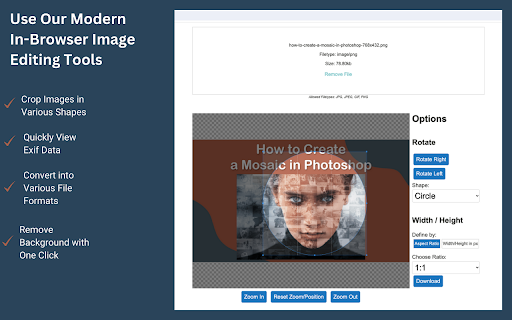
Simply right-click on any image on the web and select one of our web-based image editing tools.

You can:
🔸 Instantly view Exif Data of any photo with just one click.
🔸 Crop images into various shapes, including circles, rectangles, and freehand selections.
🔸 Convert your images into a range of file formats, such as PNG, JPEG, and more.
🔸 Effortlessly remove backgrounds from images with a single click.
🔸 Split/Divide images into multiple tiles.
🔸 Resize images to your exact specifications.

User information handled by this extension
- The content of the page you're currently browsing (to fetch images).
- The content of imagy.app during image transfer.

We do not store this information and will not disclose it.
Technical
- Version
- 0.0.4
- Manifest
- V3
- Size
- 19.25KiB
- Min Chrome
- 88
- Languages
- 1
- Featured
- No
Metadata
- ID
- gfchjifgjlgceflhkbbgfcndcelmbooj
- Developer ID
- u3beda19d2031a9bc9c49ae2c562d7bdb
- Developer Email
- [email protected]
- Created
- Jan 25, 2024
- Last Updated (Store)
- Nov 6, 2025
- Last Scraped
- Jun 3, 2026
- Website
- imagy.app
- Support URL
- https://imagy.app/contact/
- Privacy Policy
- https://imagy.app/privacy-policy/
Similar extensions
Alternatives to imagy tools, ranked by description similarity.

Remove / Upscale / Compress / Colorize in One Click
Right-click any image to instantly remove its background, upscale 8x, compress, or colorize.
67
★ 5.0

EFFECT.APP
Edit images from any site in Effect.app with one click — 35+ effects
602
★ 5.0
resizemy.photos
Resize or crop any photo or image from any website or upload your own image
9.0K
★ 4.0

Quick Image Tools
Edit images instantly, right from your browser.
—

Photo Editor
A simple in-browser photo editor - use this when you want to do some quick edits to your photos
10.0K
★ 5.0

Image Flow
Edit and download images in your preferred format
33
★ 1.0

Image Transformer
Easily mirror or rotate images on a webpage
229
★ 3.0

Exif Viewer
View the EXIF data in your photos. Select photos on your device or on a web page. Simply right-click on an image in a web page.
30.0K
★ 2.9
Data sourced from the Chrome Web Store · last verified Jun 3, 2026.