
Surfingkeys
Rich shortcuts to click links/switch tabs/scroll, capture pages, use your browser like vim for productivity.
As of June 2026, Surfingkeys has 20,000 users and a 4.67/5 rating from 291 reviews in the Functionality & UI category.
Usersdown 33.3 percent−33.3%
20.0K
20,000
Ratingno change0%
4.67
291 reviews
Reviewsup 0.3 percent+0.3%
291
Version
1.18.0
Manifest V3
90-day change · In the last 90 days this extension lost 10.0K users.
History
5 snapshotsTracking since Apr 7, 2026.
View as table
| Date | Users | Rating | Reviews | Version |
|---|---|---|---|---|
| Apr 7, 2026 | 30.0K | 4.67 | 290 | 1.18.0 |
| Apr 17, 2026 | 30.0K | 4.67 | 291 | 1.18.0 |
| May 8, 2026 | 30.0K | 4.67 | 291 | 1.18.0 |
| May 19, 2026 | 20.0K | 4.67 | 291 | 1.18.0 |
| May 24, 2026 | 30.0K | 4.67 | 291 | 1.18.0 |
| Now | 20.0K | 4.67 | 291 | 1.18.0 |
Permissions & access
- Permissions
- nativeMessagingtabshistorybookmarksscriptingstoragesessionsdownloadstopSitesclipboardReadclipboardWriteproxyttsdownloads.shelffaviconuserScriptstabGroups
- Host access
- <all_urls>
Screenshots


About
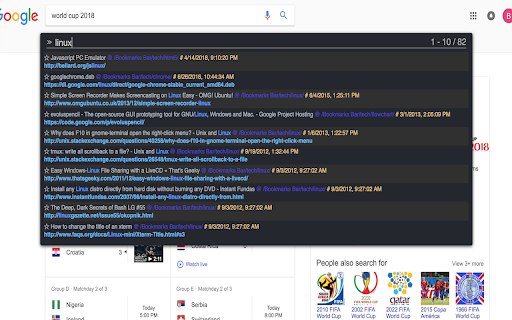
A Chrome extension for Vim users, but EMACS users would also love it, as it is much extendable with javascript.

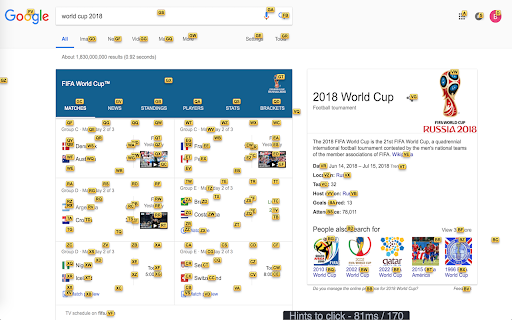
# to click links

    f   Open a link, press SHIFT to flip hints if they are overlapped.
    C   Open a link in non-active new tab
    cf  Open multiple links in a new tab
    gf  Open a link in non-active new tab
    af  Open a link in new tab

# to switch tabs

    E    Go one tab left
    R    Go one tab right
    x    Close current tab
    X    Restore closed tab
    W    New window with current tab
    J    Move current tab to left
    K    Move current tab to right
    yt   Duplicate current tab
    <<   Move current tab to left
    >>   Move current tab to right
    g0   Go to the first tab
    g$   Go to the last tab
    gx0  Close all tabs on left
    gxt  Close tab on left
    gxT  Close tab on right
    gx$  Close all tabs on right

# to scroll pages / DIVs

    0    Scroll all the way to the left
    e    Scroll a page up
    d    Scroll a page down
    gg   Scroll to the top of the page
    G    Scroll to the bottom of the page
    j    Scroll down
    k    Scroll up
    h    Scroll left
    l    Scroll right
    $    Scroll all the way to the right
    %    Scroll to percentage of current page
    cS   Reset scroll target
    cs   Change scroll target

# to capture full pages / DIV

    yG   Capture current full page
    yS   Capture scrolling element

# to search seleted with kinds of search engines

    sg   Search selected with google
    sw   Search selected with bing
    sy   Search selected with youtube
    sb   Search selected with baidu

# to edit input with vim editor

    Ctrl-i   Go to edit box with vim editor

# to edit URL with vim editor

    su   Edit current URL with vim editor
Technical
- Version
- 1.18.0
- Manifest
- V3
- Size
- 2.43MiB
- Min Chrome
- 88
- Languages
- 1
- Featured
- Yes
Metadata
- ID
- gfbliohnnapiefjpjlpjnehglfpaknnc
- Developer ID
- u1f480ae6548b4ccab1286463e192169e
- Developer Email
- [email protected]
- Created
- Sep 4, 2015
- Last Updated (Store)
- Mar 3, 2026
- Last Scraped
- Jun 2, 2026
- Website
- https://brookhong.github.io/
Similar extensions
Alternatives to Surfingkeys, ranked by description similarity.

Simple Vim Scrolling
Navigate pages using vim-style keyboard shortcuts
6

Bookmarks & Tabs Search
Extension for keyboard focused users to easily switch tabs or open bookmarks. Use Ctrl+M to open (Extensions / Keyboard Shortcuts).
81
★ 5.0

Web Harpoon
Pin pages using commands and easily jump to them with keyboard commands only!
7
★ 5.0

vimek
Vim-inspired keyboard shortcuts for Brave Browser.
3
★ 5.0

Vi Editing Mode
Automatically and non-intrusively add a vi editing mode to all textareas/inputs. Behaviour is unchanged until you hit Escape.
67

Vim-For-Docs
An implementation of Vim motions for Google Docs
584
★ 5.0

PowerTabs - Tab Switcher
Quick tab switcher with keyboard shortcuts, search across tabs, recently closed tabs, history, and bookmarks
31

Tmux Tab Groups
Tmux-inspired tab group navigation
6
★ 1.0
Data sourced from the Chrome Web Store · last verified Jun 2, 2026.