
Simple Vim Scrolling
Navigate pages using vim-style keyboard shortcuts
As of June 2026, Simple Vim Scrolling has 6 users in the Functionality & UI category.
Usersup 20.0 percent+20.0%
6
6
Ratingno change0%
—
— reviews
Reviewsno change0%
—
Version
1.0
Manifest V3
History
1 snapshotsTracking since Apr 1, 2026.
View as table
| Date | Users | Rating | Reviews | Version |
|---|---|---|---|---|
| Apr 1, 2026 | 5 | — | — | 1.0 |
| Now | 6 | — | — | 1.0 |
Permissions & access
- Permissions
- None declared
- Host access
- None declared
Screenshots
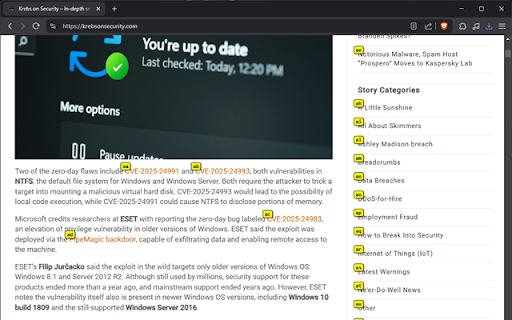
About
A simple Chrome extension that adds vim-style keyboard navigation to any webpage.

Features:
- Smooth scrolling for comfortable navigation.
- Keyboard shortcuts don't interfere with text input in forms.
- Works on all websites.
- Incredibly small and focused feature-set.

Controls:
- `j`: Scroll down
- `k`: Scroll up
- `gg`: Go to top of page
- `G`: Go to bottom of page
- `H`: Go back in browser history
- `L`: Go forward in browser history
- `f`: Enter link-hint mode - displays 2-character codes next to all visible links
  - Type the corresponding 2-character code to navigate to that link
  - Press `Esc` to exit link-hint mode
Technical
- Version
- 1.0
- Manifest
- V3
- Size
- 39.99KiB
- Min Chrome
- 88
- Languages
- 1
- Featured
- No
Metadata
- ID
- abmmjelbbmjnlbeccocaepgefggghpbj
- Developer ID
- uf2ca12e55c8608785cf843fa902c9753
- Developer Email
- [email protected]
- Created
- Mar 16, 2025
- Last Updated (Store)
- Mar 16, 2025
- Last Scraped
- Jun 1, 2026
- Website
- —
Similar extensions
Alternatives to Simple Vim Scrolling, ranked by description similarity.

vimek
Vim-inspired keyboard shortcuts for Brave Browser.
3
★ 5.0

Surfingkeys
Rich shortcuts to click links/switch tabs/scroll, capture pages, use your browser like vim for productivity.
20.0K
★ 4.7

Tabium
A popup extension to list and switch between open tabs using vim keys.
—

Bookmarks & Tabs Search
Extension for keyboard focused users to easily switch tabs or open bookmarks. Use Ctrl+M to open (Extensions / Keyboard Shortcuts).
81
★ 5.0

Keyboard Navigator
Navigate web pages using keyboard hints. Tap 'Shift' to activate.
12

Vim-For-Docs
An implementation of Vim motions for Google Docs
584
★ 5.0

Chrome Shortcut Overlay
Keyboard navigation overlay for web pages - customizable shortcuts
8

Vi Editing Mode
Automatically and non-intrusively add a vi editing mode to all textareas/inputs. Behaviour is unchanged until you hit Escape.
67
Data sourced from the Chrome Web Store · last verified Jun 1, 2026.