DeploySentinel Recorder
Record browser interactions to auto generate Cypress, Playwright and Puppeteer test scripts.
As of May 2026, DeploySentinel Recorder has 4,000 users and a 4.50/5 rating from 16 reviews in the Developer Tools category.
Usersno change0%
4.0K
4,000
Ratingno change0%
4.50
16 reviews
Reviewsno change0%
16
Version
0.7.1
Manifest V3
History
1 snapshotsTracking since May 1, 2026.
View as table
| Date | Users | Rating | Reviews | Version |
|---|---|---|---|---|
| May 1, 2026 | 4.0K | 4.50 | 16 | 0.7.1 |
| Now | 4.0K | 4.50 | 16 | 0.7.1 |
Permissions & access
- Permissions
- activeTabscriptingstoragecontextMenuswebNavigation
- Host access
- <all_urls>
Screenshots


About
Simply step through your website while recording with DeploySentinel Recorder and the extension will convert the captured user flow into a Cypress, Playwright or Puppeteer script.

✨ Features

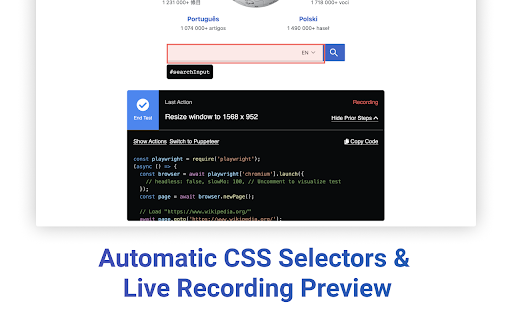
- 💻  Automatically capture clicks, keyboard inputs, window resizes, and scroll events.
- 🤖 Generate clean and commented scripts for Cypress, Playwright and Puppeteer.
- 📋 Preview recording progress and copy generated scripts mid-test to clipboard.
- 📛 Generate element selectors using `id` and `class` as well as other HTML properties (ex. `aria-label`, `alt`, `name`, `data-testid`)
- 🖱 Capture hover events via context menu option (right-click)
- ✅ Assert/wait for specific text to be visible on the page
- 📸 Generate full page screenshot events

✨ Getting Started

1. Visit the site you want to start recording from
2. Click the extension icon and click "Start Recording from Current Tab"
3. Use the site as you would normally (click links, fill forms, etc.) Right-click an element and select "Record hover over element" to record a hover event over an element.
4. Click "End Test" whenever you are done. You can copy the generated script via the recording overlay.
5. Click the extension icon and select "View Last Recording" to access the last recorded test any time afterwards.

Pro tip: To view captured steps or generated code mid-recording, click "Show More" in the recording overlay.

Learn more from the docs: https://www.deploysentinel.com/docs/recorder

Have feedback or want to contribute improvements? View this extension on Github: https://github.com/DeploySentinel/Recorder
Technical
- Version
- 0.7.1
- Manifest
- V3
- Size
- 686KiB
- Min Chrome
- 88
- Languages
- 1
- Featured
- Yes
Metadata
- ID
- geggbdbnidkhbnbjoganapfhkpgkndfo
- Developer ID
- u55d3dc6fb2ef70882a9bf891623dc8b8
- Developer Email
- [email protected]
- Created
- Nov 15, 2021
- Last Updated (Store)
- Jul 27, 2022
- Last Scraped
- May 31, 2026
- Website
- deploysentinel.com
- Support URL
- —
- Privacy Policy
- —
Similar extensions
Alternatives to DeploySentinel Recorder, ranked by description similarity.

Playwright Chrome Recorder
Playwright extension for DevTools that allows you to export tests directly from the Recorder panel.
10.0K
★ 2.8

CodeceptJS Chrome Recorder
CodeceptJS Extension for Devtools that allows you to export tests directly from the Recorder panel.
1.0K
★ 5.0

Playwright Recorder
Record browser actions and generate Playwright test scripts in JavaScript, TypeScript, Python, Java, and C# (.NET).
1.0K
★ 5.0

Playwright Test Recorder
Record user interactions and generate Playwright test scripts
61

Supercheck Recorder
Record browser interactions and save them as Playwright tests directly to Supercheck
35
★ 5.0

WebPageTest Recorder Extension
An extension for Chrome Recorder to export a recorder session as a WebPageTest Custom Script
2.0K
★ 4.3

Reqnroll Recorder
Automatically record browser interactions and generate Reqnroll BDD tests with Gherkin feature files and C# step definitions.
6

TestBot Recorder
Record browser interactions and capture web elements with auto-generated locators for test automation.
51
★ 5.0
Data sourced from the Chrome Web Store · last verified May 31, 2026.