
Playwright Chrome Recorder
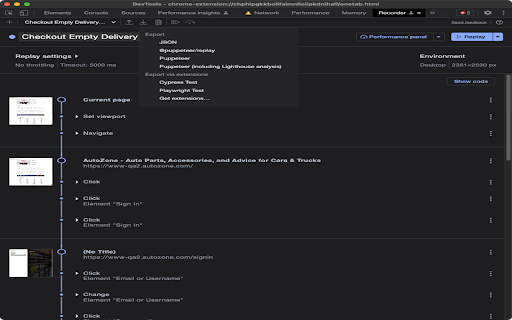
Playwright extension for DevTools that allows you to export tests directly from the Recorder panel.
As of May 2026, Playwright Chrome Recorder has 10,000 users and a 2.80/5 rating from 15 reviews in the Developer Tools category.
Usersno change0%
10.0K
10,000
Ratingno change0%
2.80
15 reviews
Reviewsno change0%
15
Version
1.0.0
Manifest V3
History
1 snapshotsTracking since Apr 29, 2026.
View as table
| Date | Users | Rating | Reviews | Version |
|---|---|---|---|---|
| Apr 29, 2026 | 10.0K | 2.80 | 15 | 1.0.0 |
| Now | 10.0K | 2.80 | 15 | 1.0.0 |
Permissions & access
- Permissions
- None declared
- Host access
- None declared
Screenshots
About
Records a user session and generates Playwright code for automation and testing purposes.
Playwright Recorder

Playwright Recorder is a developer tool that records user interaction within a web application and generates Playwright scripts to allow the developer to replicate that particular session. This will speed up your development cycle by facilitating the creation of unit and integration tests.

Getting Started
Click 'Add to Chrome'. That's it! Once you see our icon at the upper-right of your browser window, you are ready to start generating Playwright scripts.

Features
This extension will allow you to:
* Record clicks, typing, submits, and navigation in the browser.
* See the scripts render live as they are generated.
* Delete accidental actions.
* Reorder actions as necessary.
* Pause and resume recording within a single session.
* Record navigation within a domain.
* Copy the generated code to your clipboard.

Usage
* Open the extension and click 'Start Recording' to begin recording actions.
* Click links, submit forms, etc.
* Check your saved actions by opening the popup at any time.
* Click 'Stop Recording' to stop recording. From there, you will have the option to resume recording, reset, or copy your generated code to your clipboard.
* You can also use keyboard shortcuts:
    On Macs:
    - ctrl + R to start and stop recording
    - ctrl + G to reset
    On PCs and Linux:
    - alt + R to start and stop recording
    - alt + G to reset
Technical
- Version
- 1.0.0
- Manifest
- V3
- Size
- 15.09KiB
- Min Chrome
- 104.0.0.0
- Languages
- 1
- Featured
- Yes
Metadata
- ID
- bfnbgoehgplaehdceponclakmhlgjlpd
- Developer ID
- u7c0cb0e3b56170aa13a24cc678df951f
- Developer Email
- [email protected]
- Created
- May 2, 2023
- Last Updated (Store)
- May 2, 2023
- Last Scraped
- May 26, 2026
- Website
- —
- Support URL
- —
- Privacy Policy
- —
Similar extensions
Alternatives to Playwright Chrome Recorder, ranked by description similarity.

Playwright Test Recorder
Record user interactions and generate Playwright test scripts
61

Playwright Recorder
Record browser actions and generate Playwright test scripts in JavaScript, TypeScript, Python, Java, and C# (.NET).
1.0K
★ 5.0

CodeceptJS Chrome Recorder
CodeceptJS Extension for Devtools that allows you to export tests directly from the Recorder panel.
1.0K
★ 5.0

Supercheck Recorder
Record browser interactions and save them as Playwright tests directly to Supercheck
35
★ 5.0

Playwright CRX
Playwright as a chrome extension. You can record using Playwright Record directly on your browser. Just attach the tabs you want to…
40.0K
★ 4.9
DeploySentinel Recorder
Record browser interactions to auto generate Cypress, Playwright and Puppeteer test scripts.
4.0K
★ 4.5

Auto Test Recorder for Robot & Playwright
Record web interactions and instantly generate automated test scripts for Robot Framework and Playwright.
16

WebPageTest Recorder Extension
An extension for Chrome Recorder to export a recorder session as a WebPageTest Custom Script
2.0K
★ 4.3
Data sourced from the Chrome Web Store · last verified May 26, 2026.