
Coursera Video Speedup
Speed up Coursera videos with this simple Chrome extension.
As of May 2026, Coursera Video Speedup has 1,000 users and a 1.30/5 rating from 10 reviews in the Workflow & Planning category.
Usersno change0%
1.0K
1,000
Ratingdown 2.3 percent−2.3%
1.30
10 reviews
Reviewsup 11.1 percent+11.1%
10
Version
1.0
Manifest V3
History
1 snapshotsTracking since May 30, 2026.
View as table
| Date | Users | Rating | Reviews | Version |
|---|---|---|---|---|
| May 30, 2026 | 1.0K | 1.33 | 9 | 1.0 |
| Now | 1.0K | 1.30 | 10 | 1.0 |
Permissions & access
- Permissions
- None declared
- Host access
- https://www.coursera.org/*
Screenshots
About
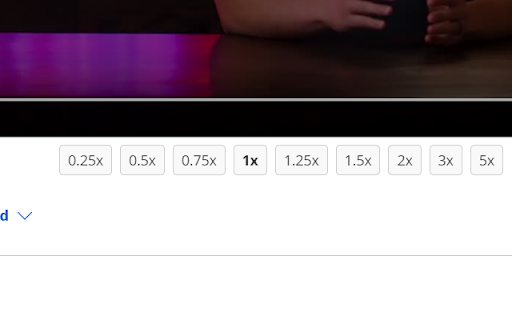
Coursera Video Speedup is a lightweight and easy-to-use browser extension that allows you to control the playback speed of videos on Coursera. With multiple speed options available, you can quickly adjust the playback speed of your video lectures or tutorials, making it easier to learn at your own pace.

This extension offers a clean and intuitive interface with speed buttons displayed below the video in window mode, hiding them in fullscreen mode for an immersive viewing experience. The selected speed button is highlighted, giving you clear visual feedback about the current playback speed.

Whether you want to slow down a complex topic or breeze through familiar content, Coursera Video Speedup Extension gives you the flexibility to customize your video-watching experience.

Main features:

🚀 Multiple speed options: 0.25x, 0.5x, 0.75x, 1x, 1.25x, 1.5x, 2x, 3x, and 5x
🎛️ Easy-to-use interface with speed buttons
📺 Fullscreen compatibility
Technical
- Version
- 1.0
- Manifest
- V3
- Size
- 6.81KiB
- Min Chrome
- 88
- Languages
- 1
- Featured
- No
Metadata
- ID
- gdpjpckhidomjkaeligpppbbfndfknbe
- Developer ID
- u69c819f6976069ea852fc679a21ef4bb
- Developer Email
- [email protected]
- Created
- Mar 29, 2023
- Last Updated (Store)
- Mar 29, 2023
- Last Scraped
- May 30, 2026
- Website
- —
- Support URL
- —
- Privacy Policy
- —
Similar extensions
Alternatives to Coursera Video Speedup, ranked by description similarity.

Coursera Playback Extender
Add more playback speed options for videos on Coursera
40

Video Speed Controller – Speed Up & Increase Video speed!
Easily adjust the playback speed with a user-friendly interface.
1.0K
★ 5.0

Simple Skip
Minimalist video speed controller with glassmorphism design.
1
★ 5.0

Video Playback Speed (2x-4x-16x)
Control video playback speed from 0.25x to 16x on any website. Modern dark UI with slider and manual input controls.
10.0K
★ 4.9

Video Speed Controller - video manager
Video speed control for all HTML5 video players. Speed up, slow down video or audio with keyboard shortcuts.
400.0K
★ 4.6

Youtube Custom Speed Control
Control YouTube playback speed with ease.
46
★ 4.0

Change YouTube Speed
Change YouTube Speed 0.1x to 15x
459
★ 5.0

Video Speed Controller
Video Speed Controller for netflix video, primevideo, hotstar, etc.
100.0K
★ 4.6
Data sourced from the Chrome Web Store · last verified May 30, 2026.