
Video Speed Controller
Video Speed Controller for netflix video, primevideo, hotstar, etc.
As of June 2026, Video Speed Controller has 100,000 users and a 4.64/5 rating from 1,105 reviews in the Workflow & Planning category.
Usersno change0%
100.0K
100,000
Ratingup 0.2 percent+0.2%
4.64
1.1K reviews
Reviewsup 3.4 percent+3.4%
1.1K
Version
3.2.7
Manifest V3
History
3 snapshotsTracking since Apr 21, 2026.
View as table
| Date | Users | Rating | Reviews | Version |
|---|---|---|---|---|
| Apr 21, 2026 | 100.0K | 4.63 | 1.1K | 3.2.7 |
| May 7, 2026 | 100.0K | 4.63 | 1.1K | 3.2.7 |
| Jun 4, 2026 | 100.0K | 4.63 | 1.1K | 3.2.7 |
| Now | 100.0K | 4.64 | 1.1K | 3.2.7 |
Permissions & access
- Permissions
- storage
- Host access
- *://*/*
Screenshots
About
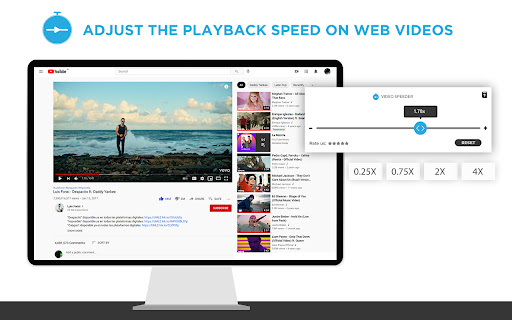
Video Speed Controller offers stable and adjustable video speed controller extension options on various Video Streaming Services, such as Netflix, Amazon Prime Video, YouTube, Twitch, Disney+ Hotstar, and others. It’s perfect for speed control for streaming videos, making lessons quicker or action sequences slower, or adjusting video playback rate for any video in a browser, up to 4x speed.

Enjoy a more personalized approach to viewing video content in 2025, whether you’re changing playback speed on Netflix, binging shows or movies, or studying important sections with ease


Key Features

Adjustable Playback Speed: Control AV playback speed; slow motion (e.g., 0.25x) or quick preview (e.g., 4x). Use this video speed adjustment tool for complete flexibility.

User-Friendly Interface: A single, easy-to-understand pop-up menu for activation and regulation of playback speed, making it a customizable video speed experience.

Keyboard Shortcuts: Get full speed control with default and personalized video speed shortcut Chrome keys for quicker adjustments.

Platform Compatibility: Supports streaming on Netflix, Amazon Prime Videos, YouTube, Twitch, Disney+ Hotstar, and more. Perfect for playback speed extension for YouTube users.

Fine-Tuning Options: For precise speed changes, use step adjustments to refine your playback experience.


How to Use Video Speed Controller Extension

Install the Extension: The video speed controller extension is available for free and can be installed via the Chrome Web Store.

Open a Video: Start a video on the platform of your choice, such as Netflix or YouTube, and adjust video playback rate to your liking.

Access the Extension: Locate the control video speed Chrome extension icon in the browser toolbar.

Adjust Playback Speed: Use the pop-up menu to change playback speed Netflix, speed up or slow down YouTube videos, or watch Netflix faster or slower.

Enjoy: Start streaming your content at your desired pace, tailored perfectly with the speed control for streaming videos feature!


Keyboard Shortcuts

Increase Speed:

Windows/Linux: Ctrl + Shift + Right

Mac: Command + Shift + Right


Decrease Speed:

Windows/Linux: Ctrl + Shift + Left

Mac: Command + Shift + Left


Open Extension:

Windows/Linux: Ctrl + Shift + J

Mac: Option + J


Reset Speed:

One-click reset to normal speed (1.0x).


FAQs

1. Does the Video Speed Controller work on all streaming sites?

Yes, it supports most popular streaming sites like Netflix, Prime Video, YouTube, and Twitch.

2. Can I use this extension to adjust speed in smaller steps?

Yes, you can fine-tune the playback speed using small step adjustments for greater control.

3. Are keyboard shortcuts customizable?

Currently, keyboard shortcuts are preset but cover the essential speed control functions for quick adjustments.
Technical
- Version
- 3.2.7
- Manifest
- V3
- Size
- 769KiB
- Min Chrome
- 88
- Languages
- 11
- Featured
- Yes
Metadata
- ID
- gioehmkjkeamcinbdelehlpnpdcdjpdp
- Developer ID
- ueaa2c4c140cf99736cbb2271c6e030e5
- Developer Email
- [email protected]
- Created
- Jun 25, 2021
- Last Updated (Store)
- May 5, 2025
- Last Scraped
- Jun 4, 2026
- Website
- —
- Support URL
- —
Similar extensions
Alternatives to Video Speed Controller, ranked by description similarity.

Video Speed Controller - video manager
Video speed control for all HTML5 video players. Speed up, slow down video or audio with keyboard shortcuts.
400.0K
★ 4.6

Super Video Speed Controller with Shortcuts
Speed up or slow down HTML5 videos with keyboard shortcuts
420
★ 4.5

Video Speed Controller – Speed Up & Increase Video speed!
Easily adjust the playback speed with a user-friendly interface.
1.0K
★ 5.0

Video Speed Controller
Control video playback speed with configurable increments.
58
★ 4.7

SpeedBang - Multiplatform Video Speed Booster
Universal video speed controller for all platforms. Control 0.25x to 16x speed with keyboard shortcuts and site memory.
51
★ 5.0

Change Video Playback Speeds
Quickly adjust video playback speeds with a simple slider. Customize Netflix subtitles appearance.
106

YouTube Controller
Control video playback and enhance focus on YouTube with keyboard shortcuts and on-screen controls
11
★ 5.0

Change YouTube Speed
Change YouTube Speed 0.1x to 15x
459
★ 5.0
Data sourced from the Chrome Web Store · last verified Jun 4, 2026.