
Vibe Check
Real-time design feedback and vibe checks for your web apps using AI.
As of June 2026, Vibe Check has 14 users in the Developer Tools category.
Usersup 100.0 percent+100.0%
14
14
Ratingno change0%
—
— reviews
Reviewsno change0%
—
Version
1.3
Manifest V3
90-day change · In the last 90 days this extension 1 version update.
History
9 snapshotsTracking since Apr 1, 2026.
View as table
| Date | Users | Rating | Reviews | Version |
|---|---|---|---|---|
| Apr 1, 2026 | 7 | — | — | 1.2 |
| Apr 16, 2026 | 6 | — | — | 1.2 |
| Apr 27, 2026 | 9 | — | — | 1.2 |
| May 4, 2026 | 9 | — | — | 1.2 |
| May 10, 2026 | 9 | — | — | 1.3 |
| May 15, 2026 | 11 | — | — | 1.3 |
| May 21, 2026 | 13 | — | — | 1.3 |
| Jun 3, 2026 | 14 | — | — | 1.3 |
| Jun 9, 2026 | 17 | — | — | 1.3 |
| Now | 14 | — | — | 1.3 |
Changelog
- May 4, 2026description
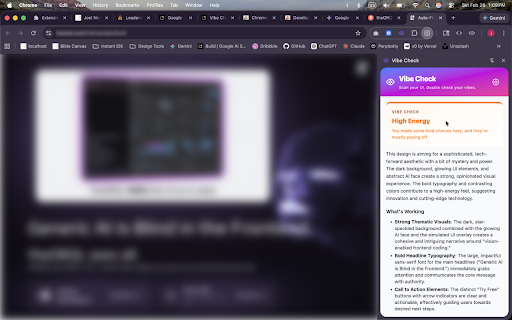
Vibe Check is an on-demand AI design mentor for those who do not have a solid background in design. Whether you are a frontend developer, UI/UX designer, or just building your first side project, Vibe Check instantly analyzes the design of your current webpage and provides actionable feedback to help you level up your UI.

Simply open the Vibe Check side panel, click "Analyze Design", and watch as it scans your page. In seconds, you'll get a comprehensive design review right in your browser, along with a suggested AI prompt for your vibe-coding platform to begin to implement changes based on the feedback.

✨ Key Features:

🎨 Instant Vibe Scoring: Find out if your design is "Immaculate," "Corporate," "Playful," or "Chaotic."

🔍 Detailed Analysis: Get actionable feedback on what is working well and what needs improvement regarding visual hierarchy, spacing, typography, and color schemes.

♿ Accessibility Checks: Automatically spot potential contrast issues and small touch targets.

💻 AI Fix Prompts: Instantly generates a ready-to-use prompt that you can copy and paste into your favorite AI coding assistant (like Cursor or Copilot) to automatically implement the suggested design fixes!

⚡ Bring Your Own Key: Vibe Check uses your own API keys, keeping you in complete control. We currently support Google Gemini (with OpenAI and Anthropic Claude coming soon!).

🔒 Privacy First: We respect your data. Vibe Check captures your active browser tab (including full-page, below-the-fold content) at the exact moment you click "Check Design." We do not track your browsing history, and your screenshots are never stored, logged, or retained by us. We do not sell your data or use it for personalized advertising. Your API keys are encrypted and saved securely in your browser's local storage.

➡️ Future Features
- More models, including ChatGPT & Claude
- Chat interface for follow up questions
- User Profiles
- Design Redlining Enhancements

Feedback and suggestions welcome!

===================================

📌 What's New in Version 1.2:

- Full-Page Capture: Vibe Check now captures your entire page — not just the viewport — so the AI can analyze your full layout, below-the-fold content, and overall page flow.

- Redlined Screenshots: Get AI-generated annotated screenshots that visually highlight specific design issues, making it easier than ever to pinpoint exactly what needs fixing.

- Add Your Own Context: Before running an analysis, you can now provide optional context like "this is a SaaS landing page" or "focus on mobile responsiveness" to get more targeted, relevant feedback.

- Onboarding for New Users: First-time users are now greeted with a friendly setup guide instead of a blank panel — no more guessing where to find the API key settings.

- Snappier Capture Animation: We replaced the old scanning line with a quick border flash and "Page captured" toast for a faster, cleaner feel.

- Secure API Key Transmission — Fixed a security issue where Gemini API keys were being transmitted as URL query parameters instead of secure HTTP headers.


📌 What's New in Version 1.1:

- Upgraded AI Models: You can now analyze your designs using the newest Gemini 3.1 multimodal models. We've also updated the default model to Gemini 3.1 Flash Lite, giving you blazing fast, high-quality feedback without burning through paid API limits. We've also designated the models that are free and don't rely on having billing set up.

- Better Error Recovery: Say goodbye to cryptic API errors. If you hit an API limit or try to scan a locked-down Chrome system page, Vibe Check now tells you exactly what went wrong and how to fix it. Plus, a new "Clear and Start Over" button lets you instantly reset the tool with one click.
Vibe Check is an on-demand AI design mentor for those who do not have a solid background in design. Whether you are a frontend developer, UI/UX designer, or just building your first side project, Vibe Check instantly analyzes the design of your current webpage and provides actionable feedback to help you level up your UI.

Simply open the Vibe Check side panel, click "Analyze Design", and watch as it scans your page. In seconds, you'll get a comprehensive design review right in your browser, along with a suggested AI prompt for your vibe-coding platform to begin to implement changes based on the feedback.

✨ Key Features:

🎨 Instant Vibe Scoring: Find out if your design is "Immaculate," "Corporate," "Playful," or "Chaotic."

🔍 Detailed Analysis: Get actionable feedback on what is working well and what needs improvement regarding visual hierarchy, spacing, typography, and color schemes.

♿ Accessibility Checks: Automatically spot potential contrast issues and small touch targets.

💻 AI Fix Prompts: Instantly generates a ready-to-use prompt that you can copy and paste into your favorite AI coding assistant (like Cursor or Copilot) to automatically implement the suggested design fixes!

⚡ Bring Your Own Key: Vibe Check uses your own API keys, keeping you in complete control. We currently support Google Gemini (with OpenAI and Anthropic Claude coming soon!).

🔒 Privacy First: We respect your data. Vibe Check captures your active browser tab (including full-page, below-the-fold content) at the exact moment you click "Check Design." We do not track your browsing history, and your screenshots are never stored, logged, or retained by us. We do not sell your data or use it for personalized advertising. Your API keys are encrypted and saved securely in your browser's local storage.

➡️ Future Features
- More models, including ChatGPT & Claude
- Chat interface for follow up questions
- User Profiles
- Design Redlining Enhancements

Feedback and suggestions welcome!

===================================

📌 What's New in Version 1.3:

- Precision Redlines: We've upgraded the AI to use strict DOM coordinates. Annotation bubbles now snap perfectly to the center of the UI elements being critiqued, eliminating marker drift.

- Smarter Full-Page Captures: Vibe Check now automatically detects complex web layouts (like inner scrollable containers) and handles parallax backgrounds, resulting in flawless, seamless full-page screenshots.

- Full-Screen Redline Viewer: Say goodbye to cluttered downloads! Generated redlined screenshots now open instantly in a new, full-width browser tab for immediate review.

- Intelligent UI Scaling: The redline notes sidebar now dynamically calculates its size based on the captured image resolution, giving crystal-clear readability even on ultra-wide or 4K Retina displays.

- Dark Mode Prompts: The "Suggested AI Prompt" block has been redesigned with a sleek dark theme and matching "Copy" button, making it visually distinct from the rest of your feedback.

📌 What's New in Version 1.2:

- Full-Page Capture: Vibe Check now captures your entire page — not just the viewport — so the AI can analyze your full layout, below-the-fold content, and overall page flow.

- Redlined Screenshots: Get AI-generated annotated screenshots that visually highlight specific design issues, making it easier than ever to pinpoint exactly what needs fixing.

- Add Your Own Context: Before running an analysis, you can now provide optional context like "this is a SaaS landing page" or "focus on mobile responsiveness" to get more targeted, relevant feedback.

- Onboarding for New Users: First-time users are now greeted with a friendly setup guide instead of a blank panel — no more guessing where to find the API key settings.

- Snappier Capture Animation: We replaced the old scanning line with a quick border flash and "Page captured" toast for a faster, cleaner feel.

- Secure API Key Transmission — Fixed a security issue where Gemini API keys were being transmitted as URL query parameters instead of secure HTTP headers.


📌 What's New in Version 1.1:

- Upgraded AI Models: You can now analyze your designs using the newest Gemini 3.1 multimodal models. We've also updated the default model to Gemini 3.1 Flash Lite, giving you blazing fast, high-quality feedback without burning through paid API limits. We've also designated the models that are free and don't rely on having billing set up.

- Better Error Recovery: Say goodbye to cryptic API errors. If you hit an API limit or try to scan a locked-down Chrome system page, Vibe Check now tells you exactly what went wrong and how to fix it. Plus, a new "Clear and Start Over" button lets you instantly reset the tool with one click.
Permissions & access
- Permissions
- activeTabscriptingstoragesidePanel
- Host access
- None declared
Screenshots


About
Vibe Check is an on-demand AI design mentor for those who do not have a solid background in design. Whether you are a frontend developer, UI/UX designer, or just building your first side project, Vibe Check instantly analyzes the design of your current webpage and provides actionable feedback to help you level up your UI.

Simply open the Vibe Check side panel, click "Analyze Design", and watch as it scans your page. In seconds, you'll get a comprehensive design review right in your browser, along with a suggested AI prompt for your vibe-coding platform to begin to implement changes based on the feedback.

✨ Key Features:

🎨 Instant Vibe Scoring: Find out if your design is "Immaculate," "Corporate," "Playful," or "Chaotic."

🔍 Detailed Analysis: Get actionable feedback on what is working well and what needs improvement regarding visual hierarchy, spacing, typography, and color schemes.

♿ Accessibility Checks: Automatically spot potential contrast issues and small touch targets.

💻 AI Fix Prompts: Instantly generates a ready-to-use prompt that you can copy and paste into your favorite AI coding assistant (like Cursor or Copilot) to automatically implement the suggested design fixes!

⚡ Bring Your Own Key: Vibe Check uses your own API keys, keeping you in complete control. We currently support Google Gemini (with OpenAI and Anthropic Claude coming soon!).

🔒 Privacy First: We respect your data. Vibe Check captures your active browser tab (including full-page, below-the-fold content) at the exact moment you click "Check Design." We do not track your browsing history, and your screenshots are never stored, logged, or retained by us. We do not sell your data or use it for personalized advertising. Your API keys are encrypted and saved securely in your browser's local storage.

➡️ Future Features
- More models, including ChatGPT & Claude
- Chat interface for follow up questions
- User Profiles
- Design Redlining Enhancements

Feedback and suggestions welcome!

===================================

📌 What's New in Version 1.3:

- Precision Redlines: We've upgraded the AI to use strict DOM coordinates. Annotation bubbles now snap perfectly to the center of the UI elements being critiqued, eliminating marker drift.

- Smarter Full-Page Captures: Vibe Check now automatically detects complex web layouts (like inner scrollable containers) and handles parallax backgrounds, resulting in flawless, seamless full-page screenshots.

- Full-Screen Redline Viewer: Say goodbye to cluttered downloads! Generated redlined screenshots now open instantly in a new, full-width browser tab for immediate review.

- Intelligent UI Scaling: The redline notes sidebar now dynamically calculates its size based on the captured image resolution, giving crystal-clear readability even on ultra-wide or 4K Retina displays.

- Dark Mode Prompts: The "Suggested AI Prompt" block has been redesigned with a sleek dark theme and matching "Copy" button, making it visually distinct from the rest of your feedback.

📌 What's New in Version 1.2:

- Full-Page Capture: Vibe Check now captures your entire page — not just the viewport — so the AI can analyze your full layout, below-the-fold content, and overall page flow.

- Redlined Screenshots: Get AI-generated annotated screenshots that visually highlight specific design issues, making it easier than ever to pinpoint exactly what needs fixing.

- Add Your Own Context: Before running an analysis, you can now provide optional context like "this is a SaaS landing page" or "focus on mobile responsiveness" to get more targeted, relevant feedback.

- Onboarding for New Users: First-time users are now greeted with a friendly setup guide instead of a blank panel — no more guessing where to find the API key settings.

- Snappier Capture Animation: We replaced the old scanning line with a quick border flash and "Page captured" toast for a faster, cleaner feel.

- Secure API Key Transmission — Fixed a security issue where Gemini API keys were being transmitted as URL query parameters instead of secure HTTP headers.


📌 What's New in Version 1.1:

- Upgraded AI Models: You can now analyze your designs using the newest Gemini 3.1 multimodal models. We've also updated the default model to Gemini 3.1 Flash Lite, giving you blazing fast, high-quality feedback without burning through paid API limits. We've also designated the models that are free and don't rely on having billing set up.

- Better Error Recovery: Say goodbye to cryptic API errors. If you hit an API limit or try to scan a locked-down Chrome system page, Vibe Check now tells you exactly what went wrong and how to fix it. Plus, a new "Clear and Start Over" button lets you instantly reset the tool with one click.
Technical
- Version
- 1.3
- Manifest
- V3
- Size
- 1.05MiB
- Min Chrome
- 88
- Languages
- 1
- Featured
- No
Metadata
- ID
- gdkplaejbdhooafbckelelncocmblmfj
- Developer ID
- u21171a7d4a66ab4d8a318d6efb75ab9e
- Developer Email
- [email protected]
- Created
- Mar 4, 2026
- Last Updated (Store)
- Apr 28, 2026
- Last Scraped
- Jun 9, 2026
- Website
- —
- Support URL
- www.joelnevius.com
Similar extensions
Alternatives to Vibe Check, ranked by description similarity.

Design Copilot
AI powered design feedback on any website. Your personal design copilot.
311
★ 4.2

Vibe-Code Checker
Detect AI vibe-coded websites and analyze their tech stack
20

Vibe Feedback – Website Feedback & Bug Reporting Made Simple
Capture website feedback with voice narration, element selection, and error detection. Perfect for vibe coding with AI.
6

VibeClipper
Click any element, add a comment, and generate a context-rich prompt for AI coding CLIs.
4
★ 5.0

Rechrome
A powerful web development toolkit for content, design, SEO, and CSS editing. Perfect for developers and designers.
68
★ 5.0

Webvizio: Website Feedback and Bug Reporting Tool
Provide website feedback, report bugs, and generate detailed AI prompts for developers in one click—right on top of live web pages.
2.0K
★ 4.9

Web Developer Helper Suite
Measure, Annotate, Extract web data & Optimize local projects for AI/LLM context generation.
18

HeuristiCheck
Professional UX Audit tool using Nielsen’s heuristics with AI remediation.
165
★ 5.0
Data sourced from the Chrome Web Store · last verified Jun 9, 2026.