
Test Observatron
Exploratory Testing Tool - Observes browser actions to automatically create logs and screenshots, while you test.
As of June 2026, Test Observatron has 40 users in the Developer Tools category.
Usersup 2.6 percent+2.6%
40
40
Ratingno change0%
—
— reviews
Reviewsno change0%
—
Version
1.0.1
Manifest V3
History
6 snapshotsTracking since Apr 1, 2026.
View as table
| Date | Users | Rating | Reviews | Version |
|---|---|---|---|---|
| Apr 1, 2026 | 39 | — | — | 1.0.1 |
| Apr 16, 2026 | 38 | — | — | 1.0.1 |
| Apr 26, 2026 | 41 | — | — | 1.0.1 |
| May 7, 2026 | 40 | — | — | 1.0.1 |
| May 13, 2026 | 39 | — | — | 1.0.1 |
| May 22, 2026 | 34 | — | — | 1.0.1 |
| Now | 40 | — | — | 1.0.1 |
Permissions & access
- Permissions
- activeTabdownloadswebNavigationpageCapturestoragewebRequestcontextMenussidePanelscripting
- Host access
- <all_urls>
Screenshots
About
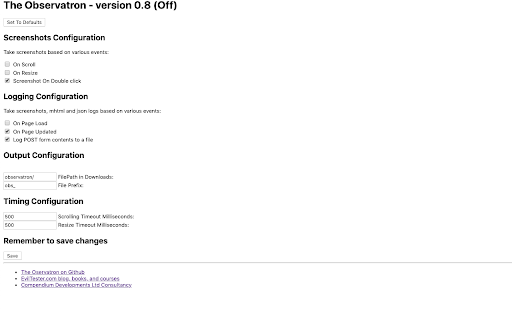
The Observatron supports Exploratory testing by taking screenshots and creating .mhtml files as you test. It also logs urls and form submissions. All logging is performed in your downloads folder so that you have control over the information. No information is sent to external servers.

Logging and screenshots saved when:

- when a page loads
- when a page updates
- when you double click on the page
- when you resize the page
- when you scroll through the page
- when you submit a form
- etc.

All of the above can be switched on and off from the options.

All images are stored in your downloads folder so you can easily find them and see them being saved.

You can also save logs of: bugs, todos, questions, or any custom information. To do this:

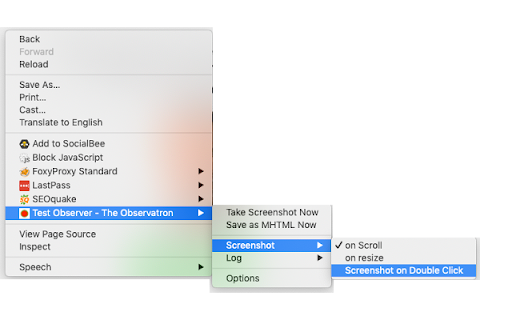
- from the context menu choose "Take Note", or open the sidebar, or use the extension in the dev tools panel
- in the dialog, write your note
- you can choose if you want a screenshot with that
- the note and optional screenshot will be saved to your downloads
- the note will be tracked in the notes session and shown in the note taking panel UI

Notes take the format:

- "? question text to output as the note"
- "! description of the bug to output as the note"
- "- todo text to output"
- "@type text to output as custom type"

Questions, Todos, and Bugs can be opened and closed (with a closing note), notes are simple logs.

Custom types can be 'closable' if input with a trailing `[]` e.g. `@check[] check this thing`

When you save a screenshot with the note screenshot it will have `_note_noteid` at the end of the filename. This can help you cross reference screenshots to notes, although the timestamping should mean that the screenshot is the next file saved after the note.

Control the folder the files are saved in by giving your session a name.

e.g. "obs_2019-02-20-11-32-57-314-screenshot-1201x1104_note_1550662375417.jpg"

This extension is open source.

Copyright 2019-2026 Compendium Developments Ltd, Alan Richardson
Technical
- Version
- 1.0.1
- Manifest
- V3
- Size
- 55.58KiB
- Min Chrome
- 88
- Languages
- 1
- Featured
- No
Metadata
- ID
- gdiemnbjpblghfbejnbohdnnmodbknoe
- Developer ID
- u998bbc8f861d57c6720bd75b180f2d5d
- Developer Email
- [email protected]
- Created
- Mar 1, 2019
- Last Updated (Store)
- Jan 7, 2026
- Last Scraped
- Jun 9, 2026
- Website
- —
- Support URL
- —
- Privacy Policy
- https://www.eviltester.com/page/privacy/
Similar extensions
Alternatives to Test Observatron, ranked by description similarity.

Chrome Step Recorder
Record user actions into manual steps with screenshots and page performance timings
4.0K
★ 4.3

Exploratory Testing Chrome Extension
Exploratory Testing Session Using Chrome
250
★ 5.0

TestSnapper
Record UI test sessions with smart field detection, locator extraction, and export to DOCX, PDF, and JSON.
6

BugRepro
Capture bugs with screenshots, recordings, console logs, and network data. Works on any site to help teams debug faster.
13
★ 5.0

Exploratory Testing Extension
Chrome extension for exploratory testing
7.0K
★ 4.3

BugSnap
One-click bug reports with screenshot, console logs & environment info
1
★ 5.0

Console Logger
Captures JavaScript console messages from the active tab, displays them live, and automatically saves them to a file.
24

BugBox Dashcam (Adaptive Entropy Edition)
Smart Adaptive Entropy Recording. Captures screen, console, and network activity only when significant events occur.
2
Data sourced from the Chrome Web Store · last verified Jun 9, 2026.