
Gwdw
One-click positioning in the editor.
As of May 2026, Gwdw has 89 users and a 5.00/5 rating from 3 reviews in the Developer Tools category.
Usersdown 11.9 percent−11.9%
89
89
Ratingno change0%
5.00
3 reviews
Reviewsno change0%
3
Version
1.0.0
Manifest V3
History
5 snapshotsTracking since Apr 1, 2026.
View as table
| Date | Users | Rating | Reviews | Version |
|---|---|---|---|---|
| Apr 1, 2026 | 101 | 5.00 | 3 | 1.0.0 |
| Apr 21, 2026 | 98 | 5.00 | 3 | 1.0.0 |
| May 6, 2026 | 90 | 5.00 | 3 | 1.0.0 |
| May 18, 2026 | 90 | 5.00 | 3 | 1.0.0 |
| May 31, 2026 | 96 | 5.00 | 3 | 1.0.0 |
| Now | 89 | 5.00 | 3 | 1.0.0 |
Permissions & access
- Permissions
- tabsscriptingstorage
- Host access
- <all_urls>, *://*/*
Screenshots

About
文章地址:https://juejin.cn/post/7524215370016096282
🚀 Boost Your React Development Productivity
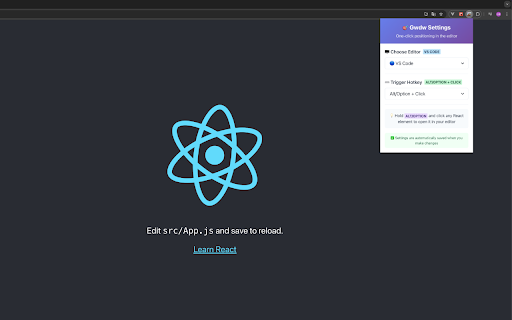
Gwdw is a powerful Chrome extension designed specifically for React developers. With just a hotkey + click, you can instantly jump from any React element in your browser to its source code in your favorite editor - no more hunting through file trees!
✨ Key Features:
🎯 One-Click Source Code Navigation
Hold your configured hotkey (Alt/Ctrl/Shift/Cmd) + click any React element.
Instantly opens the exact source file with precise line and column positioning.
Works on any React website, including development and production builds.
🖥️ Multi-Editor Support
VS Code、WebStorm、Cursor、Windsurf、Custom Editors(Configure any editor with URL templates)
⌨️ Customizable Hotkeys
Alt + Click (Default)
Ctrl + Click
Shift + Click
Cmd/Win + Click
🔧 Advanced Customization
Custom editor configuration with URL templates
Support for placeholders: {fileName}, {lineNumber}, {columnNumber}
Real-time settings preview
Automatic settings persistence
🔄 How It Works:
Install & Configure: Set your preferred editor and hotkey combination
Browse React Apps: Visit any website built with React
Click & Jump: Hold your hotkey + click any element to open its source code
Code Instantly: Your editor opens with the exact file and position
🛠️Perfect For:
React developers
Frontend engineers
Code reviewers
Debugging sessions
Learning React codebases
🔒 Privacy & Security:
No data collection
Works entirely locally
Open source codebase
Minimal permissions required
💻 System Requirements:
Chrome browser
Supported editor installed (VS Code, WebStorm, Cursor, Windsurf, or custom)
React applications with development info available
Transform your React development workflow today! Never waste time searching for component files again.
Technical
- Version
- 1.0.0
- Manifest
- V3
- Size
- 183KiB
- Min Chrome
- 88
- Languages
- 1
- Featured
- No
Metadata
- ID
- gdhfaofgjodbggngbamckopheagpbaeh
- Developer ID
- u67d82e8be0ab7199852b7b86cf3491f0
- Developer Email
- [email protected]
- Created
- Jun 30, 2025
- Last Updated (Store)
- Jul 9, 2025
- Last Scraped
- May 31, 2026
- Website
- —
- Support URL
- —
- Privacy Policy
- —
Similar extensions
Alternatives to Gwdw, ranked by description similarity.

LocatorJS
LocatorJS Chrome Extension - option-click to code (ReactJS)
354

React-DomPicker
Click any UI element to instantly jump to its React source code in VS Code. Perfect for React + Tailwind + ShadCN projects.
542
★ 5.0

React Component Finder
Click on React components in localhost and open them in VS Code
40

React code finder
Chrome extension for React Developer
1.0K
★ 5.0

React Inspector
The Inspector launch with Ctrl+Shift+X (Command+Shift+X on Mac). You can detect and open the React component source code easily.
7.0K
★ 3.5

X PANEL
Degub Tool For React Developers
3

Click to component
The Inspector launch with Ctrl+Shift+X (Command+Shift+X on Mac). You can detect and open the React component source code easily.
66

Component Code Picker
Select, preview, and extract clean HTML/CSS from any web component.
2
Data sourced from the Chrome Web Store · last verified May 31, 2026.