
LocatorJS
LocatorJS Chrome Extension - option-click to code (ReactJS)
As of June 2026, LocatorJS has 354 users in the Developer Tools category.
Usersup 3.8 percent+3.8%
354
354
Ratingno change0%
—
— reviews
Reviewsno change0%
—
Version
1.6.2
Manifest V3
History
8 snapshotsTracking since Apr 1, 2026.
View as table
| Date | Users | Rating | Reviews | Version |
|---|---|---|---|---|
| Apr 1, 2026 | 341 | — | — | 1.6.2 |
| Apr 16, 2026 | 338 | — | — | 1.6.2 |
| Apr 26, 2026 | 349 | — | — | 1.6.2 |
| May 7, 2026 | 368 | — | — | 1.6.2 |
| May 13, 2026 | 384 | — | — | 1.6.2 |
| May 22, 2026 | 360 | — | — | 1.6.2 |
| Jun 1, 2026 | 368 | — | — | 1.6.2 |
| Jun 9, 2026 | 358 | — | — | 1.6.2 |
| Now | 354 | — | — | 1.6.2 |
Permissions & access
- Permissions
- storage
- Host access
- None declared
Screenshots

About
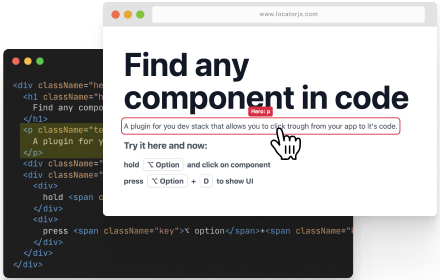
Stop wasting time searching for React component source code. With LocatorJS, simply Option+Click (Alt+Click on Windows) any element on your webpage to instantly jump to its source code in your editor.

Perfect for:
• Large codebases where finding components is time-consuming
• Onboarding new developers to unfamiliar projects
• Debugging complex component trees
• Speeding up your daily development workflow

How it works:
1. Install the extension
2. Open your React app in development mode
3. Hold Option (or Alt) and click any component
4. Your editor opens directly to that component's source file

Works with VSCode, IntelliJ IDEA, WebStorm, and other popular editors. Compatible with React, Preact, Solid, and Svelte projects.

This is a developer tool designed for local development environments (localhost). It helps you navigate your own code faster, saving hours of searching through project files.
Technical
- Version
- 1.6.2
- Manifest
- V3
- Size
- 205KiB
- Min Chrome
- 88
- Languages
- 1
- Featured
- No
Metadata
- ID
- dpploomkdkooepkpbdpjkgfnkpfhbbfp
- Developer ID
- ucdf85022a023df10f14c5f72cf5e5956
- Developer Email
- [email protected]
- Created
- Oct 18, 2025
- Last Updated (Store)
- Jan 6, 2026
- Last Scraped
- Jun 9, 2026
- Website
- —
- Support URL
- —
- Privacy Policy
- —
Similar extensions
Alternatives to LocatorJS, ranked by description similarity.
LocatorJS
LocatorJS Chrome Extension - option-click to code (ReactJS)
40.0K
★ 4.3

React code finder
Chrome extension for React Developer
1.0K
★ 5.0

Gwdw
One-click positioning in the editor.
89
★ 5.0

React Component Names
Hold Alt/Option + hover to see React component names (Dev Mode)
53
★ 5.0

React Component Finder
Click on React components in localhost and open them in VS Code
40

click-to-react-component
Option+Click React components in your browser to instantly open the source in VS Code
762
★ 3.4

React-DomPicker
Click any UI element to instantly jump to its React source code in VS Code. Perfect for React + Tailwind + ShadCN projects.
542
★ 5.0

React Inspector
The Inspector launch with Ctrl+Shift+X (Command+Shift+X on Mac). You can detect and open the React component source code easily.
7.0K
★ 3.5
Data sourced from the Chrome Web Store · last verified Jun 9, 2026.