
Leftside Back
Allows you to navigate back by just hitting the mouse on the left or right side of your screen.
As of May 2026, Leftside Back has 982 users and a 4.55/5 rating from 20 reviews in the Workflow & Planning category.
Usersup 1.0 percent+1.0%
982
982
Ratingno change0%
4.55
20 reviews
Reviewsno change0%
20
Version
2.0.0
Manifest V3
History
3 snapshotsTracking since Apr 1, 2026.
View as table
| Date | Users | Rating | Reviews | Version |
|---|---|---|---|---|
| Apr 1, 2026 | 972 | 4.55 | 20 | 2.0.0 |
| May 1, 2026 | 980 | 4.55 | 20 | 2.0.0 |
| May 30, 2026 | 1.0K | 4.55 | 20 | 2.0.0 |
| Now | 982 | 4.55 | 20 | 2.0.0 |
Permissions & access
- Permissions
- contextMenusstorage
- Host access
- <all_urls>
Screenshots
About
---- NOTICE ------
Due to security restrictions, the extension is not working in the Chrome Webstore. So to test the extension simple navigate to another website, where everything should work fine :)
---------------------

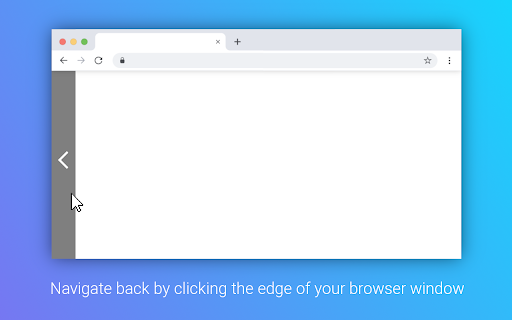
This extension turns your left side of your browser window into a large back button. It allows you to navigate back by just clicking your mouse button on the left side of your screen. You can configure whether to display an indicator bar, increasing the width of the tolerance area or enabling to also navigate forward by right clicking the edge of the browser window.
Technical
- Version
- 2.0.0
- Manifest
- V3
- Size
- 30.82KiB
- Min Chrome
- 109
- Languages
- 2
- Featured
- No
Metadata
- ID
- gdcddfacdedphcamippdkojfngoakglg
- Developer ID
- u4f0496dc84b5dabbca85c214ff72337d
- Developer Email
- [email protected]
- Created
- Nov 11, 2016
- Last Updated (Store)
- Jan 25, 2023
- Last Scraped
- May 30, 2026
- Website
- —
- Support URL
- —
- Privacy Policy
- https://extensions.redeviation.com/privacy
Similar extensions
Alternatives to Leftside Back, ranked by description similarity.
Bookmark Sidebar
Adds a toggleable sidebar with all your bookmarks at the edge of your browser window.
300.0K
★ 4.5

Chrogesture Extension
Use mouse gesture to trigger browser command.
6

Middle Click To Go Back
Go back with your middle mouse button.
818
★ 4.5

Mouse Gesture
Mouse gestures, super drag, image preview, link preview, and more.
7.0K
★ 4.3

tabtiles
Control your tabs with tiles - useful for large monitors and full screen (F11) browsing.
10.0K
★ 3.7

Extensions
Managing your Extensions does not have to be complicated
937
★ 2.9

Show Apps in new tab
This extension shows the apps overview when opening a new tab in Chrome.
40.0K
★ 3.9
Link Peek
Show a modern link summary on hover with modifier key support
114
★ 4.0
Data sourced from the Chrome Web Store · last verified May 30, 2026.