
NetSuite Sticky Header
Always see the primary record header (Customer or Order) in NetSuite. Keeps the current record's key details visible as you scroll.
As of June 2026, NetSuite Sticky Header has 15 users in the Functionality & UI category.
Usersdown 6.3 percent−6.3%
15
15
Ratingno change0%
—
— reviews
Reviewsno change0%
—
Version
2025.12.2
Manifest V3
History
6 snapshotsTracking since Apr 1, 2026.
View as table
| Date | Users | Rating | Reviews | Version |
|---|---|---|---|---|
| Apr 1, 2026 | 16 | — | — | 2025.12.2 |
| Apr 19, 2026 | 15 | — | — | 2025.12.2 |
| Apr 28, 2026 | 15 | — | — | 2025.12.2 |
| May 8, 2026 | 14 | — | — | 2025.12.2 |
| May 25, 2026 | 15 | — | — | 2025.12.2 |
| Jun 4, 2026 | 14 | — | — | 2025.12.2 |
| Now | 15 | — | — | 2025.12.2 |
Permissions & access
- Permissions
- None declared
- Host access
- None declared
Screenshots

About
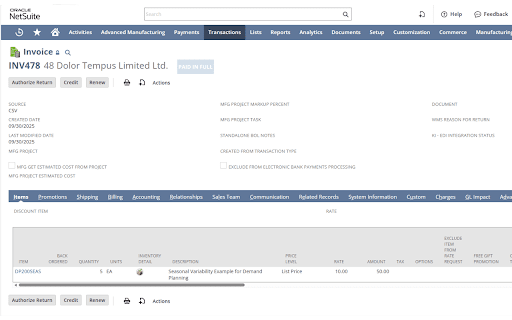
Are you tired of constantly scrolling back up in NetSuite just to remind yourself which Customer, Sales Order, Vendor Bill, or Case you are currently viewing? We know the frustration of losing context when dealing with long forms and detailed transaction records.

Introducing the must-have Chrome extension that completely transforms how you interact with NetSuite records!

The Problem Solved: Context Loss is History!
NetSuite records often contain extensive detail, forcing you to scroll far down the page. When you reach the financial tabs or related items sections, the crucial primary record header—the ID, the name, or the primary status—disappears off the top of the screen. This forces you to either memorize the key details or constantly waste time scrolling back up, disrupting your focus and slowing down your entire process.

The Solution: Uninterrupted Visibility
This powerful, yet simple, extension implements a sticky primary record header feature, mimicking the best practices of modern web design.

What it Does: It makes the entire primary information bar at the top of records (the one showing the record type, internal ID, and main title, like "Customer: John Doe (CUST1234)") remain anchored to the top of your browser window.

The Benefit: As you scroll down to review line items, notes, or related transactions, the essential information stays perfectly visible. You will always know exactly which customer, order, or item you are working on, at all times.

Change Log:
2025.12.2 - Added support for Redwood UI Interface
2025.12.1 - Initial Release
Technical
- Version
- 2025.12.2
- Manifest
- V3
- Size
- 13.7KiB
- Min Chrome
- 88
- Languages
- 1
- Featured
- No
Metadata
- ID
- gbpohlmeengkbmnpfjdafjohjigejjfe
- Developer ID
- u8e24fb69ed7b640059d2b2a5eaff33b1
- Developer Email
- [email protected]
- Created
- Dec 7, 2025
- Last Updated (Store)
- Dec 9, 2025
- Last Scraped
- Jun 4, 2026
- Website
- —
- Support URL
- —
- Privacy Policy
- —
Similar extensions
Alternatives to NetSuite Sticky Header, ranked by description similarity.

NetSuite Field Highlighter
Highlight and identify field types in NetSuite
600
★ 5.0

NetSuite HappyDiv
A powerful navigation tool for NetSuite.
4

Again, Why Salesforce
Create and manage custom Tabs in the available space on Salesforce Lightning Setup page.
231
★ 5.0

NetSuite Portlet Refresher
Refreshes NetSuite Portlets
2.0K
★ 5.0

Scroll To Top
Adds a button to scroll to the top of the page.
Simple and elegant.
2.0K
★ 4.7

New Tab
A premium, highly customizable New Tab extension with a sleek design, shortcut management, and integrated search.
6
★ 5.0

Vertical Tabs by Sensasi Delight — Sidebar & Fullscreen Navigation
Press ALT + X to toggle the side panel 🧭 A clean vertical tab sidebar for Chrome — fast, minimal, and fully usable in fullscreen 🧭
9
Chrome Window Rotator+ (Tab Manager)
View all tabs across windows. Find and access pages instantly. Organize with drag & drop.
108
★ 5.0
Data sourced from the Chrome Web Store · last verified Jun 4, 2026.