
Info Save
Capture your information from any online customer contact form, and email it back to yourself for safe-keeping.
As of May 2026, Info Save has 11 users and a 5.00/5 rating from 1 reviews in the Productivity category.
Usersdown 8.3 percent−8.3%
11
11
Ratingno change0%
5.00
1 reviews
Reviewsno change0%
1
Version
1.0
Manifest V3
History
5 snapshotsTracking since Apr 1, 2026.
View as table
| Date | Users | Rating | Reviews | Version |
|---|---|---|---|---|
| Apr 1, 2026 | 12 | 5.00 | 1 | 1.0 |
| Apr 21, 2026 | 13 | 5.00 | 1 | 1.0 |
| May 6, 2026 | 13 | 5.00 | 1 | 1.0 |
| May 17, 2026 | 12 | 5.00 | 1 | 1.0 |
| May 31, 2026 | 13 | 5.00 | 1 | 1.0 |
| Now | 11 | 5.00 | 1 | 1.0 |
Permissions & access
- Permissions
- storagetabs
- Host access
- None declared
Screenshots



About
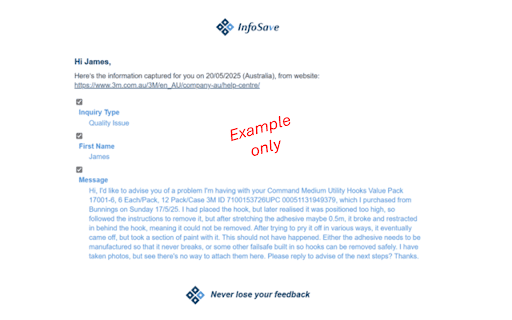
InfoSave is a Google Chrome Extension that captures whatever you write in online forms, and emails that information directly to you with just the click of a button. This ensures that your comments and feedback are never lost, and provides a convenient, searchable record of your interactions. Have you ever typed out a long, well-considered message only to lose all that valuable time and effort? Or ever filled out all the various detail requested when submitting a company complaint, only to have their website lock up or crash, and then lose all your information? Or send off detailed feedback, and then never hear back from the company? For all these reasons (and more), there's InfoSave. InfoSave Benefits? Never Lose a Submission Again – InfoSave automatically captures everything you type into online forms and emails it directly to you. Even if the website crashes, your message is safe. 100% in Your Control – Unlike auto-fill tools that just remember words for later, InfoSave actually saves your full submission as it was sent, including the form headers, ensuring you have proof of what you wrote. Protect Your Effort & Time – If a business ignores your complaint, you have the exact message to resend, follow up, or escalate. No more rewriting from memory. No Other Tool Does This – Other extensions save passwords, fill out forms, or take screenshots. But InfoSave is the only tool that gives you a complete, accurate backup of your written submissions—directly in your inbox. InfoSave – The Ultimate Safety Net for Your Feedback
Technical
- Version
- 1.0
- Manifest
- V3
- Size
- 532KiB
- Min Chrome
- 88
- Languages
- 1
- Featured
- Yes
Metadata
- ID
- gbjkfmdfmlpmbbblhfpgejdhlamkfelj
- Developer ID
- ued6cb3fb48a1f036177bd38f994f1ba8
- Developer Email
- [email protected]
- Created
- May 31, 2025
- Last Updated (Store)
- Jun 5, 2025
- Last Scraped
- May 31, 2026
- Website
- https://www.infosave.com.au/
- Support URL
- https://www.infosave.com.au/guide
- Privacy Policy
- https://www.infosave.com.au/terms
Similar extensions
Alternatives to Info Save, ranked by description similarity.

Form Saver
Automatically saves form field data as you type, including text, checkboxes, dates, and images
192

Auto Fill Input Form
Smart form filler with auto-suggestions and context menu integration.
26
★ 5.0

Easly Save It
With this extension, you can instantly save any website you want, set reminders, and note the reason for saving.
—

FormSaver Pro
Automatically saves text inputs and forms and restores them when needed.
112
★ 5.0

Easy AutoFill Forms With 1 Click - Any Website
Save form data and autofill it when needed.
130

QuickFill - Your Ultimate Form Autofiller
QuickFill simplifies the process of filling out online forms. Say goodbye to repetitive typing and hello to QuickFill!
91

SaveMyForm
Guarda automáticamente los datos de formularios para evitar pérdidas.
12
★ 4.7

QuickForm - Autofill & Form Filler
Record any form once, autofill it forever in one click. Works on React & complex web apps. Free, private, no account needed.
50.0K
★ 4.4
Data sourced from the Chrome Web Store · last verified May 31, 2026.