
DocuINK PDF tool
Upload online PDF files quickly with DocuINK.
As of May 2026, DocuINK PDF tool has 77 users in the Education category.
Usersdown 16.3 percent−16.3%
77
77
Ratingno change0%
—
— reviews
Reviewsno change0%
—
Version
1.0.0.5
Manifest V3
History
5 snapshotsTracking since Apr 1, 2026.
View as table
| Date | Users | Rating | Reviews | Version |
|---|---|---|---|---|
| Apr 1, 2026 | 92 | — | — | 1.0.0.5 |
| Apr 21, 2026 | 86 | — | — | 1.0.0.5 |
| May 6, 2026 | 91 | — | — | 1.0.0.5 |
| May 17, 2026 | 87 | — | — | 1.0.0.5 |
| May 31, 2026 | 78 | — | — | 1.0.0.5 |
| Now | 77 | — | — | 1.0.0.5 |
Permissions & access
- Permissions
- scriptingactiveTabcookies
- Host access
- https://*.evolaclass.com/
Screenshots




About
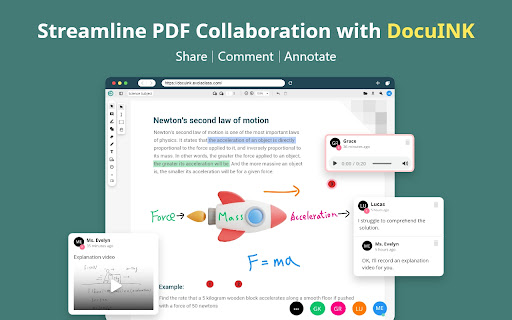
Enhance PDF collaboration with DocuINK, an online platform for educators, students, designers, and marketers. Enjoy versatile annotation and comment tools. Streamline teamwork and class collaboration, save time, and boost productivity with DocuINK!

Highlighted Features:

.Multimedia comments for interactive discussions
Add a magical point to any part of your PDF files to link to comments including texts, images, screen recordings, webcam videos, and voice messages.

.Cloud annotations for highlighting key points and ideas
Upload PDF files to annotate, edit and draw.

.Collaboration with multiple users for efficient teamwork
Share PDF links with one or more individuals, granting them the ability to edit, comment, or view the document as needed.</li></ul>

.Effortless annotation management</strong>
Access comments and annotations by clicking on circled numbers within the PDF. Never miss any valuable input.

.Clear viewing with toggle thumbnails
Toggle thumbnails on and off to view each collaborator's comments and annotations

.Optimize the teaching and learning process
  1. Share worksheets, assignments, and assessments online.</li>
  2. Engage through video and voice explanations.</li>
  3. Make your teaching materials more engaging by adding images, videos, or texts on PDFs.

“After using DocuINK, my students became more comfortable asking questions. They would leave comments next to the topics they didn't understand, and I would respond with helpful videos or audio explanations for formula derivation. It has greatly aided my teaching.”

Try DocuINK Now: https://www.evolaclass.com/en/docuink
Technical
- Version
- 1.0.0.5
- Manifest
- V3
- Size
- 399KiB
- Min Chrome
- 88
- Languages
- 6
- Featured
- Yes
Metadata
- ID
- gbdcdfmbpmfociihgbbepidhjddploel
- Developer ID
- uccdd918d421c784f2f634de9e68cb75e
- Developer Email
- [email protected]
- Created
- Jul 31, 2023
- Last Updated (Store)
- Jun 7, 2025
- Last Scraped
- May 31, 2026
- Website
- https://www.penpowerinc.com/
- Privacy Policy
- https://www.evolaclass.com/en/privacy-policy
Similar extensions
Alternatives to DocuINK PDF tool, ranked by description similarity.

EduLens
All-in-one Chrome extension for annotated learning, real-time collaboration, and reading focus tools.
7

MuseMarker AI
Mark anything on any website with MuseMarker. Chat with an AI about your selected text for insights, summaries & discussions.
7

Wizdomi Annotator (v5.0)
Stable annotation tools with screenshot download. Click the icon to activate.
13
★ 5.0

Web & PDF Marker Pro
Premium highlighter with Auto-Highlighter, Local Backup/Restore, Smart Reader Mode, and advanced analytics.
6

Magic Annotate & Mark
Annotating on Google Docs made easy
134
★ 1.0

Shifu — AI Study Assistant
Instantly understand and take notes from text, videos and images, all with smart context.
13
★ 5.0

TeachBooks Annotator
A tool for making annotations on websites, with the primary application for use with online interactive textbooks. This extension…
12

StudyCap
Welcome Studycap!
37
Data sourced from the Chrome Web Store · last verified May 31, 2026.